> ## Documentation Index
> Fetch the complete documentation index at: https://docs.scrapegraphai.com/llms.txt
> Use this file to discover all available pages before exploring further.
# 🏢 Company Information
> Extract structured company data from websites
 [](https://github.com/ScrapeGraphAI/scrapegraph-py/blob/main/cookbook/company-info/scrapegraph_sdk.ipynb)
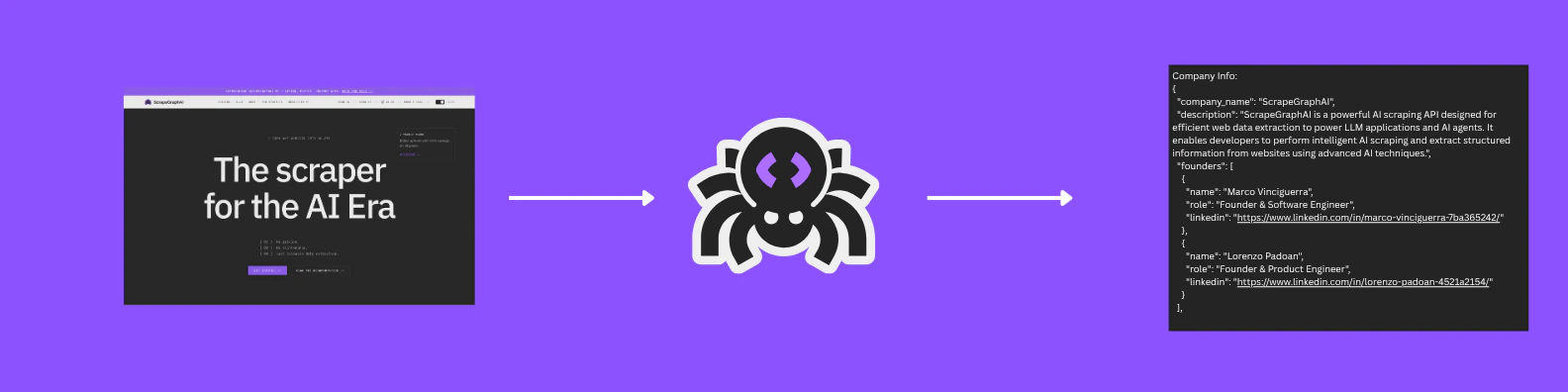
Learn how to extract structured company information from websites using ScrapeGraphAI's Extract service. This example demonstrates how to gather company details, contact information, and social media presence.
## The Goal
We'll extract the following company information:
| Field | Description |
| -------------- | ------------------------------------------------------- |
| Company Name | Name of the company |
| Description | Brief description of the company |
| Founders | List of founders with their roles and LinkedIn profiles |
| Logo | Company logo URL |
| Partners | List of company partners |
| Pricing Plans | Details of available pricing tiers |
| Contact Emails | Company contact information |
| Social Links | LinkedIn, Twitter, and GitHub profiles |
| Legal | Privacy policy and terms of service URLs |
| API Status | Status page URL |
## Code Example
```python theme={null}
from pydantic import BaseModel, Field
from typing import List
from scrapegraph_py import ScrapeGraphAI
# Schema for founder information
class FounderSchema(BaseModel):
name: str = Field(description="Name of the founder")
role: str = Field(description="Role of the founder in the company")
linkedin: str = Field(description="LinkedIn profile of the founder")
# Schema for pricing plans
class PricingPlanSchema(BaseModel):
tier: str = Field(description="Name of the pricing tier")
price: str = Field(description="Price of the plan")
credits: int = Field(description="Number of credits included in the plan")
# Schema for social links
class SocialLinksSchema(BaseModel):
linkedin: str = Field(description="LinkedIn page of the company")
twitter: str = Field(description="Twitter page of the company")
github: str = Field(description="GitHub page of the company")
# Schema for company information
class CompanyInfoSchema(BaseModel):
company_name: str = Field(description="Name of the company")
description: str = Field(description="Brief description of the company")
founders: List[FounderSchema] = Field(description="List of company founders")
logo: str = Field(description="Logo URL of the company")
partners: List[str] = Field(description="List of company partners")
pricing_plans: List[PricingPlanSchema] = Field(description="Details of pricing plans")
contact_emails: List[str] = Field(description="Contact emails of the company")
social_links: SocialLinksSchema = Field(description="Social links of the company")
privacy_policy: str = Field(description="URL to the privacy policy")
terms_of_service: str = Field(description="URL to the terms of service")
api_status: str = Field(description="API status page URL")
sgai = ScrapeGraphAI(api_key="your-api-key")
res = sgai.extract(
"Extract info about the company",
url="https://scrapegraphai.com/",
schema=CompanyInfoSchema.model_json_schema(),
)
if res.status == "success":
print(res.data.json_data)
else:
print("Failed:", res.error)
```
## Example Output
```json theme={null}
{
"company_name": "ScrapeGraphAI",
"description": "AI-powered web scraping API for structured data extraction",
"founders": [
{
"name": "John Doe",
"role": "CEO",
"linkedin": "https://linkedin.com/in/johndoe"
}
],
"logo": "https://scrapegraphai.com/logo.png",
"partners": ["OpenAI", "Anthropic"],
"pricing_plans": [
{
"tier": "Starter",
"price": "$49/month",
"credits": 1000
}
],
"contact_emails": ["contact@scrapegraphai.com"],
"social_links": {
"linkedin": "https://linkedin.com/company/scrapegraphai",
"twitter": "https://twitter.com/scrapegraphai",
"github": "https://github.com/ScrapeGraphAI"
},
"privacy_policy": "https://scrapegraphai.com/privacy",
"terms_of_service": "https://scrapegraphai.com/terms",
"api_status": "https://status.scrapegraphai.com"
}
```
Learn more about our AI-powered extraction service
Explore our Python SDK documentation
***
Have a suggestion for a new example? [Contact us](mailto:contact@scrapegraphai.com) with your use case or contribute directly on [GitHub](https://github.com/ScrapeGraphAI/scrapegraph-sdk).
[](https://github.com/ScrapeGraphAI/scrapegraph-py/blob/main/cookbook/company-info/scrapegraph_sdk.ipynb)
Learn how to extract structured company information from websites using ScrapeGraphAI's Extract service. This example demonstrates how to gather company details, contact information, and social media presence.
## The Goal
We'll extract the following company information:
| Field | Description |
| -------------- | ------------------------------------------------------- |
| Company Name | Name of the company |
| Description | Brief description of the company |
| Founders | List of founders with their roles and LinkedIn profiles |
| Logo | Company logo URL |
| Partners | List of company partners |
| Pricing Plans | Details of available pricing tiers |
| Contact Emails | Company contact information |
| Social Links | LinkedIn, Twitter, and GitHub profiles |
| Legal | Privacy policy and terms of service URLs |
| API Status | Status page URL |
## Code Example
```python theme={null}
from pydantic import BaseModel, Field
from typing import List
from scrapegraph_py import ScrapeGraphAI
# Schema for founder information
class FounderSchema(BaseModel):
name: str = Field(description="Name of the founder")
role: str = Field(description="Role of the founder in the company")
linkedin: str = Field(description="LinkedIn profile of the founder")
# Schema for pricing plans
class PricingPlanSchema(BaseModel):
tier: str = Field(description="Name of the pricing tier")
price: str = Field(description="Price of the plan")
credits: int = Field(description="Number of credits included in the plan")
# Schema for social links
class SocialLinksSchema(BaseModel):
linkedin: str = Field(description="LinkedIn page of the company")
twitter: str = Field(description="Twitter page of the company")
github: str = Field(description="GitHub page of the company")
# Schema for company information
class CompanyInfoSchema(BaseModel):
company_name: str = Field(description="Name of the company")
description: str = Field(description="Brief description of the company")
founders: List[FounderSchema] = Field(description="List of company founders")
logo: str = Field(description="Logo URL of the company")
partners: List[str] = Field(description="List of company partners")
pricing_plans: List[PricingPlanSchema] = Field(description="Details of pricing plans")
contact_emails: List[str] = Field(description="Contact emails of the company")
social_links: SocialLinksSchema = Field(description="Social links of the company")
privacy_policy: str = Field(description="URL to the privacy policy")
terms_of_service: str = Field(description="URL to the terms of service")
api_status: str = Field(description="API status page URL")
sgai = ScrapeGraphAI(api_key="your-api-key")
res = sgai.extract(
"Extract info about the company",
url="https://scrapegraphai.com/",
schema=CompanyInfoSchema.model_json_schema(),
)
if res.status == "success":
print(res.data.json_data)
else:
print("Failed:", res.error)
```
## Example Output
```json theme={null}
{
"company_name": "ScrapeGraphAI",
"description": "AI-powered web scraping API for structured data extraction",
"founders": [
{
"name": "John Doe",
"role": "CEO",
"linkedin": "https://linkedin.com/in/johndoe"
}
],
"logo": "https://scrapegraphai.com/logo.png",
"partners": ["OpenAI", "Anthropic"],
"pricing_plans": [
{
"tier": "Starter",
"price": "$49/month",
"credits": 1000
}
],
"contact_emails": ["contact@scrapegraphai.com"],
"social_links": {
"linkedin": "https://linkedin.com/company/scrapegraphai",
"twitter": "https://twitter.com/scrapegraphai",
"github": "https://github.com/ScrapeGraphAI"
},
"privacy_policy": "https://scrapegraphai.com/privacy",
"terms_of_service": "https://scrapegraphai.com/terms",
"api_status": "https://status.scrapegraphai.com"
}
```
Learn more about our AI-powered extraction service
Explore our Python SDK documentation
***
Have a suggestion for a new example? [Contact us](mailto:contact@scrapegraphai.com) with your use case or contribute directly on [GitHub](https://github.com/ScrapeGraphAI/scrapegraph-sdk).