> ## Documentation Index
> Fetch the complete documentation index at: https://docs.scrapegraphai.com/llms.txt
> Use this file to discover all available pages before exploring further.
# 🏠 Homes Listings
> How to extract real estate data from Homes.com
 [](https://github.com/ScrapeGraphAI/scrapegraph-py/blob/main/cookbook/homes-forsale/scrapegraph_sdk.ipynb)
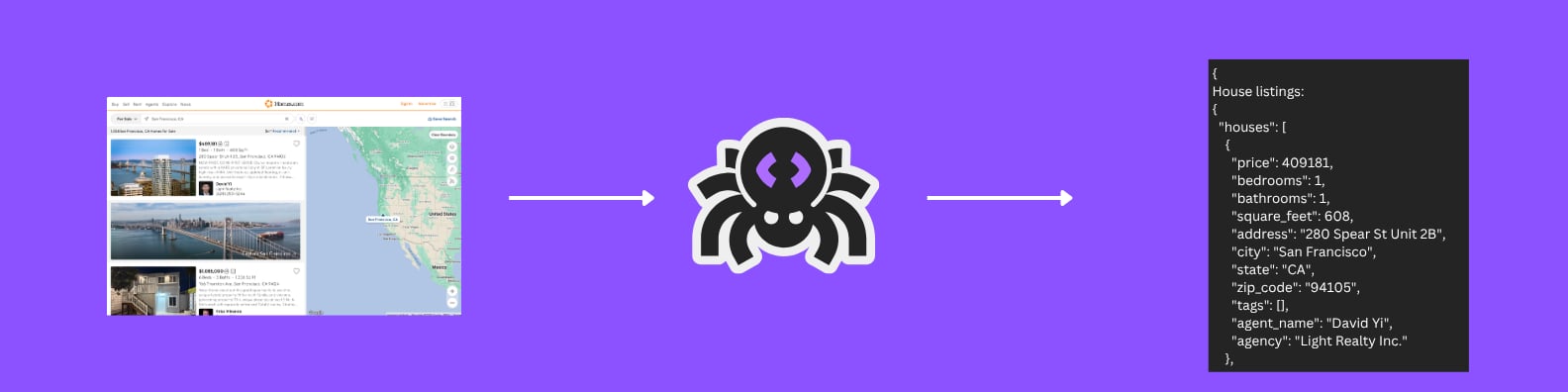
Learn how to extract property listings from Homes.com using ScrapeGraphAI's Extract service. This example demonstrates how to gather detailed property information, pricing, and agent details.
## The Goal
We'll extract the following property information:
| Field | Description |
| ----------- | --------------------- |
| Price | Property price in USD |
| Bedrooms | Number of bedrooms |
| Bathrooms | Number of bathrooms |
| Square Feet | Total square footage |
| Address | Property address |
| City | Property city |
| State | Property state |
| ZIP Code | Location ZIP code |
| Tags | Property features |
| Agent | Listing agent name |
| Agency | Listing agency |
## Code Example
```python theme={null}
from pydantic import BaseModel, Field
from typing import List, Optional
from scrapegraph_py import ScrapeGraphAI, FetchConfig
# Schema for a single house listing
class HouseSchema(BaseModel):
price: int = Field(description="Price of the house in USD")
bedrooms: int = Field(description="Number of bedrooms")
bathrooms: int = Field(description="Number of bathrooms")
square_feet: int = Field(description="Total square footage of the house")
address: str = Field(description="Address of the house")
city: str = Field(description="City where the house is located")
state: str = Field(description="State where the house is located")
zip_code: str = Field(description="ZIP code of the house location")
tags: List[str] = Field(description="Tags like 'New construction' or 'Large garage'")
agent_name: str = Field(description="Name of the listing agent")
agency: str = Field(description="Agency listing the house")
# Schema containing a list of house listings
class HouseListingsSchema(BaseModel):
houses: List[HouseSchema] = Field(description="List of house listings on Homes.com or similar platforms")
sgai = ScrapeGraphAI() # reads SGAI_API_KEY from env
res = sgai.extract(
"Extract property listings information",
url="https://www.homes.com/san-francisco-ca/?bb=nzpwspy0mS749snkvsb",
schema=HouseListingsSchema.model_json_schema(),
fetch_config=FetchConfig(stealth=True), # homes.com has anti-bot defenses
)
if res.status == "success":
print(res.data.json_data)
```
## Example Output
```json theme={null}
{
"houses": [
{
"price": 750000,
"bedrooms": 4,
"bathrooms": 3,
"square_feet": 2500,
"address": "123 Main Street",
"city": "San Francisco",
"state": "CA",
"zip_code": "94105",
"tags": ["New Construction", "Smart Home", "Mountain View"],
"agent_name": "Jane Smith",
"agency": "Bay Area Realty"
},
{
"price": 525000,
"bedrooms": 3,
"bathrooms": 2,
"square_feet": 1800,
"address": "456 Oak Avenue",
"city": "San Francisco",
"state": "CA",
"zip_code": "94110",
"tags": ["Recently Renovated", "Garage", "Garden"],
"agent_name": "John Davis",
"agency": "Golden Gate Properties"
}
]
}
```
Learn more about our AI-powered extraction service
Explore our Python SDK documentation
***
Have a suggestion for a new example? [Contact us](mailto:contact@scrapegraphai.com) with your use case or contribute directly on [GitHub](https://github.com/ScrapeGraphAI/scrapegraph-sdk).
[](https://github.com/ScrapeGraphAI/scrapegraph-py/blob/main/cookbook/homes-forsale/scrapegraph_sdk.ipynb)
Learn how to extract property listings from Homes.com using ScrapeGraphAI's Extract service. This example demonstrates how to gather detailed property information, pricing, and agent details.
## The Goal
We'll extract the following property information:
| Field | Description |
| ----------- | --------------------- |
| Price | Property price in USD |
| Bedrooms | Number of bedrooms |
| Bathrooms | Number of bathrooms |
| Square Feet | Total square footage |
| Address | Property address |
| City | Property city |
| State | Property state |
| ZIP Code | Location ZIP code |
| Tags | Property features |
| Agent | Listing agent name |
| Agency | Listing agency |
## Code Example
```python theme={null}
from pydantic import BaseModel, Field
from typing import List, Optional
from scrapegraph_py import ScrapeGraphAI, FetchConfig
# Schema for a single house listing
class HouseSchema(BaseModel):
price: int = Field(description="Price of the house in USD")
bedrooms: int = Field(description="Number of bedrooms")
bathrooms: int = Field(description="Number of bathrooms")
square_feet: int = Field(description="Total square footage of the house")
address: str = Field(description="Address of the house")
city: str = Field(description="City where the house is located")
state: str = Field(description="State where the house is located")
zip_code: str = Field(description="ZIP code of the house location")
tags: List[str] = Field(description="Tags like 'New construction' or 'Large garage'")
agent_name: str = Field(description="Name of the listing agent")
agency: str = Field(description="Agency listing the house")
# Schema containing a list of house listings
class HouseListingsSchema(BaseModel):
houses: List[HouseSchema] = Field(description="List of house listings on Homes.com or similar platforms")
sgai = ScrapeGraphAI() # reads SGAI_API_KEY from env
res = sgai.extract(
"Extract property listings information",
url="https://www.homes.com/san-francisco-ca/?bb=nzpwspy0mS749snkvsb",
schema=HouseListingsSchema.model_json_schema(),
fetch_config=FetchConfig(stealth=True), # homes.com has anti-bot defenses
)
if res.status == "success":
print(res.data.json_data)
```
## Example Output
```json theme={null}
{
"houses": [
{
"price": 750000,
"bedrooms": 4,
"bathrooms": 3,
"square_feet": 2500,
"address": "123 Main Street",
"city": "San Francisco",
"state": "CA",
"zip_code": "94105",
"tags": ["New Construction", "Smart Home", "Mountain View"],
"agent_name": "Jane Smith",
"agency": "Bay Area Realty"
},
{
"price": 525000,
"bedrooms": 3,
"bathrooms": 2,
"square_feet": 1800,
"address": "456 Oak Avenue",
"city": "San Francisco",
"state": "CA",
"zip_code": "94110",
"tags": ["Recently Renovated", "Garage", "Garden"],
"agent_name": "John Davis",
"agency": "Golden Gate Properties"
}
]
}
```
Learn more about our AI-powered extraction service
Explore our Python SDK documentation
***
Have a suggestion for a new example? [Contact us](mailto:contact@scrapegraphai.com) with your use case or contribute directly on [GitHub](https://github.com/ScrapeGraphAI/scrapegraph-sdk).