> ## Documentation Index
> Fetch the complete documentation index at: https://docs.scrapegraphai.com/llms.txt
> Use this file to discover all available pages before exploring further.
# Playground
> Interactive API testing environment
## API Playground
The playground allows you to test our APIs interactively without writing any code. Perfect for prototyping and testing your scraping configurations.
 ### Available Services
Choose from our three main services in the center panel:
* [**SmartScraper**](/services/smartscraper): AI-powered scraping for any website
* [**SearchScraper**](/services/searchscraper): Find and extract any data using AI starting from a prompt
* [**Markdownify**](/services/markdownify): Convert web content to clean Markdown
### Interactive Features
* **Service Info**: The right sidebar provides detailed information about the selected service
* **Example Labels**: Click on pre-made examples to populate the playground with common use cases
* **Run Button**: Execute your configuration instantly
* **Code Examples**: Click the code button next to run to see implementation in:
* [Python SDK](/sdks/python)
* [JavaScript SDK](/sdks/javascript)
* cURL commands
## Output Schema Configuration
Define exactly what data you want to extract:
### Available Services
Choose from our three main services in the center panel:
* [**SmartScraper**](/services/smartscraper): AI-powered scraping for any website
* [**SearchScraper**](/services/searchscraper): Find and extract any data using AI starting from a prompt
* [**Markdownify**](/services/markdownify): Convert web content to clean Markdown
### Interactive Features
* **Service Info**: The right sidebar provides detailed information about the selected service
* **Example Labels**: Click on pre-made examples to populate the playground with common use cases
* **Run Button**: Execute your configuration instantly
* **Code Examples**: Click the code button next to run to see implementation in:
* [Python SDK](/sdks/python)
* [JavaScript SDK](/sdks/javascript)
* cURL commands
## Output Schema Configuration
Define exactly what data you want to extract:
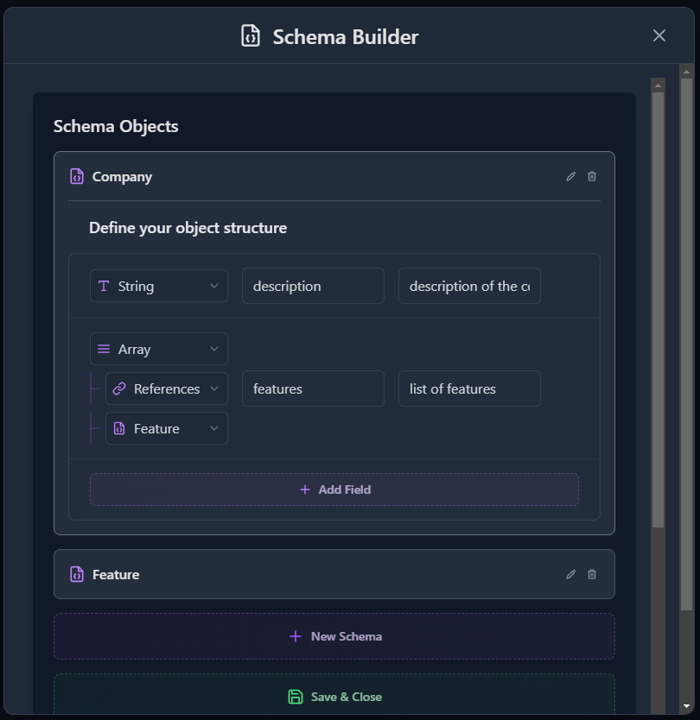 ### Schema Features
* **Custom Extraction**: Specify the structure of your desired output
* **Schema Editor**: Visual interface for defining data fields
* **Preview**: See how your schema maps to the extracted data
* **Multiple Formats**: Preview and copy your schema in:
* Pydantic (Python)
* Zod (TypeScript)
* JSON Schema
## Code Examples
Click the code button to view implementation examples:
### Schema Features
* **Custom Extraction**: Specify the structure of your desired output
* **Schema Editor**: Visual interface for defining data fields
* **Preview**: See how your schema maps to the extracted data
* **Multiple Formats**: Preview and copy your schema in:
* Pydantic (Python)
* Zod (TypeScript)
* JSON Schema
## Code Examples
Click the code button to view implementation examples:
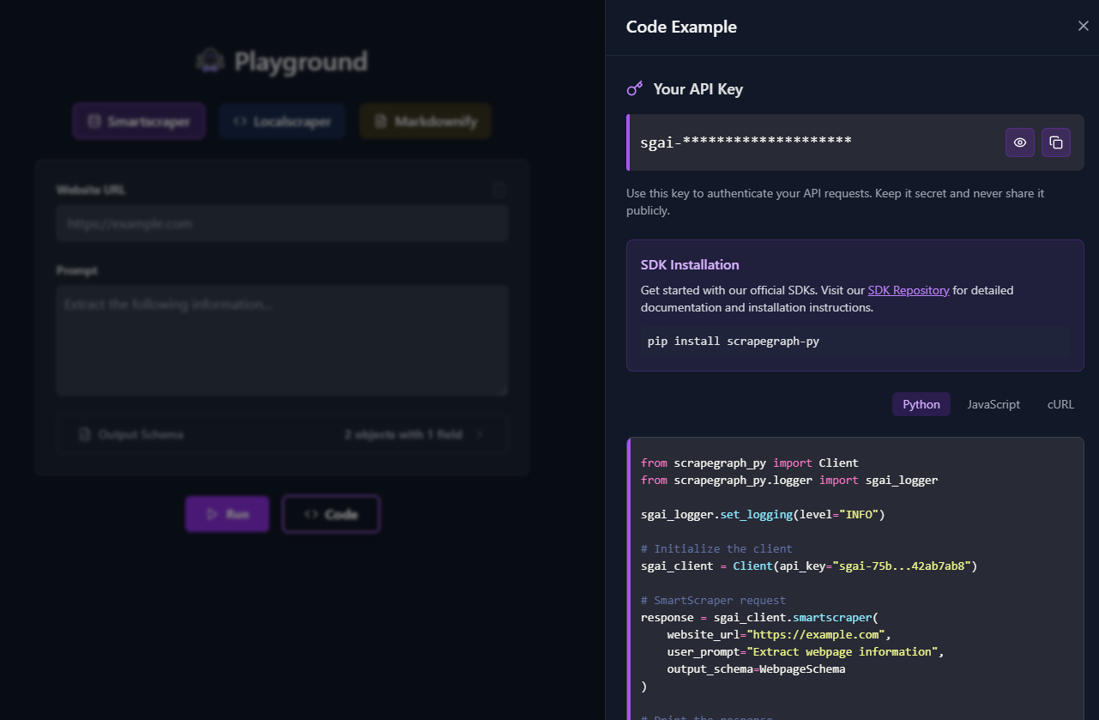 ### Available Implementations
The code sidebar shows you how to implement your current playground configuration using:
* **Python SDK**: Ready-to-use Python code using our [official SDK](/sdks/python)
* **JavaScript SDK**: JavaScript/TypeScript implementation with our [JS SDK](/sdks/javascript)
* **cURL**: Direct API calls for command-line usage
Copy the code directly from the sidebar to use in your own applications!
Use the code examples button to see how your playground configuration translates into actual API calls using our SDKs!
### Available Implementations
The code sidebar shows you how to implement your current playground configuration using:
* **Python SDK**: Ready-to-use Python code using our [official SDK](/sdks/python)
* **JavaScript SDK**: JavaScript/TypeScript implementation with our [JS SDK](/sdks/javascript)
* **cURL**: Direct API calls for command-line usage
Copy the code directly from the sidebar to use in your own applications!
Use the code examples button to see how your playground configuration translates into actual API calls using our SDKs!