> ## Documentation Index
> Fetch the complete documentation index at: https://docs.scrapegraphai.com/llms.txt
> Use this file to discover all available pages before exploring further.
# n8n: Transition Guide from v1 to v2
> Move your n8n workflows from n8n-nodes-scrapegraphai 0.x to 1.0.2+
## Transition from v1 to v2
v1 of the n8n node (`0.x`, last published `0.1.21`) calls the deprecated v1 API. After login, v1 is deprecated within 7 days. Update to `1.0.2` and rebuild any workflows that use the renamed resources or fields below.
If you're on `n8n-nodes-scrapegraphai@0.x`, this is your migration checkpoint.
Before anything else, update the community node in n8n at **Settings → Community Nodes → `n8n-nodes-scrapegraphai` → Update to `1.0.2`** (or later). Your existing `SGAI-APIKEY` works as-is — no re-auth needed.
## Method-by-method migration
Use this table to map old resources to the new ones. Details and field changes follow below.
| v1 | v2 | Notes |
| ---------------------------- | ---------------------------------------------------------------------------------------------------------------------------------------------------------------------------------------------------------------- | --------------------------------------------------------------------------------------------------------- |
| `Markdownify` | [**`Scrape`**](/integrations/n8n) with format `Markdown` | One Scrape node with a Markdown format entry replaces Markdownify. |
| `SmartScraper` | [**`Extract`**](/integrations/n8n) | Same job — structured extraction from a URL. |
| `SearchScraper` | [**`Search`**](/integrations/n8n) | Renamed; the prompt-style query field is now called `Query`. |
| `SmartCrawler` (single call) | [**`Crawl.Start`**](/integrations/n8n), then [**`Crawl.GetStatus`**](/integrations/n8n), [**`Crawl.Stop`**](/integrations/n8n), [**`Crawl.Resume`**](/integrations/n8n), [**`Crawl.Delete`**](/integrations/n8n) | Crawl is async — Start returns a job ID, poll Get Status. |
| `Scrape` | [**`Scrape`**](/integrations/n8n) | Same name, expanded — multi-format per call (markdown, HTML, JSON, screenshot, links, summary, branding). |
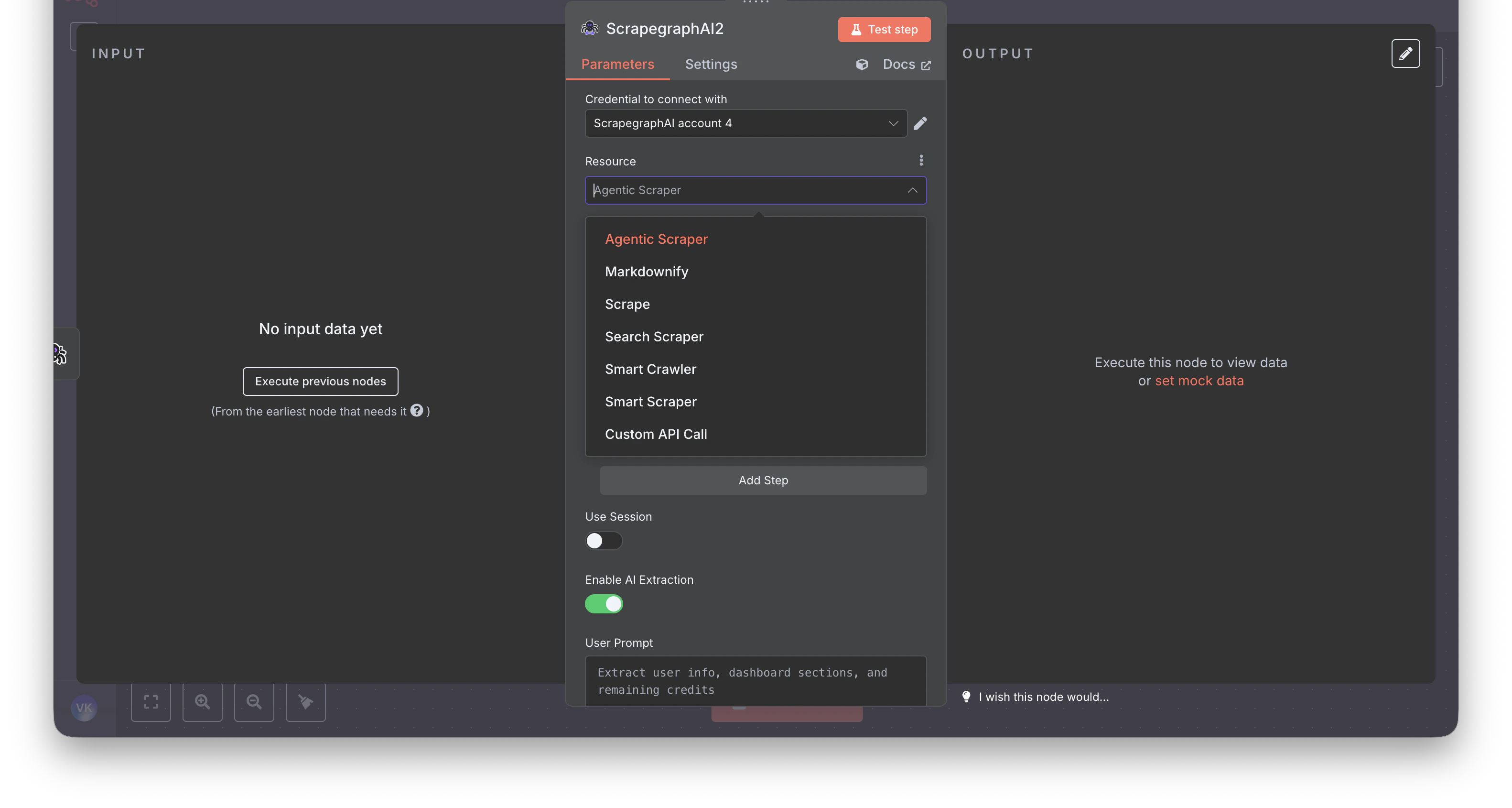
| `AgenticScraper` | **Removed** | Use `Extract` with **Fetch Config** (mode `JS`, stealth, wait) for hard pages. |
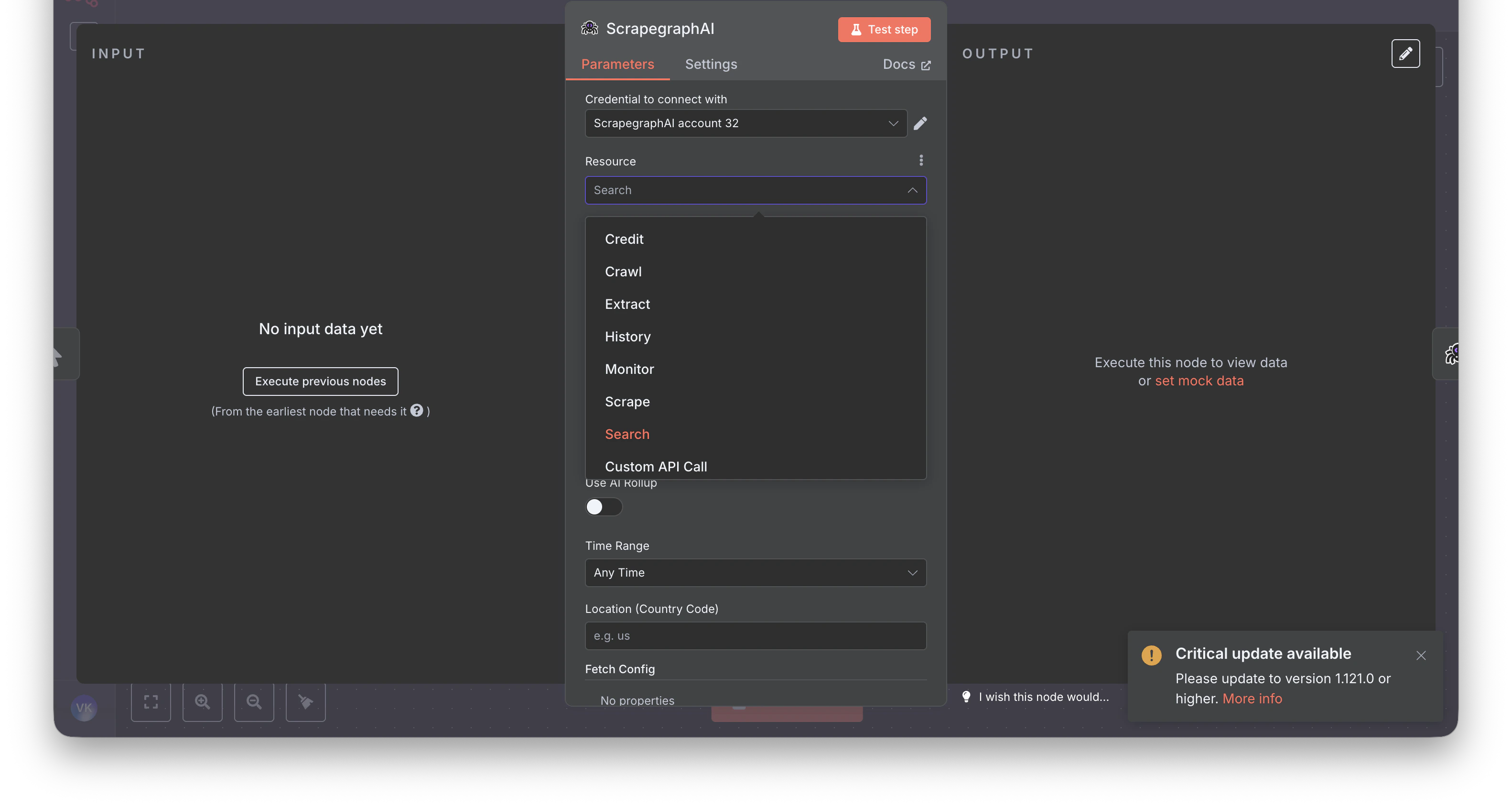
| — | [**`Monitor`**](/integrations/n8n) (new) | Cron-scheduled fetches with diff detection and webhooks. |
| — | [**`History`**](/integrations/n8n) (new) | Look up past results by `scrapeRefId`. |
| — | [**`Credit`**](/integrations/n8n) (new) | Check remaining credits and plan. |
The resource picker at a glance — **before** (v1, 6 resources):
 **After** (v2, 7 resources):
 ## Step-by-step rebuild
### 1. Markdownify → [`Scrape`](/integrations/n8n)
**Before:** A dedicated `Markdownify` resource that always returned markdown.
**After:** Use the **Scrape** resource with one `Markdown` format entry. Same job, more flexible — you can mix in HTML, Links, Summary, or Branding in the same call.
### 2. SmartScraper → [`Extract`](/integrations/n8n)
**Before (v1):** `Website URL` + `User Prompt`, plus optional flat fields like `Render Heavy JS` and `Number of Scrolls`.
**After (v2):** `URL` + `Prompt`, optional `Schema (JSON)` behind a `Use JSON Schema` toggle. All fetch knobs move into a single **Fetch Config** collection shared across every resource.
| v1 field | v2 field |
| --------------------------------------- | ------------------------------------------------- |
| `Website URL` (`websiteUrl`) | `URL` |
| `User Prompt` (`userPrompt`) | `Prompt` |
| `Output Schema` (`outputSchema`) | `Schema (JSON)` (behind `Use JSON Schema` toggle) |
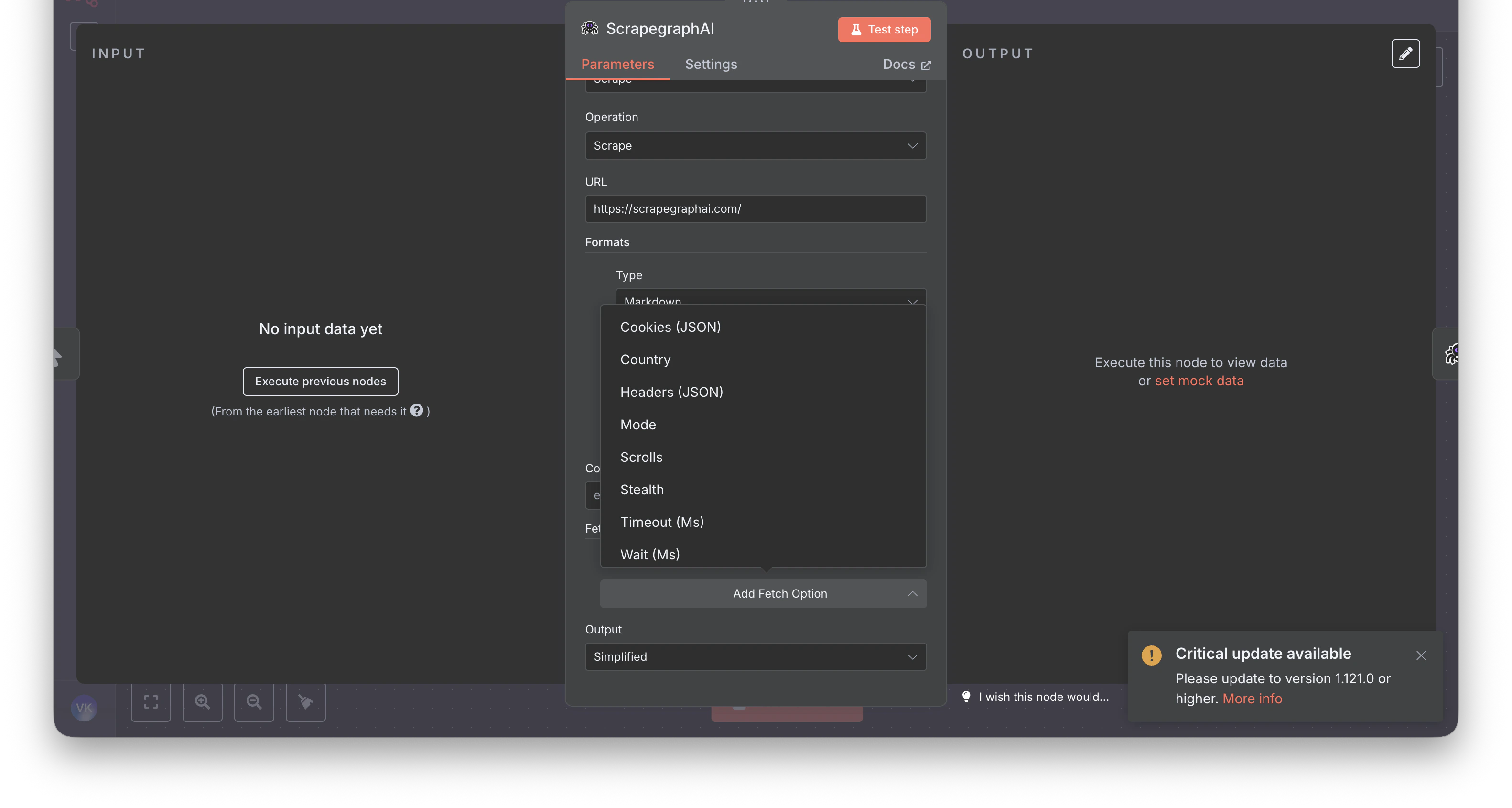
| `Render Heavy JS` (`renderHeavyJs`) | `Fetch Config → Mode` set to `JS` |
| `Number of Scrolls` (`numberOfScrolls`) | `Fetch Config → Scrolls` |
Fetch Config also adds knobs that didn't exist in v1: `Stealth`, `Wait (Ms)`, `Timeout (Ms)`, `Country`, `Headers (JSON)`, `Cookies (JSON)`.
## Step-by-step rebuild
### 1. Markdownify → [`Scrape`](/integrations/n8n)
**Before:** A dedicated `Markdownify` resource that always returned markdown.
**After:** Use the **Scrape** resource with one `Markdown` format entry. Same job, more flexible — you can mix in HTML, Links, Summary, or Branding in the same call.
### 2. SmartScraper → [`Extract`](/integrations/n8n)
**Before (v1):** `Website URL` + `User Prompt`, plus optional flat fields like `Render Heavy JS` and `Number of Scrolls`.
**After (v2):** `URL` + `Prompt`, optional `Schema (JSON)` behind a `Use JSON Schema` toggle. All fetch knobs move into a single **Fetch Config** collection shared across every resource.
| v1 field | v2 field |
| --------------------------------------- | ------------------------------------------------- |
| `Website URL` (`websiteUrl`) | `URL` |
| `User Prompt` (`userPrompt`) | `Prompt` |
| `Output Schema` (`outputSchema`) | `Schema (JSON)` (behind `Use JSON Schema` toggle) |
| `Render Heavy JS` (`renderHeavyJs`) | `Fetch Config → Mode` set to `JS` |
| `Number of Scrolls` (`numberOfScrolls`) | `Fetch Config → Scrolls` |
Fetch Config also adds knobs that didn't exist in v1: `Stealth`, `Wait (Ms)`, `Timeout (Ms)`, `Country`, `Headers (JSON)`, `Cookies (JSON)`.
 ### 3. SearchScraper → [`Search`](/integrations/n8n)
**Before:** `User Prompt` + a few flat options.
**After:** `Query` (the search string) plus optional `Rollup Prompt` for AI extraction across all fetched results, optional `Schema (JSON)` behind a toggle, and new fields like `Time Range` and `Location (Country Code)`.
| v1 field | v2 field |
| -------------------------------- | ---------------------------------------------------- |
| `User Prompt` (`userPrompt`) | `Query` |
| `Output Schema` (`outputSchema`) | `Schema (JSON)` (behind `Use JSON Schema` toggle) |
| — | `Rollup Prompt` (new — AI extraction across results) |
| — | `Time Range` / `Location (Country Code)` (new) |
### 4. SmartCrawler → [`Crawl`](/integrations/n8n) jobs
**Before:** A single synchronous `SmartCrawler` operation.
**After:** Crawl is explicitly async. Start the job, then poll. Five operations are exposed: `Start`, `Get Status`, `Stop`, `Resume`, `Delete`.
A typical chain in n8n:
1. **Crawl → Start** — returns a `cronId`
2. **Wait** node (\~60s)
3. **Crawl → Get Status** — returns the `pages[]` array
4. (Optional) **Split Out** + **History → Get** — fetch full content per crawled page
See the full walkthrough on the [n8n integration page](/integrations/n8n#example-crawl-a-site-save-every-page-to-airtable).
### 5. Output shape
Downstream nodes (Set, IF, HTTP Request) that reference v1 paths like `$json.result.markdown` will break — v2 returns a different shape.
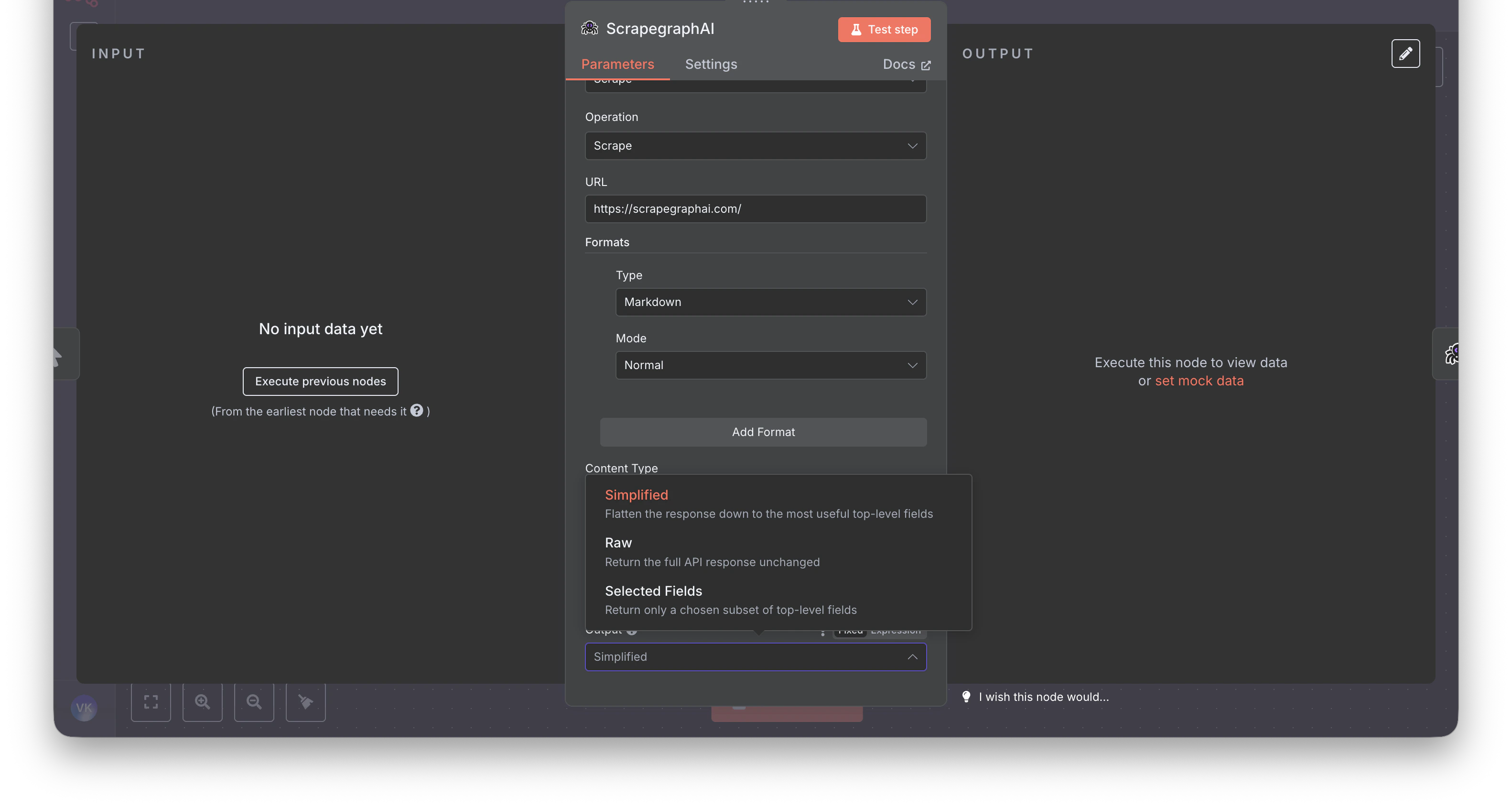
The new node ships an **Output** parameter on every content-producing operation (Scrape, Extract, Search) with three modes: **Simplified**, **Raw**, **Selected Fields**. Pick **Simplified** when migrating — it's the closest match to v1.
### 3. SearchScraper → [`Search`](/integrations/n8n)
**Before:** `User Prompt` + a few flat options.
**After:** `Query` (the search string) plus optional `Rollup Prompt` for AI extraction across all fetched results, optional `Schema (JSON)` behind a toggle, and new fields like `Time Range` and `Location (Country Code)`.
| v1 field | v2 field |
| -------------------------------- | ---------------------------------------------------- |
| `User Prompt` (`userPrompt`) | `Query` |
| `Output Schema` (`outputSchema`) | `Schema (JSON)` (behind `Use JSON Schema` toggle) |
| — | `Rollup Prompt` (new — AI extraction across results) |
| — | `Time Range` / `Location (Country Code)` (new) |
### 4. SmartCrawler → [`Crawl`](/integrations/n8n) jobs
**Before:** A single synchronous `SmartCrawler` operation.
**After:** Crawl is explicitly async. Start the job, then poll. Five operations are exposed: `Start`, `Get Status`, `Stop`, `Resume`, `Delete`.
A typical chain in n8n:
1. **Crawl → Start** — returns a `cronId`
2. **Wait** node (\~60s)
3. **Crawl → Get Status** — returns the `pages[]` array
4. (Optional) **Split Out** + **History → Get** — fetch full content per crawled page
See the full walkthrough on the [n8n integration page](/integrations/n8n#example-crawl-a-site-save-every-page-to-airtable).
### 5. Output shape
Downstream nodes (Set, IF, HTTP Request) that reference v1 paths like `$json.result.markdown` will break — v2 returns a different shape.
The new node ships an **Output** parameter on every content-producing operation (Scrape, Extract, Search) with three modes: **Simplified**, **Raw**, **Selected Fields**. Pick **Simplified** when migrating — it's the closest match to v1.
 ## What else changed in v2
* **New Fetch Config knobs** that didn't exist in v1: `Stealth`, `Wait (Ms)`, `Timeout (Ms)`, `Country`, `Headers (JSON)`, `Cookies (JSON)`
* **New resources**: `Monitor` (cron + diff + webhook), `History` (look up past results by `scrapeRefId`), `Credit` (check usage)
* **Async crawl model** with five lifecycle ops instead of one synchronous call
* **AI-Agent friendly** — every content-producing op exposes `Simplified` / `Raw` / `Selected Fields` output modes
* **Cleaner credentials test** — n8n hits `GET /api/credits` to verify keys
## Recommended path
1. Update the community node: **Settings → Community Nodes → `n8n-nodes-scrapegraphai` → Update to `1.0.2`** (or later)
2. Open each affected workflow — v1 ScrapeGraphAI nodes will surface as deprecated or fail to execute
3. Drop in fresh **ScrapeGraphAI** nodes and pick the matching v2 resource from the [migration table](#method-by-method-migration)
4. Re-map fields per the [step-by-step rebuild](#step-by-step-rebuild) above
5. Set **Output** to `Simplified` (closest to v1)
6. Test the node, fix downstream expressions, delete the v1 node
## FAQ
* **Will my workflows keep running until I touch them?** Yes — until the next execution opens the v1 node, which then fails against the deprecated v1 API.
* **Can I run v1 and v2 side-by-side?** No — same package, version-pinned.
* **Self-hosted vs n8n Cloud?** Self-hosted: bump the version in **Community Nodes**. n8n Cloud doesn't yet allow community nodes.
* **I used Agentic Scraper — what now?** Use **Extract** with **Fetch Config → Mode = JS** plus **Stealth** and **Wait (Ms)**.
## Related guides
Full reference for the v2 node — every resource, operation, and field
Python / JavaScript / REST migration — the underlying API changes
Source code, issue tracker, release notes
The last 0.x release (deprecated)
## What else changed in v2
* **New Fetch Config knobs** that didn't exist in v1: `Stealth`, `Wait (Ms)`, `Timeout (Ms)`, `Country`, `Headers (JSON)`, `Cookies (JSON)`
* **New resources**: `Monitor` (cron + diff + webhook), `History` (look up past results by `scrapeRefId`), `Credit` (check usage)
* **Async crawl model** with five lifecycle ops instead of one synchronous call
* **AI-Agent friendly** — every content-producing op exposes `Simplified` / `Raw` / `Selected Fields` output modes
* **Cleaner credentials test** — n8n hits `GET /api/credits` to verify keys
## Recommended path
1. Update the community node: **Settings → Community Nodes → `n8n-nodes-scrapegraphai` → Update to `1.0.2`** (or later)
2. Open each affected workflow — v1 ScrapeGraphAI nodes will surface as deprecated or fail to execute
3. Drop in fresh **ScrapeGraphAI** nodes and pick the matching v2 resource from the [migration table](#method-by-method-migration)
4. Re-map fields per the [step-by-step rebuild](#step-by-step-rebuild) above
5. Set **Output** to `Simplified` (closest to v1)
6. Test the node, fix downstream expressions, delete the v1 node
## FAQ
* **Will my workflows keep running until I touch them?** Yes — until the next execution opens the v1 node, which then fails against the deprecated v1 API.
* **Can I run v1 and v2 side-by-side?** No — same package, version-pinned.
* **Self-hosted vs n8n Cloud?** Self-hosted: bump the version in **Community Nodes**. n8n Cloud doesn't yet allow community nodes.
* **I used Agentic Scraper — what now?** Use **Extract** with **Fetch Config → Mode = JS** plus **Stealth** and **Wait (Ms)**.
## Related guides
Full reference for the v2 node — every resource, operation, and field
Python / JavaScript / REST migration — the underlying API changes
Source code, issue tracker, release notes
The last 0.x release (deprecated)