> ## Documentation Index
> Fetch the complete documentation index at: https://docs.scrapegraphai.com/llms.txt
> Use this file to discover all available pages before exploring further.
# n8n
> Use ScrapeGraphAI inside n8n workflows — scrape, extract, crawl, monitor, and more, with no code
## Overview
The official [`n8n-nodes-scrapegraphai`](https://www.npmjs.com/package/n8n-nodes-scrapegraphai) community node exposes the full v2 API as a single node with seven resources: **Scrape**, **Extract**, **Search**, **Crawl**, **Monitor**, **History**, and **Credit**. Drop it into any n8n workflow, point it at a URL, and you get markdown, structured JSON, screenshots, or a recurring monitor — wired into the rest of your stack via the 400+ nodes n8n already ships with.
`n8n-nodes-scrapegraphai`
Issues, PRs, and the changelog
## Installation
Inside your n8n instance, open **Settings → Community Nodes → Install** and enter:
```
n8n-nodes-scrapegraphai
```
Acknowledge the risks prompt and install. The node appears as **ScrapeGraphAI** in the node panel.
Self-hosted n8n only — n8n Cloud does not yet allow community nodes. If you don't have a host, follow the [self-hosting guide](https://docs.n8n.io/hosting/).
## Credentials
Add a new **ScrapeGraphAI API** credential and paste your API key. n8n will hit `GET /api/credits` to verify the key — a green banner confirms it works.
Get your API key from the [ScrapeGraphAI dashboard](https://scrapegraphai.com/dashboard).
## What's in the node
| Resource | Operations | What it does |
| ----------- | -------------------------------------------------------------------------- | -------------------------------------------------------------------------------------------------------------- |
| **Scrape** | `scrape` | Fetch a page in markdown, HTML, JSON (AI-extracted), screenshot, links, summary, branding, or any combination |
| **Extract** | `extract` | Run a natural-language prompt over a URL, raw HTML, or markdown — optional JSON schema |
| **Search** | `search` | AI web search with inline content; optional rollup prompt across results |
| **Crawl** | `start`, `getStatus`, `stop`, `resume`, `delete` | Async multi-page crawls with patterns, depth, per-page formats, MIME-type filters, and an external-link toggle |
| **Monitor** | `create`, `list`, `get`, `update`, `pause`, `resume`, `delete`, `activity` | Cron-scheduled fetches with diff detection and webhooks |
| **History** | `get`, `list` | Look up past results by `scrapeRefId` — used to fetch full content for crawled pages |
| **Credit** | `get` | Check remaining credits and plan |
Every content-producing operation (Scrape / Extract / Search) exposes an **Output** parameter with three modes — Simplified, Raw, or Selected Fields — so the response shape stays predictable when chained into AI Agent tools or downstream nodes.
## Tour the modules
Drop a **ScrapeGraphAI** node onto the canvas, pick a credential, and the **Resource** dropdown gives you everything the v2 API exposes:
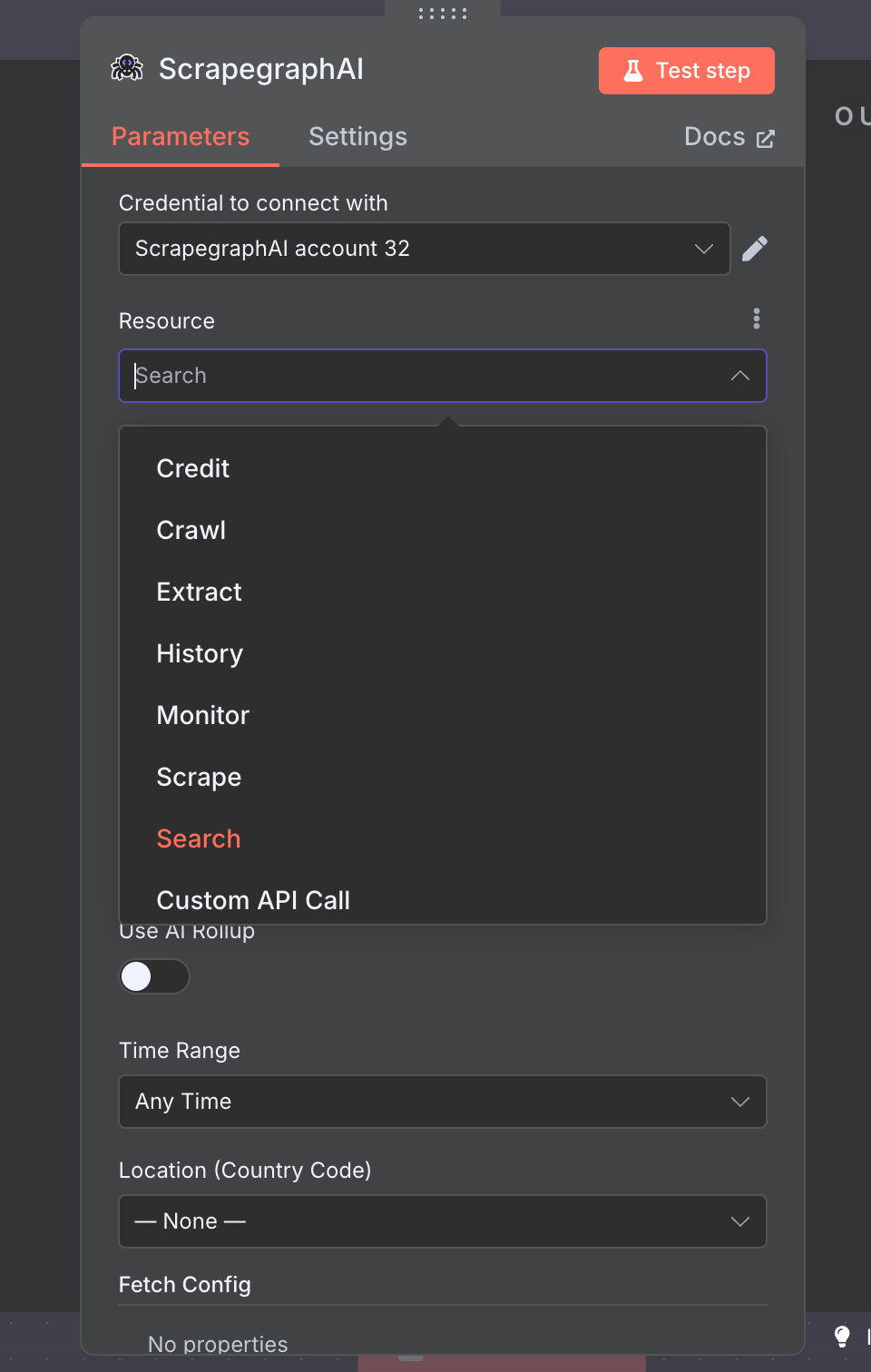 The rest of this section walks through each resource with its key fields visible.
### Scrape
Fetch a page in one or more formats — markdown, HTML, JSON (AI extraction), screenshot, links, summary, or branding. Add as many `Format` rows as you need; each one carries its own per-format options.
The rest of this section walks through each resource with its key fields visible.
### Scrape
Fetch a page in one or more formats — markdown, HTML, JSON (AI extraction), screenshot, links, summary, or branding. Add as many `Format` rows as you need; each one carries its own per-format options.
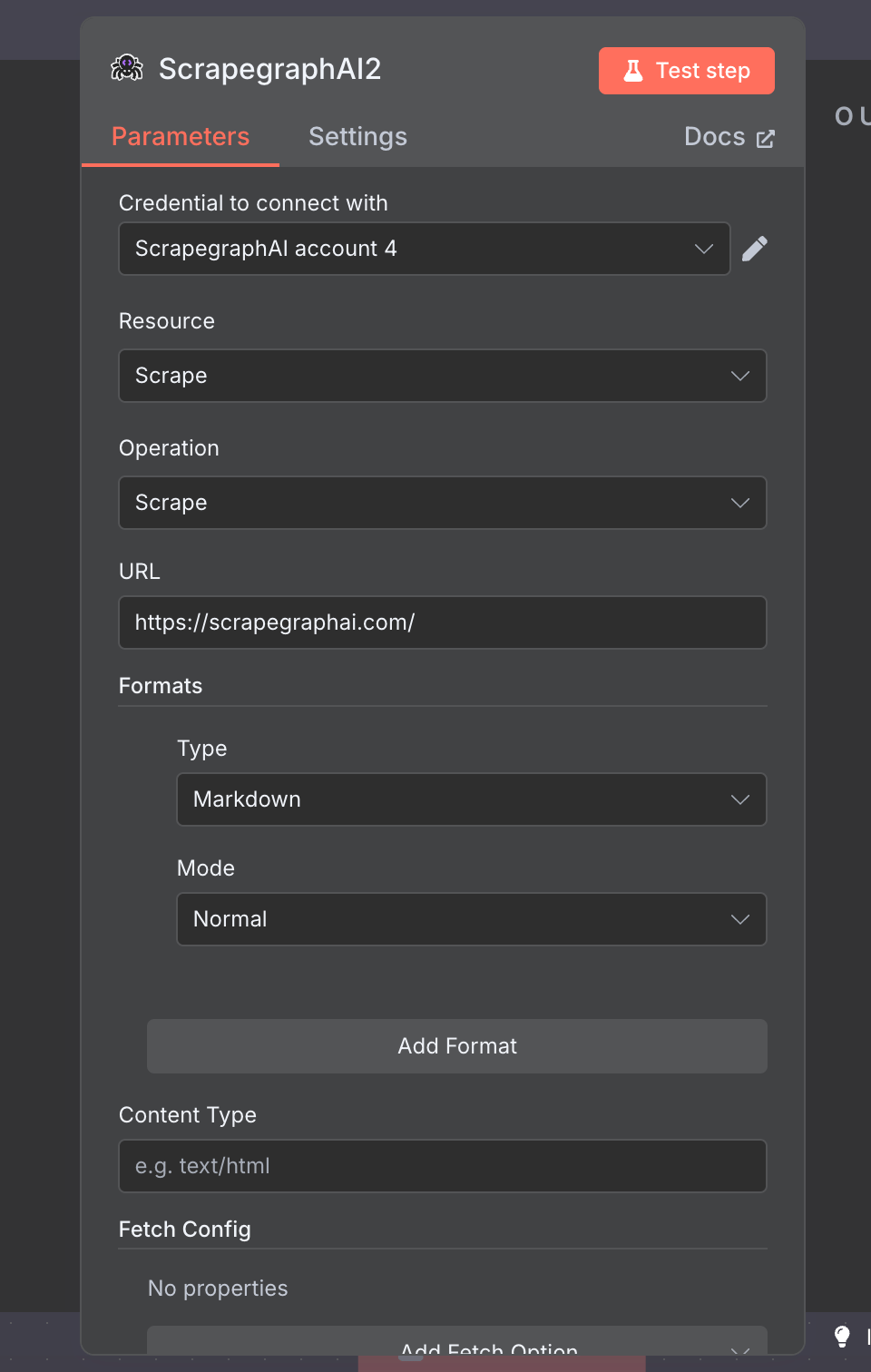 | Field | Notes |
| ------------ | ------------------------------------------------------------------------------------------------------------------------------------------------------------------------ |
| URL | The page to fetch |
| Formats | Add one row per output format. Each format exposes its own sub-options (Mode for markdown/HTML, Prompt+Schema for JSON, Full Page/Width/Height/Quality for screenshots). |
| Content Type | Optional MIME-type hint for the fetcher |
| Fetch Config | See [Fetch Config](#fetch-config) below |
### Extract
Run a natural-language prompt over a URL, raw HTML, or markdown. Toggle **Use JSON Schema** to constrain the output shape.
| Field | Notes |
| ------------ | ------------------------------------------------------------------------------------------------------------------------------------------------------------------------ |
| URL | The page to fetch |
| Formats | Add one row per output format. Each format exposes its own sub-options (Mode for markdown/HTML, Prompt+Schema for JSON, Full Page/Width/Height/Quality for screenshots). |
| Content Type | Optional MIME-type hint for the fetcher |
| Fetch Config | See [Fetch Config](#fetch-config) below |
### Extract
Run a natural-language prompt over a URL, raw HTML, or markdown. Toggle **Use JSON Schema** to constrain the output shape.
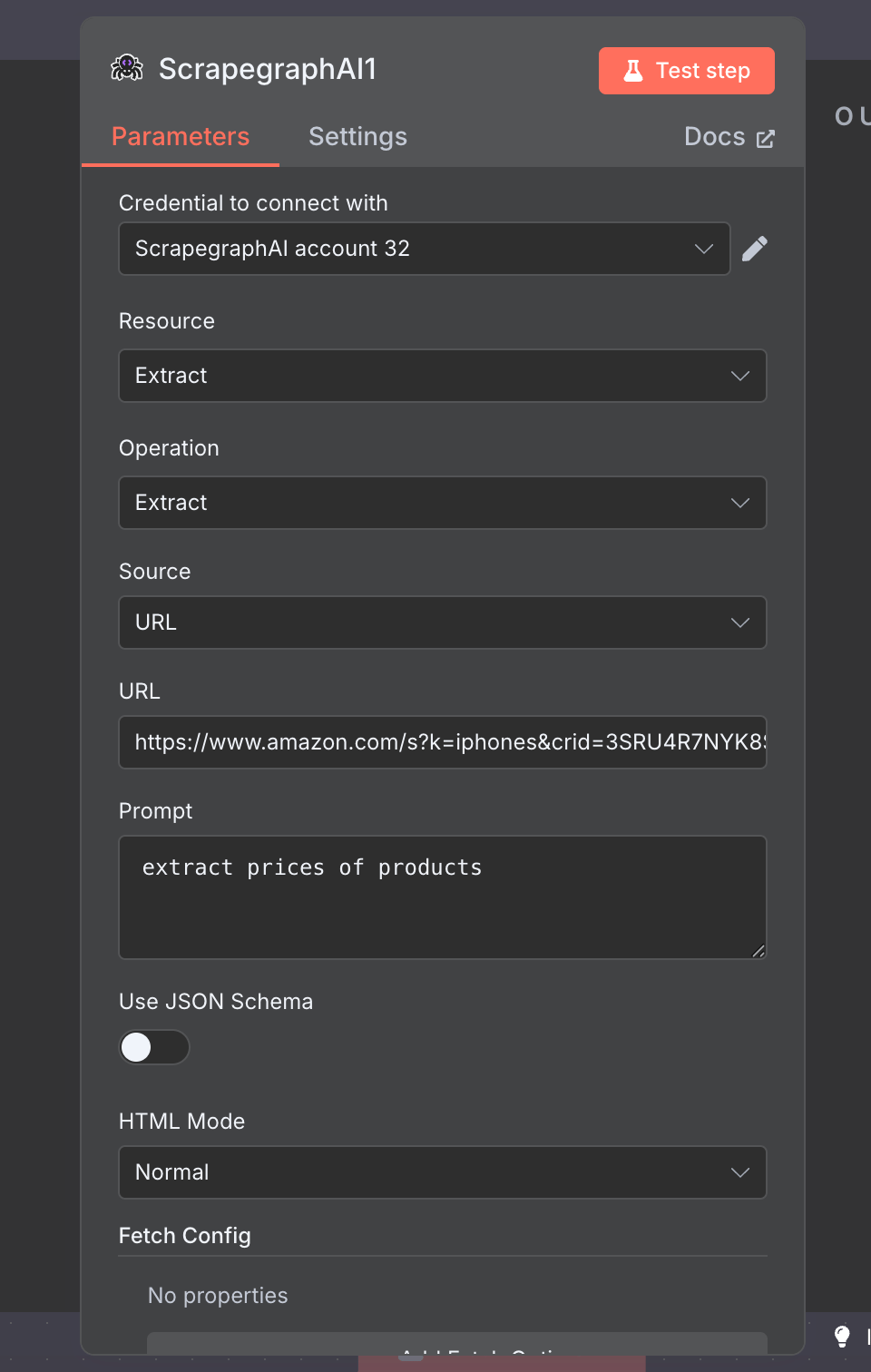 | Field | Notes |
| --------------- | --------------------------------------------------------------------------------------------- |
| Source | `URL`, `HTML`, or `Markdown` — picks the input mode |
| Prompt | What you want extracted, in plain English |
| Use JSON Schema | Toggle on to paste a JSON schema and lock the output shape |
| HTML Mode | `Normal`, `Reader`, or `Prune` — controls how the page HTML is preprocessed before extraction |
### Search
Run an AI-powered web search and get the top results with content already fetched. Toggle **Use AI Rollup** to summarise across all results in one call.
| Field | Notes |
| --------------- | --------------------------------------------------------------------------------------------- |
| Source | `URL`, `HTML`, or `Markdown` — picks the input mode |
| Prompt | What you want extracted, in plain English |
| Use JSON Schema | Toggle on to paste a JSON schema and lock the output shape |
| HTML Mode | `Normal`, `Reader`, or `Prune` — controls how the page HTML is preprocessed before extraction |
### Search
Run an AI-powered web search and get the top results with content already fetched. Toggle **Use AI Rollup** to summarise across all results in one call.
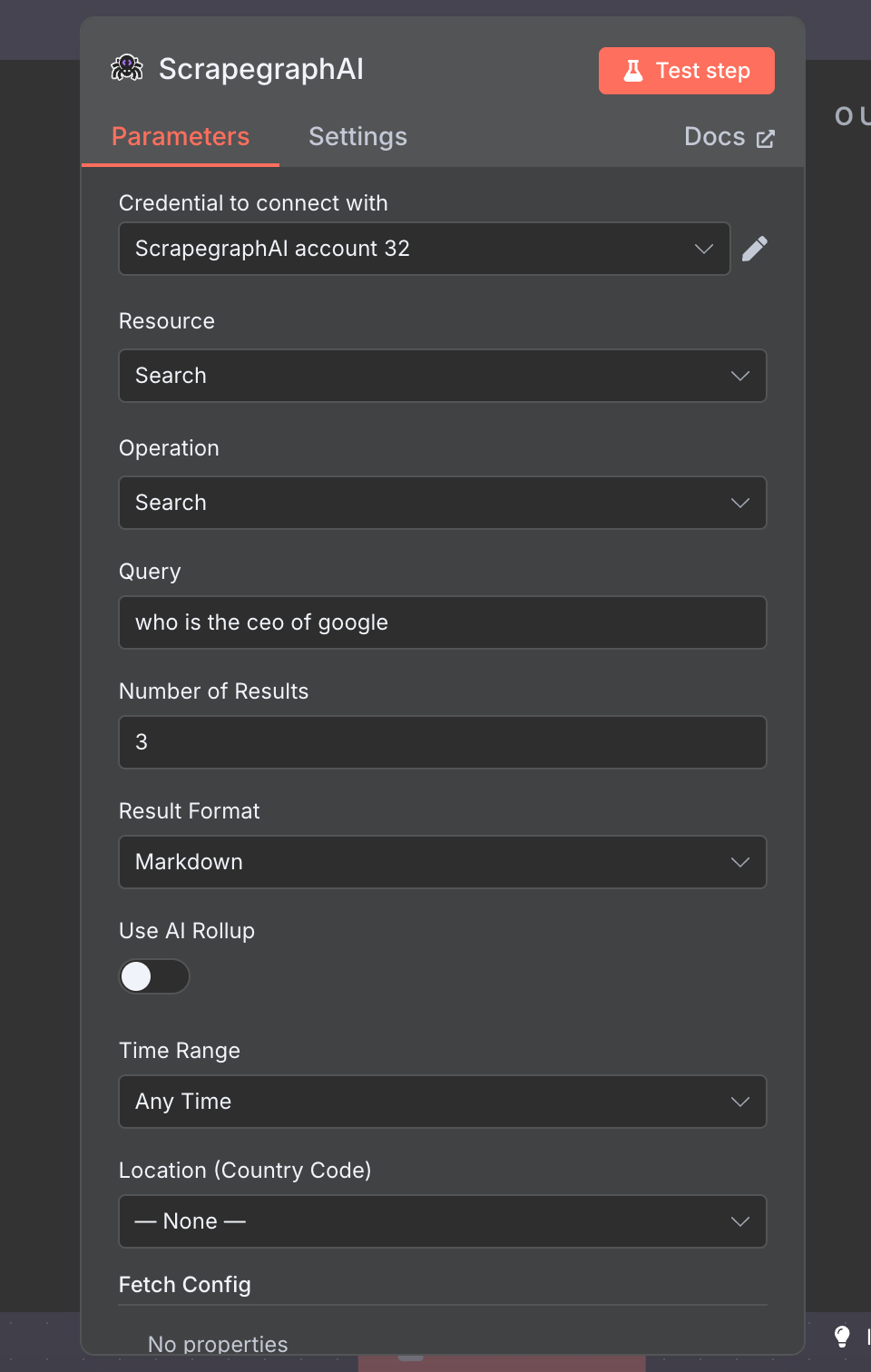 | Field | Notes |
| ----------------------- | -------------------------------------------------------------------------------------- |
| Query | The search query |
| Number of Results | 1–20 |
| Result Format | `Markdown` or `HTML` for each result's inline content |
| Use AI Rollup | Toggle on to add a `Prompt` (and optional schema) that runs across the fetched results |
| Time Range | Filter to past hour / day / week / month / year |
| Location (Country Code) | 52 curated ISO codes for geo-targeted results |
### Crawl
Asynchronous multi-page crawl with five operations:
| Field | Notes |
| ----------------------- | -------------------------------------------------------------------------------------- |
| Query | The search query |
| Number of Results | 1–20 |
| Result Format | `Markdown` or `HTML` for each result's inline content |
| Use AI Rollup | Toggle on to add a `Prompt` (and optional schema) that runs across the fetched results |
| Time Range | Filter to past hour / day / week / month / year |
| Location (Country Code) | 52 curated ISO codes for geo-targeted results |
### Crawl
Asynchronous multi-page crawl with five operations:
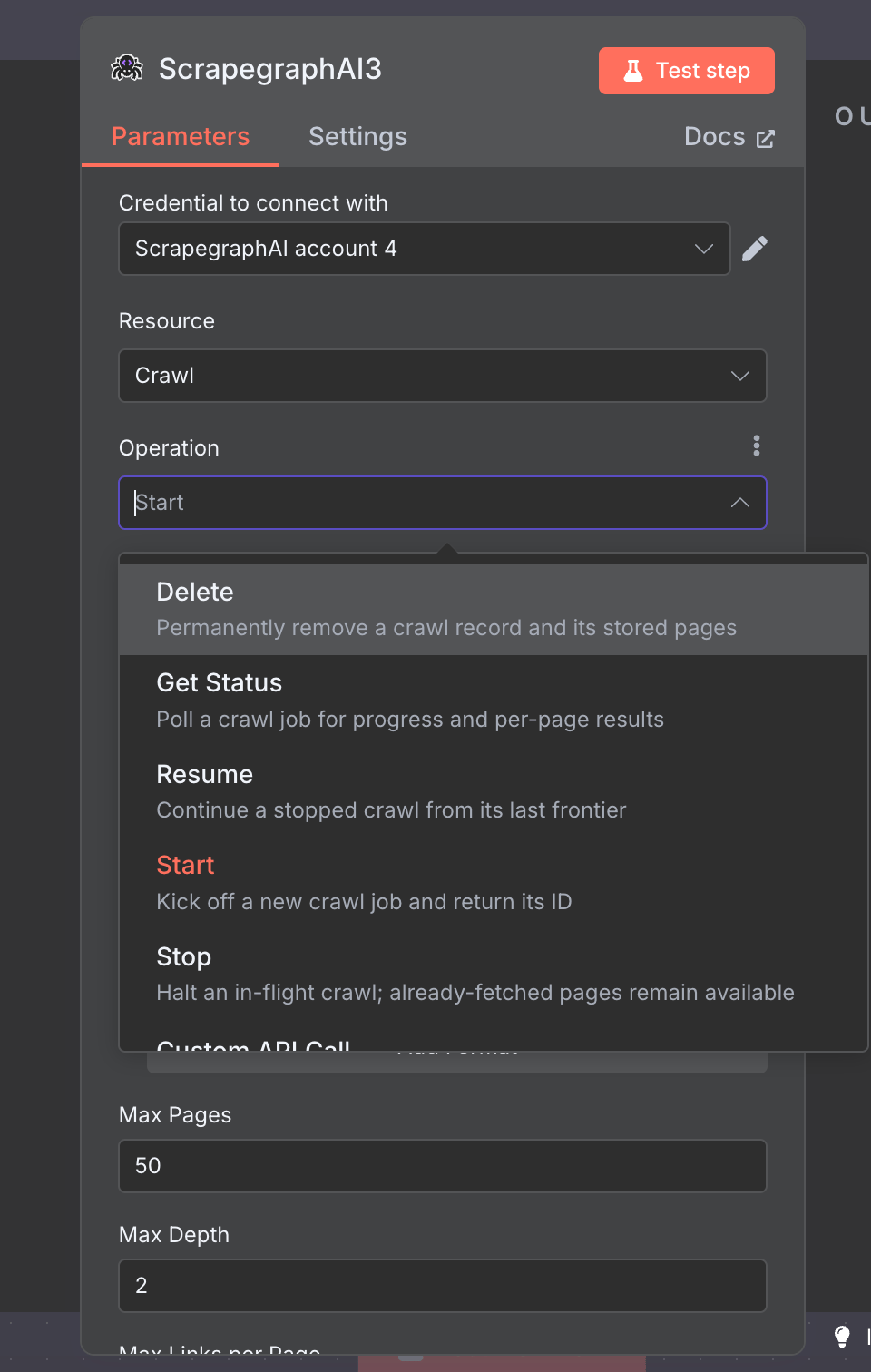 `Start` kicks off a crawl and returns a job ID — the other ops drive the lifecycle (poll, halt, resume, clean up).
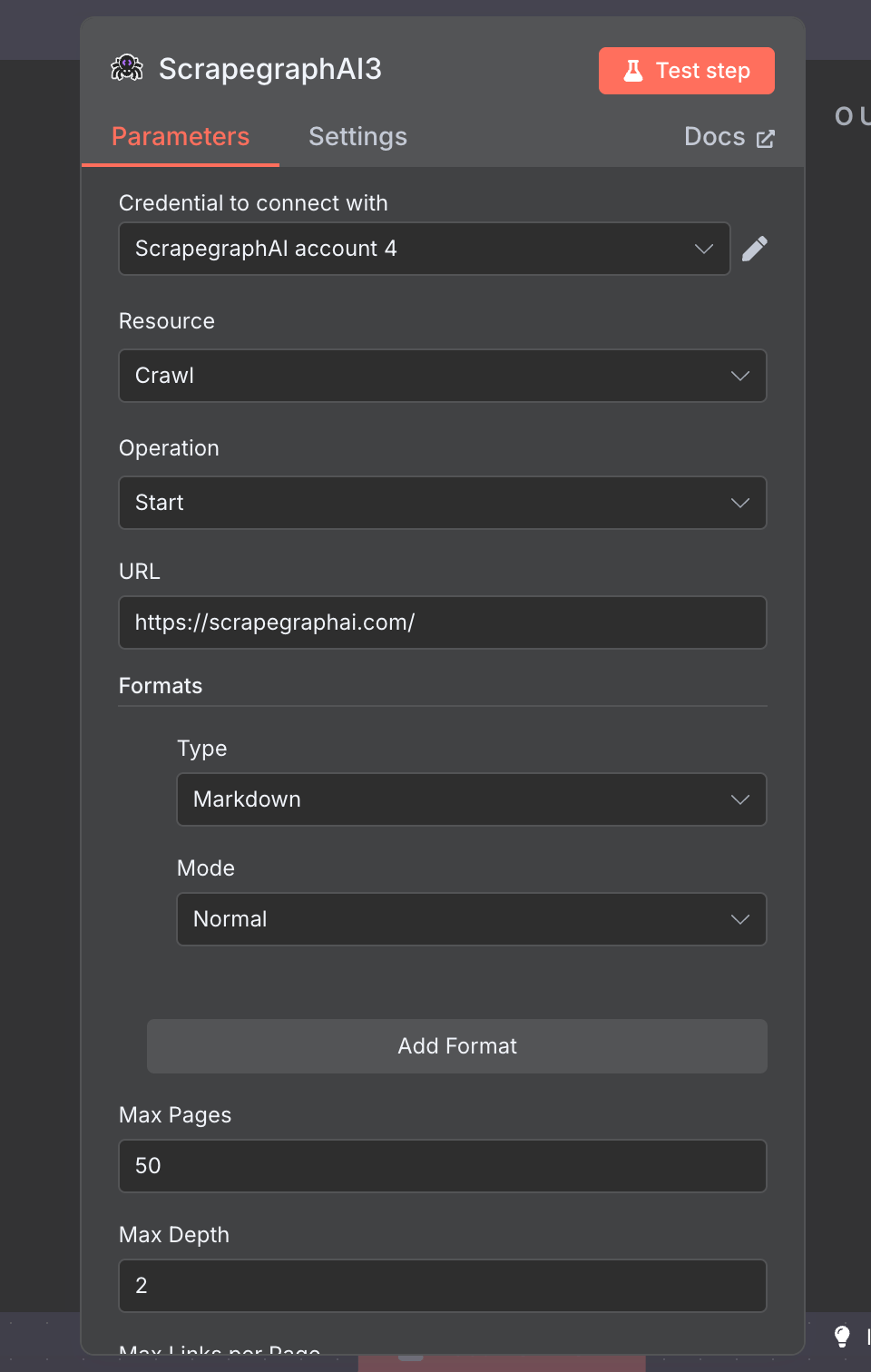 | Field | Notes |
| -------------------------- | ----------------------------------------------------------------------------------------- |
| URL | Starting URL |
| Formats | Same multi-format model as Scrape — every crawled page is captured in each format you add |
| Max Pages | Default `50`, max `1000` |
| Max Depth | Default `2` |
| Max Links per Page | Default `10` |
| Allow External Links | Off by default — keeps the crawl on the starting domain |
| Include / Exclude Patterns | Glob-style URL filters |
| Content Types | Optional MIME-type filter (HTML, PDF, DOCX, images, …) |
### Monitor
Cron-scheduled fetches with diff detection and webhook delivery. Eight operations cover the whole monitor lifecycle:
| Field | Notes |
| -------------------------- | ----------------------------------------------------------------------------------------- |
| URL | Starting URL |
| Formats | Same multi-format model as Scrape — every crawled page is captured in each format you add |
| Max Pages | Default `50`, max `1000` |
| Max Depth | Default `2` |
| Max Links per Page | Default `10` |
| Allow External Links | Off by default — keeps the crawl on the starting domain |
| Include / Exclude Patterns | Glob-style URL filters |
| Content Types | Optional MIME-type filter (HTML, PDF, DOCX, images, …) |
### Monitor
Cron-scheduled fetches with diff detection and webhook delivery. Eight operations cover the whole monitor lifecycle:
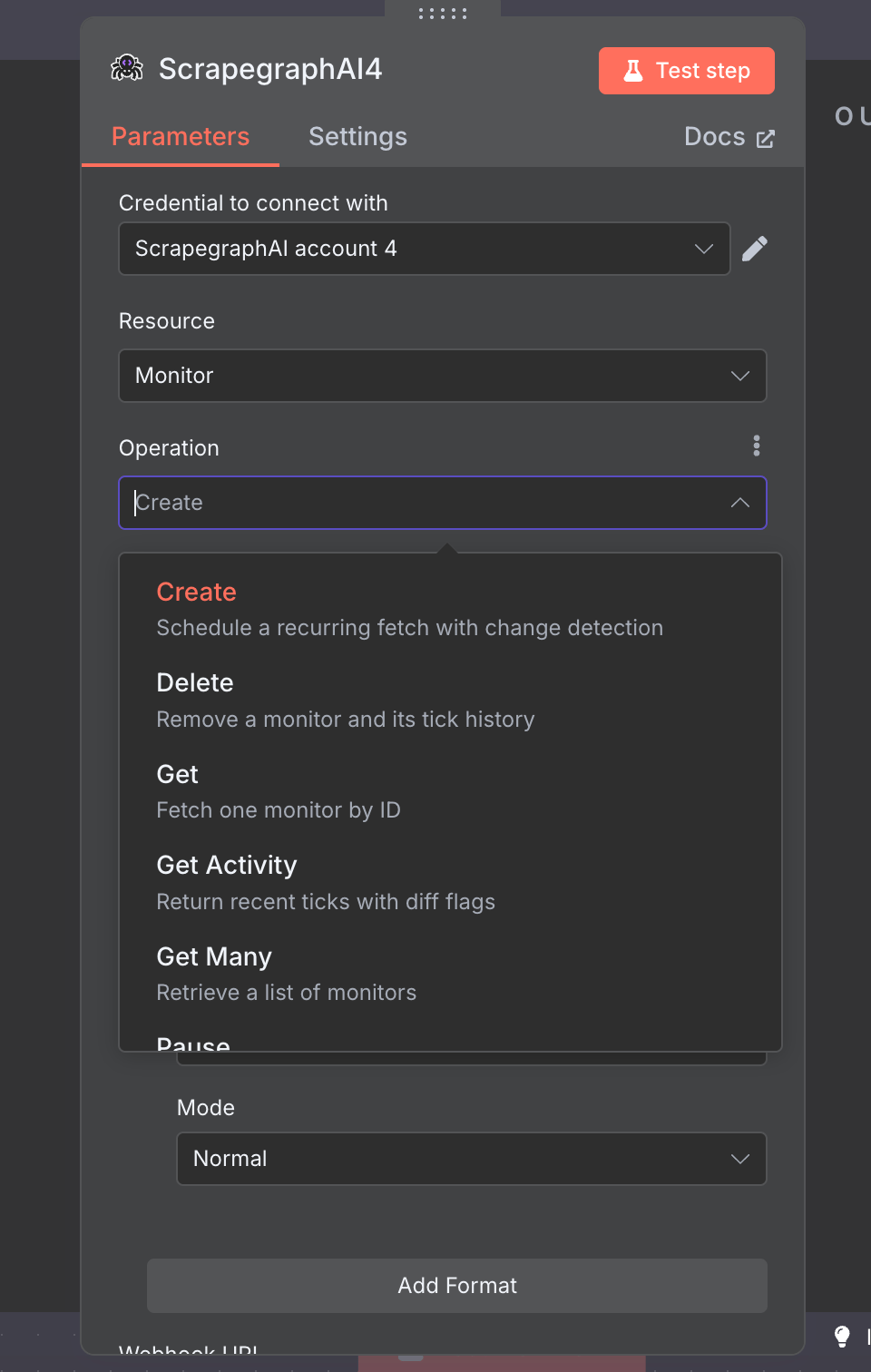 `Create` schedules a recurring fetch; `Get Activity` returns recent ticks with diff flags so you can react to changes.
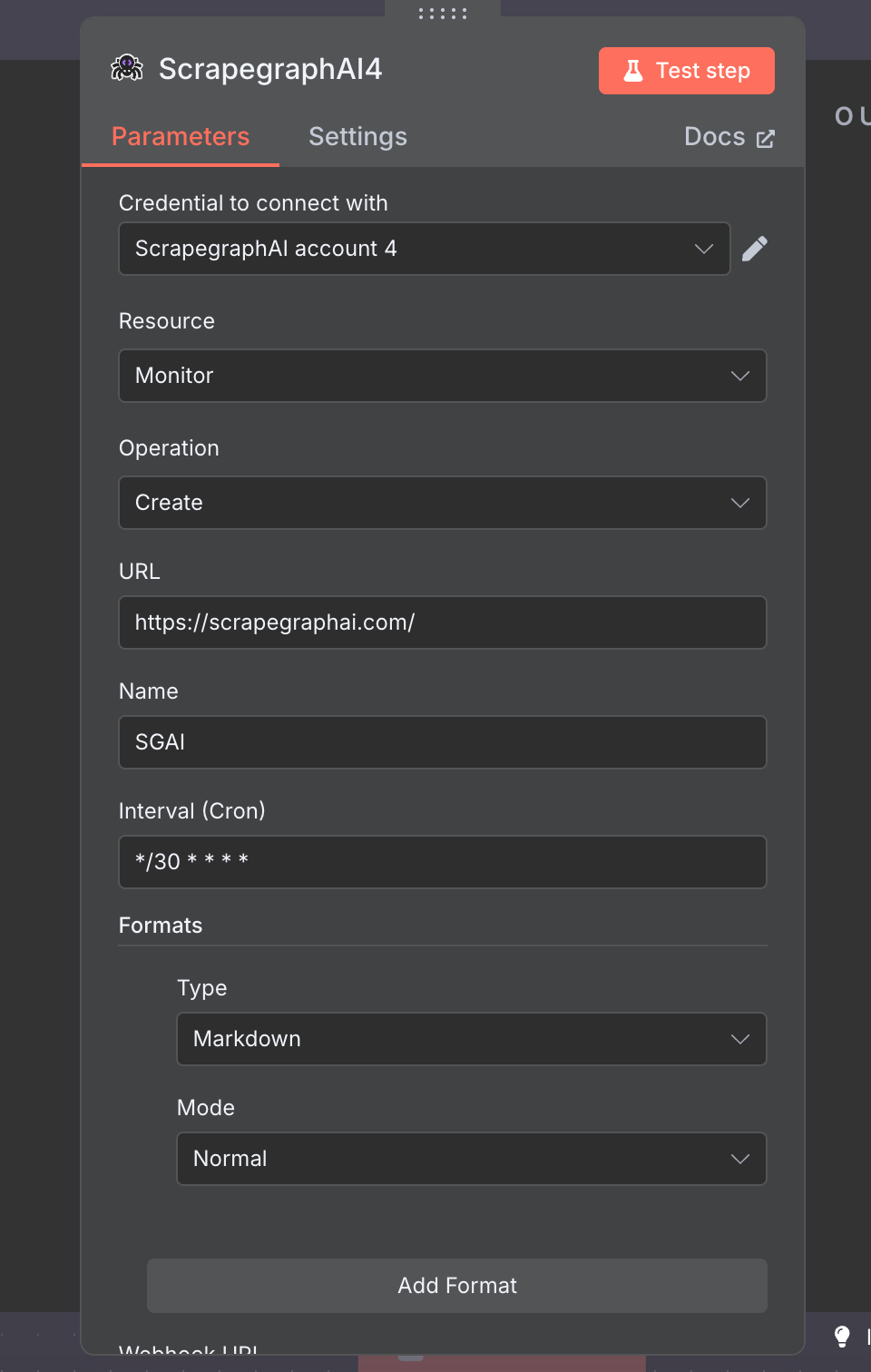 | Field | Notes |
| --------------- | --------------------------------------------------------------------------- |
| URL | Page to monitor |
| Name | Human label for the monitor |
| Interval (Cron) | Standard 5-field cron expression — e.g. `*/30 * * * *` for every 30 minutes |
| Formats | Same multi-format model — each tick captures all configured formats |
| Webhook URL | Optional. Wire to an n8n Webhook node for instant delta notifications. |
### History
Look up past results by `scrapeRefId`. Used to retrieve full content for crawled pages (Crawl returns pointers, History fetches the bytes).
| Field | Notes |
| --------------- | --------------------------------------------------------------------------- |
| URL | Page to monitor |
| Name | Human label for the monitor |
| Interval (Cron) | Standard 5-field cron expression — e.g. `*/30 * * * *` for every 30 minutes |
| Formats | Same multi-format model — each tick captures all configured formats |
| Webhook URL | Optional. Wire to an n8n Webhook node for instant delta notifications. |
### History
Look up past results by `scrapeRefId`. Used to retrieve full content for crawled pages (Crawl returns pointers, History fetches the bytes).
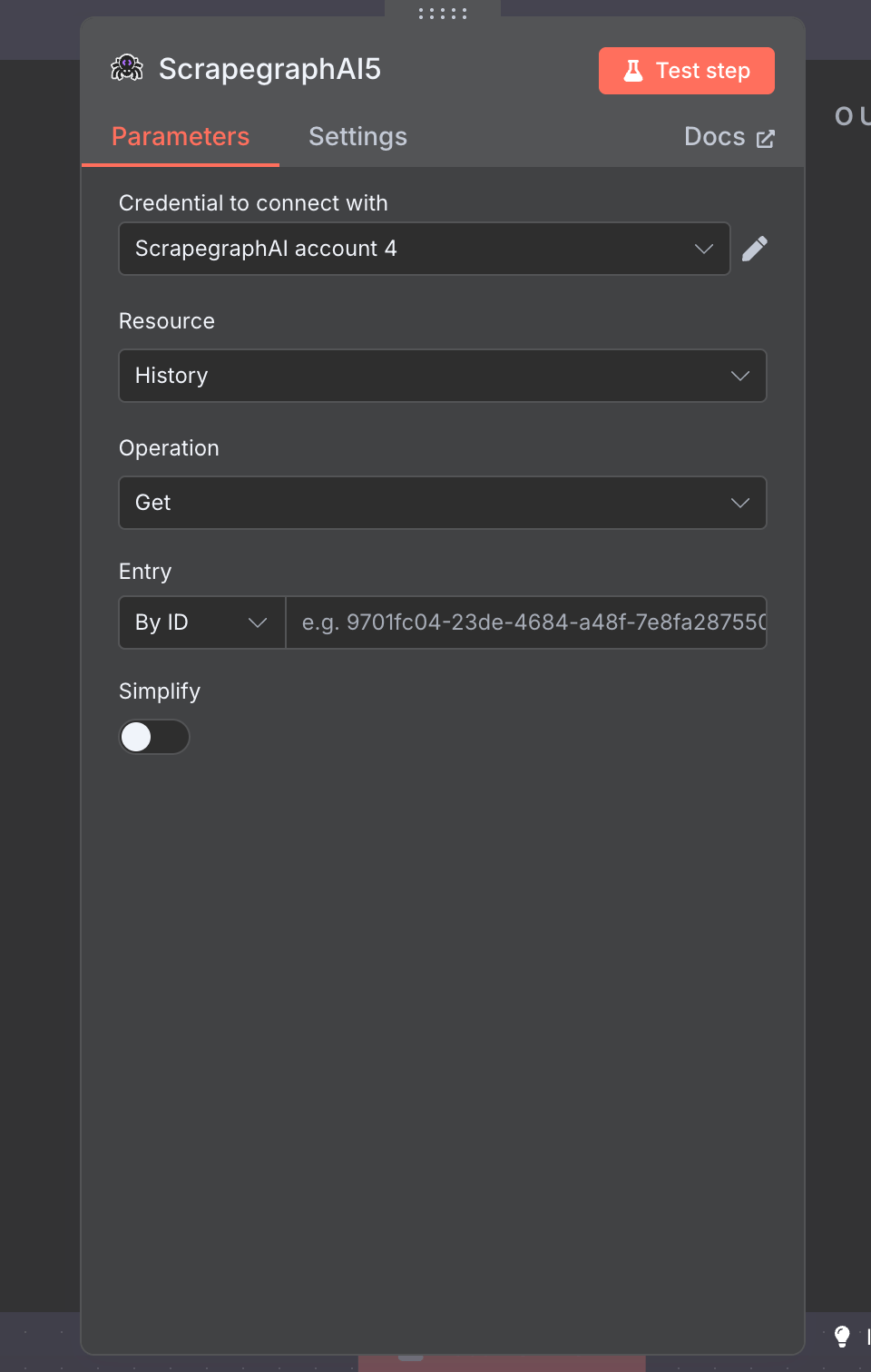 | Field | Notes |
| --------- | --------------------------------------------------------------------------------------------- |
| Operation | `Get` (single entry by ID) or `Get Many` (paginated list) |
| Entry | Resource Locator — paste an ID directly, or use an expression like `={{ $json.scrapeRefId }}` |
| Simplify | Toggle off to get the full v2 response payload |
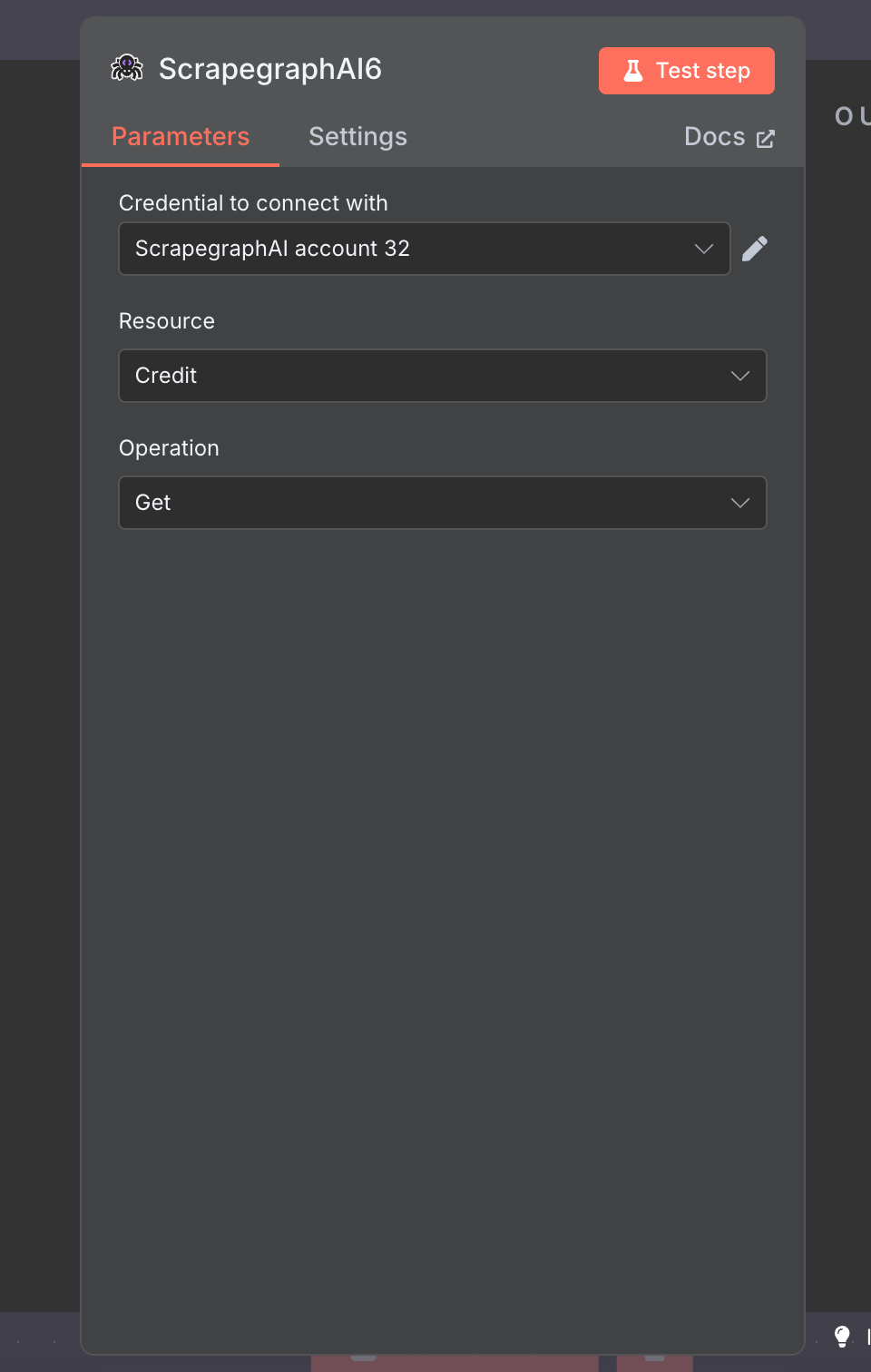
### Credit
Quick check on remaining credits and current plan. Zero-config — pick the resource, hit **Test step**.
| Field | Notes |
| --------- | --------------------------------------------------------------------------------------------- |
| Operation | `Get` (single entry by ID) or `Get Many` (paginated list) |
| Entry | Resource Locator — paste an ID directly, or use an expression like `={{ $json.scrapeRefId }}` |
| Simplify | Toggle off to get the full v2 response payload |
### Credit
Quick check on remaining credits and current plan. Zero-config — pick the resource, hit **Test step**.
 ## Example workflow: crawl a site, save every page to Airtable
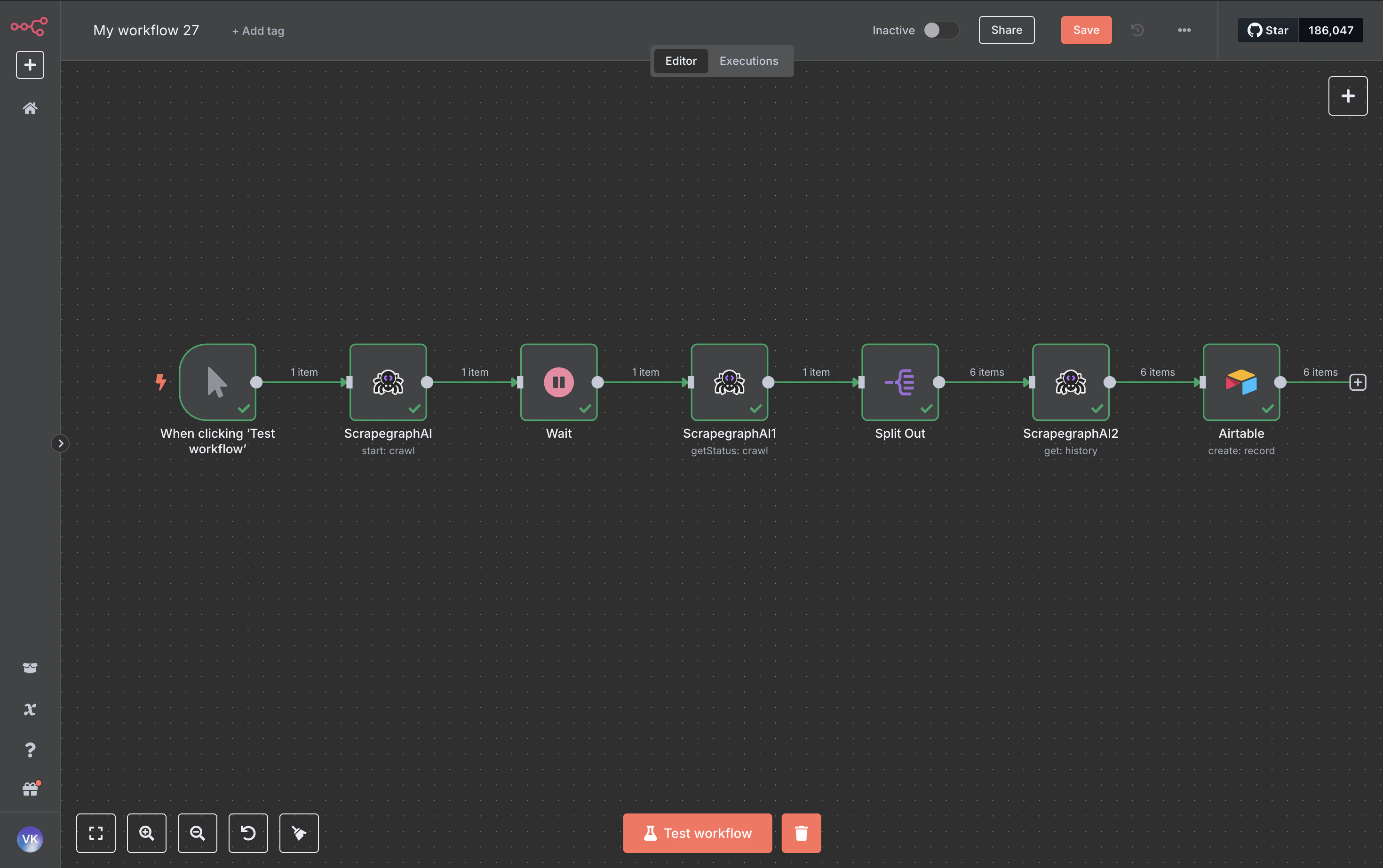
End-to-end walkthrough that chains **Crawl → Wait → Crawl Status → Split Out → History → Airtable**. The same pattern works for Notion, Google Sheets, Postgres, S3 — anywhere n8n can write.
## Example workflow: crawl a site, save every page to Airtable
End-to-end walkthrough that chains **Crawl → Wait → Crawl Status → Split Out → History → Airtable**. The same pattern works for Notion, Google Sheets, Postgres, S3 — anywhere n8n can write.
 ### 1. Crawl → Start
Kick off the crawl. The node returns a `cronId` (the crawl job ID) which the rest of the workflow chases.
| Field | Value |
| --------- | ------------------------------------- |
| Resource | `Crawl` |
| Operation | `Start` |
| URL | `https://scrapegraphai.com/` |
| Formats | one entry, `Markdown` (mode `Normal`) |
| Max Pages | `6` |
| Max Depth | `2` |
### 2. Wait
Add a **Wait** node (\~60 seconds). Crawls are asynchronous — give the worker time to fetch a few pages before polling.
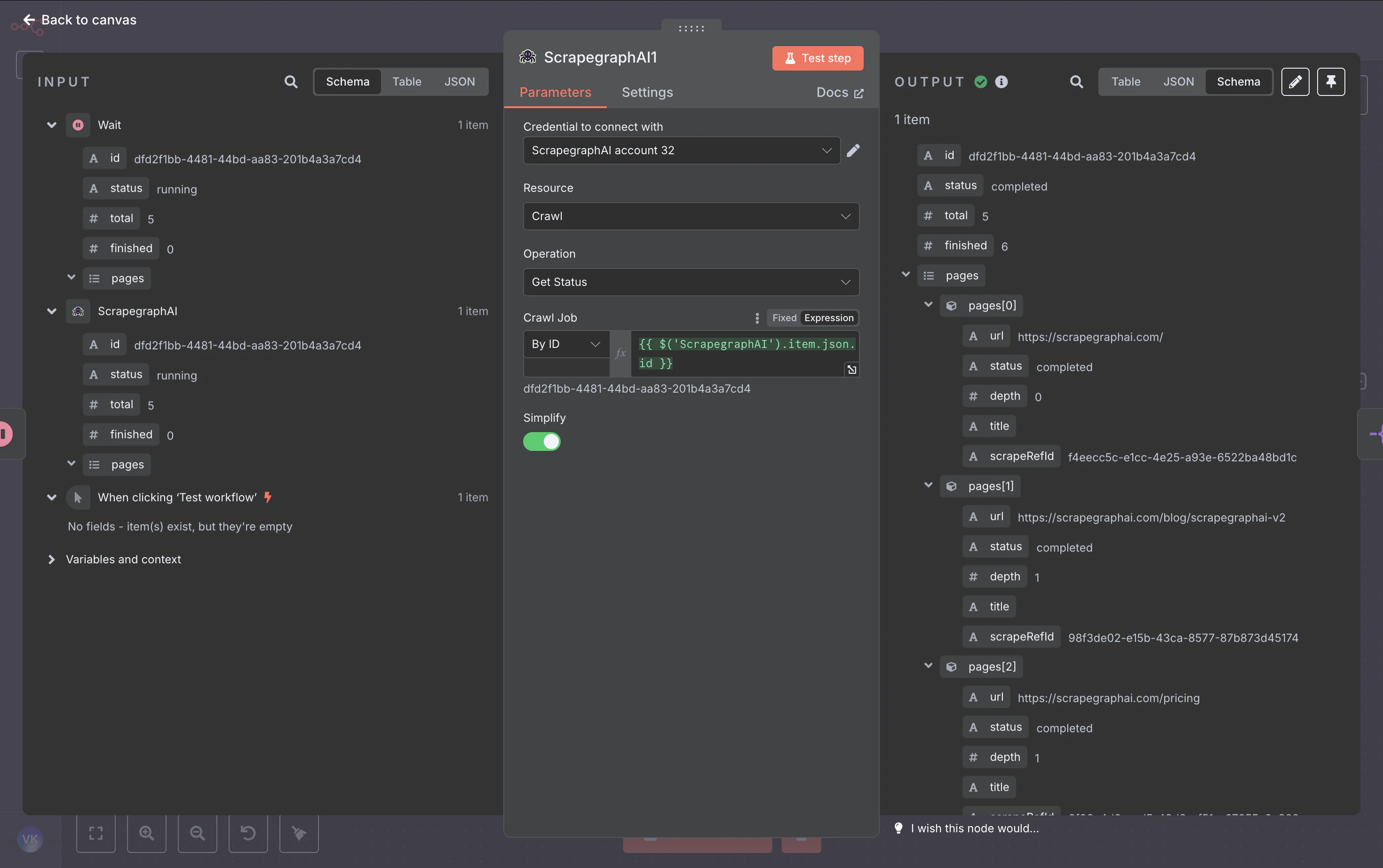
### 3. Crawl → Get Status
Pull the job state. When `status` is `completed` (or `partial`), the response includes a `pages` array with one entry per crawled page — each carrying the page URL, depth, title, and a `scrapeRefId` pointer to the stored result.
### 1. Crawl → Start
Kick off the crawl. The node returns a `cronId` (the crawl job ID) which the rest of the workflow chases.
| Field | Value |
| --------- | ------------------------------------- |
| Resource | `Crawl` |
| Operation | `Start` |
| URL | `https://scrapegraphai.com/` |
| Formats | one entry, `Markdown` (mode `Normal`) |
| Max Pages | `6` |
| Max Depth | `2` |
### 2. Wait
Add a **Wait** node (\~60 seconds). Crawls are asynchronous — give the worker time to fetch a few pages before polling.
### 3. Crawl → Get Status
Pull the job state. When `status` is `completed` (or `partial`), the response includes a `pages` array with one entry per crawled page — each carrying the page URL, depth, title, and a `scrapeRefId` pointer to the stored result.
 | Field | Value |
| --------- | ----------------------------------------------------------------------- |
| Resource | `Crawl` |
| Operation | `Get Status` |
| Crawl ID | `={{ $('ScrapegraphAI').item.json.id }}` (Resource Locator, expression) |
### 4. Split Out
Split the `pages` array into one item per page so the next node runs once per crawled URL.
| Field | Value |
| --------- | ----------------------------------------------------------------------- |
| Resource | `Crawl` |
| Operation | `Get Status` |
| Crawl ID | `={{ $('ScrapegraphAI').item.json.id }}` (Resource Locator, expression) |
### 4. Split Out
Split the `pages` array into one item per page so the next node runs once per crawled URL.
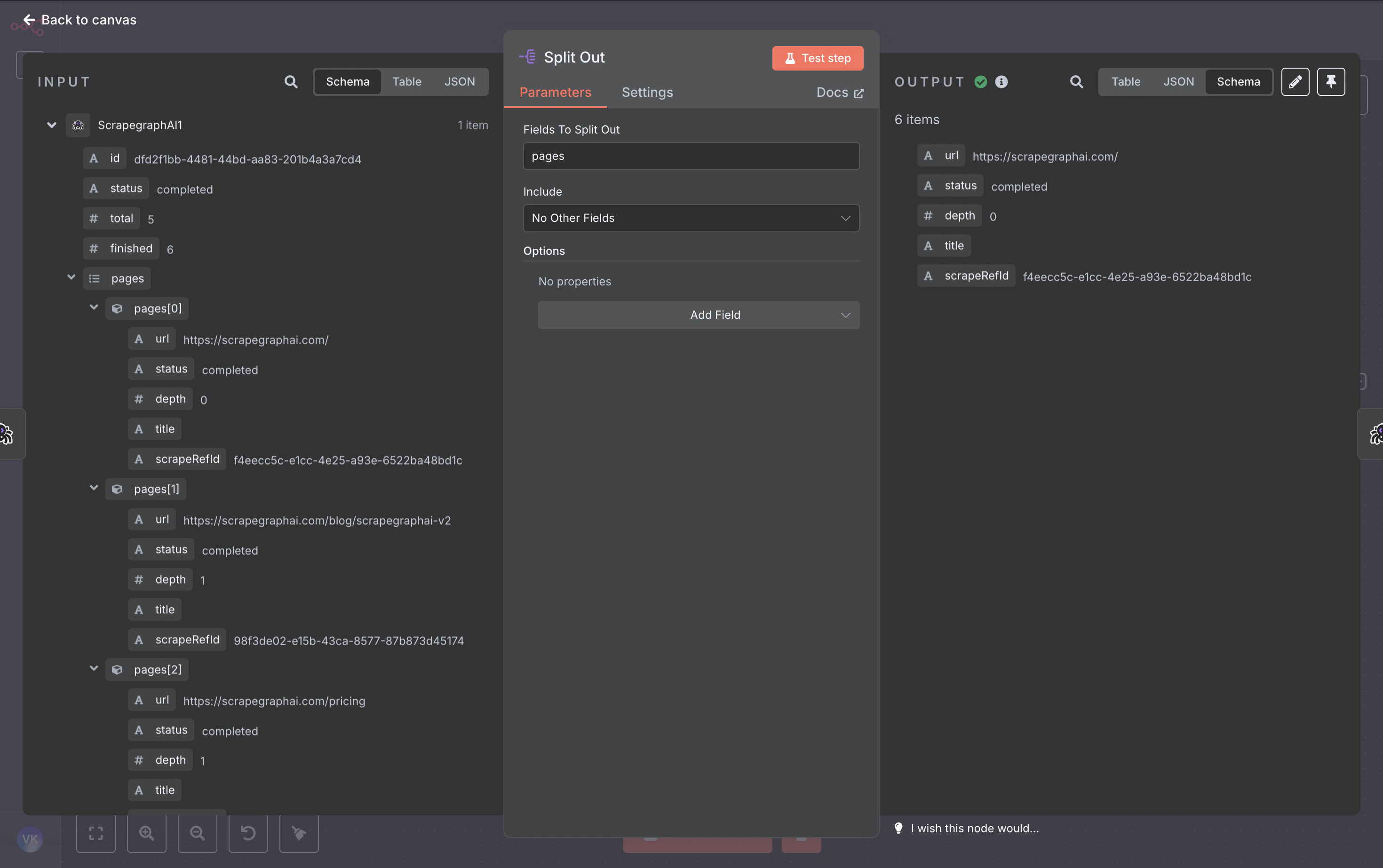 | Field | Value |
| ------------------ | ------- |
| Field To Split Out | `pages` |
### 5. History → Get
For each page, fetch the full content (markdown, HTML, JSON — whatever formats the crawl captured) using the `scrapeRefId` from Split Out.
| Field | Value |
| --------- | --------------------------------------------------------- |
| Resource | `History` |
| Operation | `Get` |
| Entry | `={{ $json.scrapeRefId }}` (Resource Locator, expression) |
| Simplify | off |
### 6. Airtable → Create
Map the page metadata + content into a row. Switch the **Base** and **Table** dropdowns to **By ID** mode and paste your IDs, then map fields with expressions:
| Field | Value |
| ------------------ | ------- |
| Field To Split Out | `pages` |
### 5. History → Get
For each page, fetch the full content (markdown, HTML, JSON — whatever formats the crawl captured) using the `scrapeRefId` from Split Out.
| Field | Value |
| --------- | --------------------------------------------------------- |
| Resource | `History` |
| Operation | `Get` |
| Entry | `={{ $json.scrapeRefId }}` (Resource Locator, expression) |
| Simplify | off |
### 6. Airtable → Create
Map the page metadata + content into a row. Switch the **Base** and **Table** dropdowns to **By ID** mode and paste your IDs, then map fields with expressions:
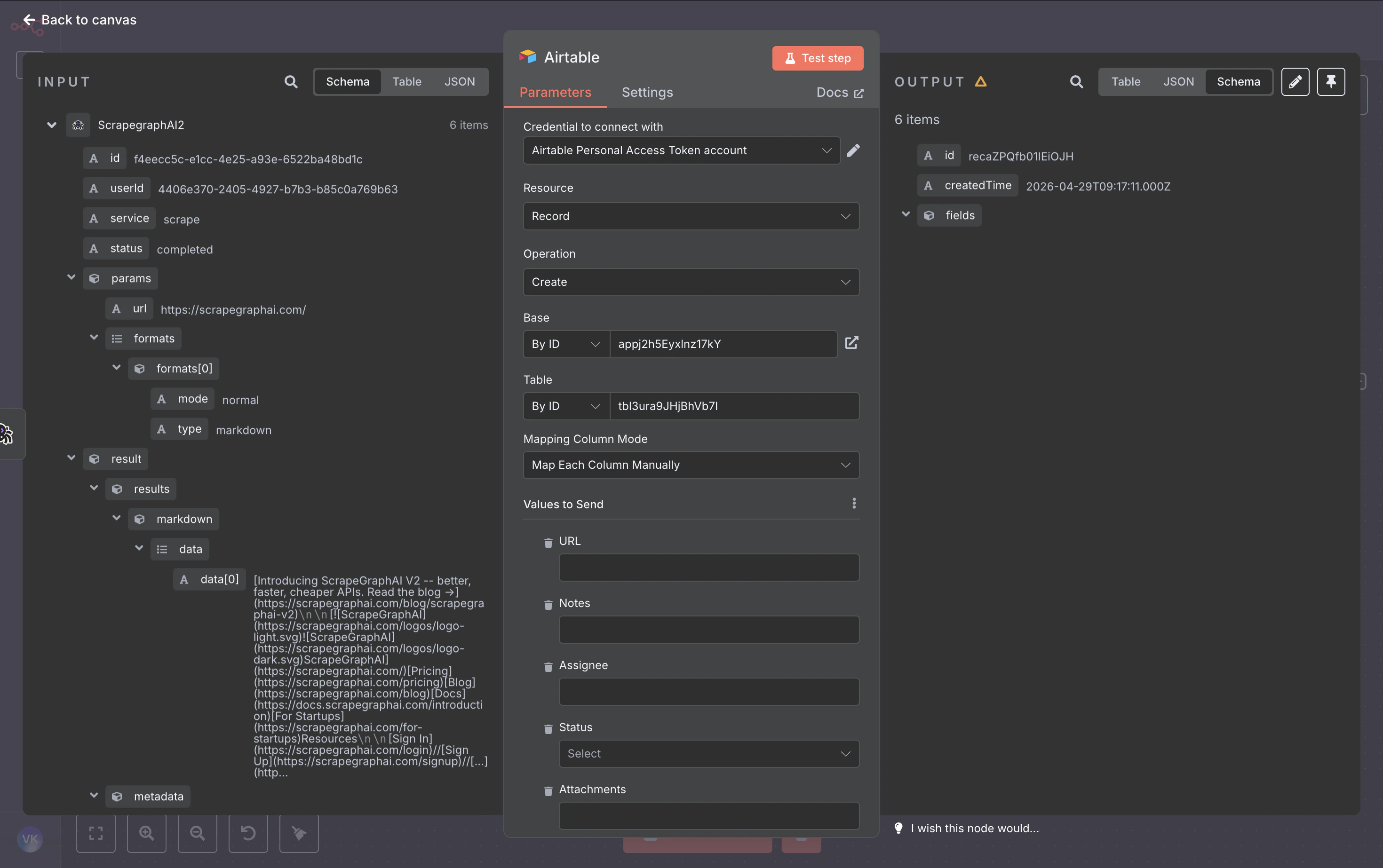 | Column | Expression |
| ----------- | ---------------------------------------------- |
| URL | `={{ $('Split Out').item.json.url }}` |
| Title | `={{ $('Split Out').item.json.title }}` |
| Depth | `={{ $('Split Out').item.json.depth }}` |
| ContentType | `={{ $json.metadata.contentType }}` |
| Markdown | `={{ $json.result.results.markdown.data[0] }}` |
### 7. Run it
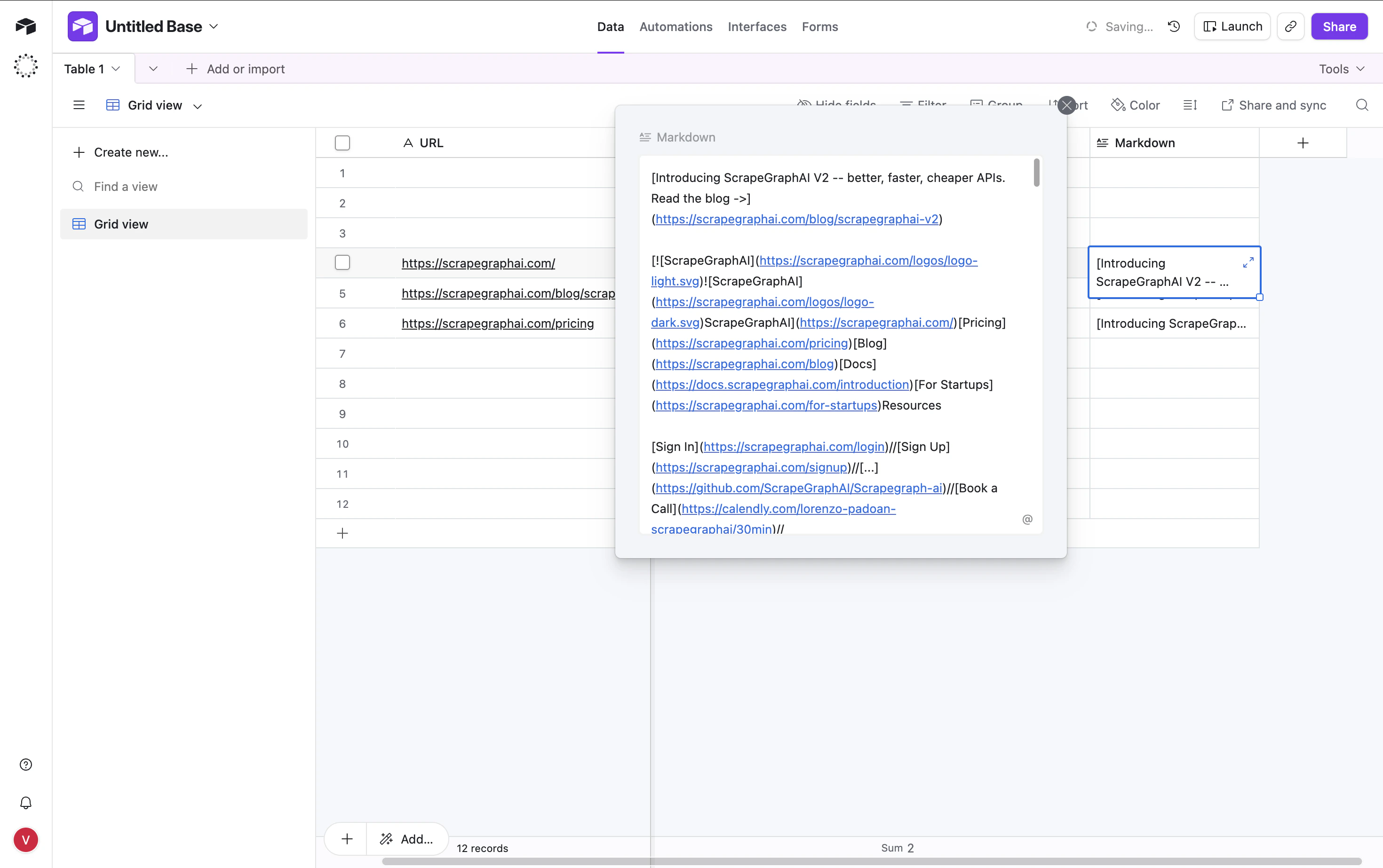
Hit **Test workflow**. The node fires once per crawled page and writes a row each time:
| Column | Expression |
| ----------- | ---------------------------------------------- |
| URL | `={{ $('Split Out').item.json.url }}` |
| Title | `={{ $('Split Out').item.json.title }}` |
| Depth | `={{ $('Split Out').item.json.depth }}` |
| ContentType | `={{ $json.metadata.contentType }}` |
| Markdown | `={{ $json.result.results.markdown.data[0] }}` |
### 7. Run it
Hit **Test workflow**. The node fires once per crawled page and writes a row each time:
 ## Output modes for AI Agent tools
When you attach the node as a tool to an n8n **AI Agent**, the **Output** parameter on Scrape / Extract / Search becomes load-bearing:
* **Simplified** — flattened response with the most useful top-level fields (`id`, `json`, `results`, `usage`, …). Easiest for an LLM to reason over.
* **Raw** — the full v2 API response, untouched.
* **Selected Fields** — comma-separated allowlist of top-level keys.
Pick the mode that matches what your agent needs to see.
## Patterns that carry over
| Pattern | Resource(s) | Notes |
| ------------------------- | ---------------------------------- | --------------------------------------------------------------------- |
| One-shot fetch | Scrape | Use `formats=[{type:"markdown"}]` for the cheapest pass |
| Structured extraction | Extract or Scrape with JSON format | JSON schema is optional but locks the shape |
| Multi-page archive | Crawl + History (this guide) | `History → Get` is how you retrieve the bytes a crawl captured |
| Recurring fetch with diff | Monitor | Wire the `webhookUrl` field to an n8n Webhook node for instant deltas |
| AI search rollup | Search with prompt | Single-call alternative to "search → scrape each result → summarize" |
## Fetch Config
Five resources — **Scrape**, **Extract**, **Search**, **Crawl**, and **Monitor** — expose an optional **Fetch Config** collection that controls how each page is fetched. Open the dropdown on any of those operations to surface the eight knobs:
## Output modes for AI Agent tools
When you attach the node as a tool to an n8n **AI Agent**, the **Output** parameter on Scrape / Extract / Search becomes load-bearing:
* **Simplified** — flattened response with the most useful top-level fields (`id`, `json`, `results`, `usage`, …). Easiest for an LLM to reason over.
* **Raw** — the full v2 API response, untouched.
* **Selected Fields** — comma-separated allowlist of top-level keys.
Pick the mode that matches what your agent needs to see.
## Patterns that carry over
| Pattern | Resource(s) | Notes |
| ------------------------- | ---------------------------------- | --------------------------------------------------------------------- |
| One-shot fetch | Scrape | Use `formats=[{type:"markdown"}]` for the cheapest pass |
| Structured extraction | Extract or Scrape with JSON format | JSON schema is optional but locks the shape |
| Multi-page archive | Crawl + History (this guide) | `History → Get` is how you retrieve the bytes a crawl captured |
| Recurring fetch with diff | Monitor | Wire the `webhookUrl` field to an n8n Webhook node for instant deltas |
| AI search rollup | Search with prompt | Single-call alternative to "search → scrape each result → summarize" |
## Fetch Config
Five resources — **Scrape**, **Extract**, **Search**, **Crawl**, and **Monitor** — expose an optional **Fetch Config** collection that controls how each page is fetched. Open the dropdown on any of those operations to surface the eight knobs:
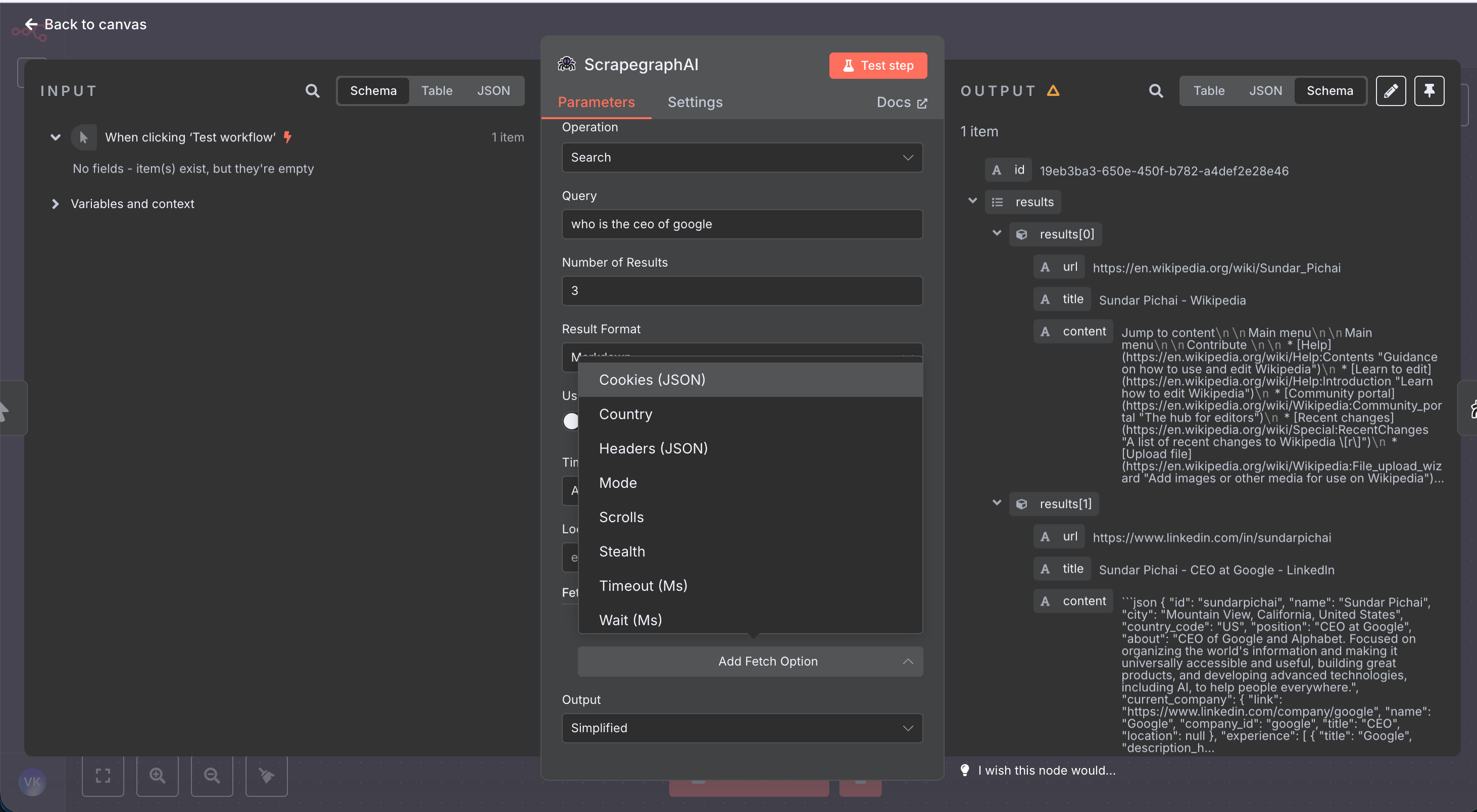 | Field | Description |
| -------------- | -------------------------------------------------------------------------------------- |
| Mode | Fetch mode — `Auto` (default), `Fast` (skips JS rendering), or `JS` (executes scripts) |
| Stealth | Residential proxy + anti-bot headers. **Adds 5 credits per call** |
| Country | Two-letter ISO country code for geo-targeted proxy (e.g. `us`, `de`, `jp`) |
| Wait (Ms) | Milliseconds to wait after page load (0–30000) |
| Timeout (Ms) | Request timeout in milliseconds (1000–60000) |
| Scrolls | Number of page scrolls to trigger lazy-loaded content (0–100) |
| Headers (JSON) | Custom HTTP headers as a JSON object string |
| Cookies (JSON) | Cookies as a JSON object string |
Reach for **Stealth** + **Mode = JS** + **Wait = 2000–5000** when a site blocks bots or only renders content after JavaScript runs. Combine with **Country** for region-locked pages.
## Troubleshooting
* **`Unknown field name: "id"` from Airtable** — your column names don't match. Switch the Airtable node's mapping to **Map Each Column Manually** and only fill the columns that exist in your table.
* **Crawl Get Status returns `pages: []`** — the crawl is still running. Increase the Wait duration or poll until `status === "completed"`.
* **History Get returns an old result** — `scrapeRefId` always points to the latest result for that pointer. Trigger a fresh crawl to refresh.
* **Credentials test fails** — confirm the key is from the v2 dashboard. The node calls `https://v2-api.scrapegraphai.com/api/credits`; v1 keys won't validate.
## Resources
Source code, issue tracker, and release notes
How to install and trust community nodes in n8n
Full v2 endpoint reference — every parameter the node sends
Get an API key and check usage
| Field | Description |
| -------------- | -------------------------------------------------------------------------------------- |
| Mode | Fetch mode — `Auto` (default), `Fast` (skips JS rendering), or `JS` (executes scripts) |
| Stealth | Residential proxy + anti-bot headers. **Adds 5 credits per call** |
| Country | Two-letter ISO country code for geo-targeted proxy (e.g. `us`, `de`, `jp`) |
| Wait (Ms) | Milliseconds to wait after page load (0–30000) |
| Timeout (Ms) | Request timeout in milliseconds (1000–60000) |
| Scrolls | Number of page scrolls to trigger lazy-loaded content (0–100) |
| Headers (JSON) | Custom HTTP headers as a JSON object string |
| Cookies (JSON) | Cookies as a JSON object string |
Reach for **Stealth** + **Mode = JS** + **Wait = 2000–5000** when a site blocks bots or only renders content after JavaScript runs. Combine with **Country** for region-locked pages.
## Troubleshooting
* **`Unknown field name: "id"` from Airtable** — your column names don't match. Switch the Airtable node's mapping to **Map Each Column Manually** and only fill the columns that exist in your table.
* **Crawl Get Status returns `pages: []`** — the crawl is still running. Increase the Wait duration or poll until `status === "completed"`.
* **History Get returns an old result** — `scrapeRefId` always points to the latest result for that pointer. Trigger a fresh crawl to refresh.
* **Credentials test fails** — confirm the key is from the v2 dashboard. The node calls `https://v2-api.scrapegraphai.com/api/credits`; v1 keys won't validate.
## Resources
Source code, issue tracker, and release notes
How to install and trust community nodes in n8n
Full v2 endpoint reference — every parameter the node sends
Get an API key and check usage