> ## Documentation Index
> Fetch the complete documentation index at: https://docs.scrapegraphai.com/llms.txt
> Use this file to discover all available pages before exploring further.
# Proxy Configuration
> Configure proxy settings, fetch modes, and geotargeting for web scraping requests
 ## Overview
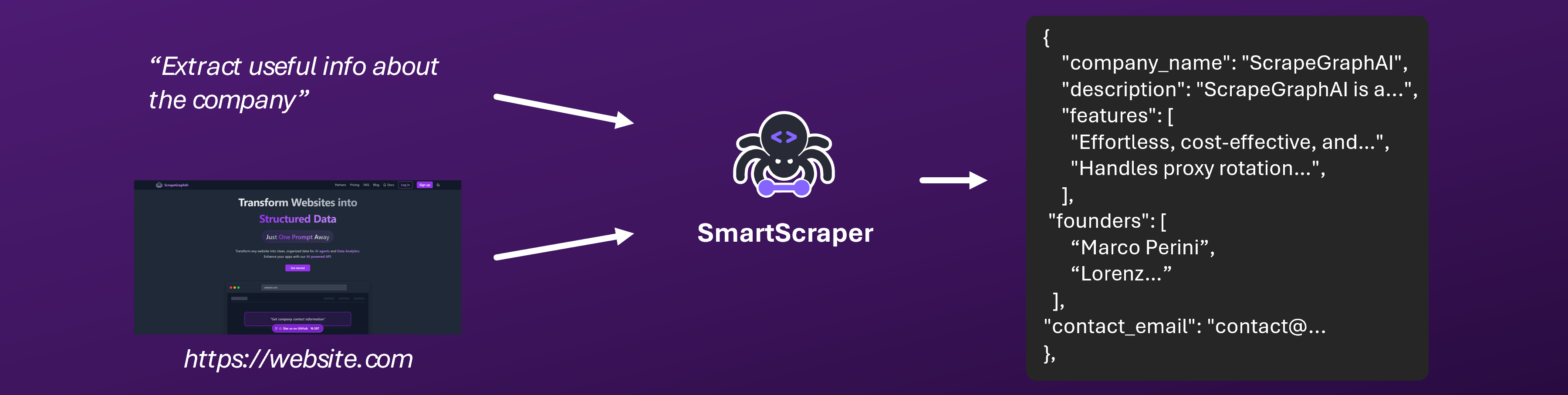
The ScrapeGraphAI API uses an intelligent proxy system that automatically handles web scraping requests through multiple proxy providers. The system uses a fallback strategy to ensure maximum reliability — if one provider fails, it automatically tries the next one.
**No configuration required**: The proxy system is fully automatic and transparent to API users. You don't need to configure proxy credentials or settings yourself.
In v2, all proxy and fetch behaviour is controlled through the `FetchConfig` object, which you can pass to any service method (`extract`, `scrape`, `search`, `crawl`, etc.).
## How It Works
The API automatically routes your scraping requests through multiple proxy providers in a smart order:
1. The system tries different proxy providers automatically
2. If one provider fails, it automatically falls back to the next one
3. Successful providers are cached for each domain to improve performance
4. Everything happens transparently — you just make your API request as normal
## Fetch Modes
The `mode` parameter inside `FetchConfig` controls how pages are retrieved and which proxy strategy is used:
| Mode | Description | JS Rendering | Best For |
| ------ | --------------------------------------------- | :----------: | --------------------------- |
| `auto` | Automatically selects the best provider chain | Adaptive | General use (default) |
| `fast` | Direct HTTP fetch via impit | No | Static pages, maximum speed |
| `js` | Headless browser rendering | Yes | JavaScript-heavy SPAs |
To enable stealth mode (residential proxy with anti-bot headers), set the separate `stealth` boolean to `true` alongside any mode. For example, `mode: "js"` with `stealth: true` provides JS rendering through a residential proxy — equivalent to the old `js+stealth` mode.
```python Python theme={null}
from scrapegraph_py import Client, FetchConfig
client = Client(api_key="your-api-key")
# Use stealth mode with JS rendering
response = client.extract(
url="https://example.com",
prompt="Extract product information",
fetch_config=FetchConfig(
mode="js",
stealth=True,
wait=2000,
),
)
```
```javascript JavaScript theme={null}
import { extract } from 'scrapegraph-js';
// Use stealth mode with JS rendering
const result = await extract('your-api-key', {
url: 'https://example.com',
prompt: 'Extract product information',
fetchConfig: {
mode: 'js',
stealth: true,
wait: 2000,
},
});
```
## Country Selection (Geotargeting)
You can optionally specify a two-letter country code via `FetchConfig.country` to route requests through proxies in a specific country. This is useful for:
* Accessing geo-restricted content
* Getting localized versions of websites
* Complying with regional requirements
* Testing location-specific features
### Using Country Code
```python Python theme={null}
from scrapegraph_py import Client, FetchConfig
client = Client(api_key="your-api-key")
# Route through US proxies
response = client.extract(
url="https://example.com",
prompt="Extract product information",
fetch_config=FetchConfig(country="us"),
)
```
```javascript JavaScript theme={null}
import { extract } from 'scrapegraph-js';
// Route through US proxies
const result = await extract('your-api-key', {
url: 'https://example.com',
prompt: 'Extract product information',
fetchConfig: { country: 'us' },
});
```
```bash cURL theme={null}
curl -X 'POST' \
'https://api.scrapegraphai.com/api/v2/extract' \
-H 'accept: application/json' \
-H 'Authorization: Bearer your-api-key' \
-H 'SGAI-APIKEY: your-api-key' \
-H 'Content-Type: application/json' \
-d '{
"url": "https://example.com",
"prompt": "Extract product information",
"fetchConfig": {
"country": "us"
}
}'
```
### Supported Country Codes
The API supports geotargeting for a wide range of countries using ISO 3166-1 alpha-2 country codes:
| Code | Country | Code | Country | Code | Country |
| ---- | ------------- | ----------- | -------------- | ---- | -------------- |
| `us` | United States | `uk` / `gb` | United Kingdom | `ca` | Canada |
| `au` | Australia | `de` | Germany | `fr` | France |
| `it` | Italy | `es` | Spain | `nl` | Netherlands |
| `be` | Belgium | `ch` | Switzerland | `at` | Austria |
| `se` | Sweden | `no` | Norway | `dk` | Denmark |
| `fi` | Finland | `pl` | Poland | `cz` | Czech Republic |
| `ie` | Ireland | `pt` | Portugal | `gr` | Greece |
| `jp` | Japan | `kr` | South Korea | `cn` | China |
| `in` | India | `sg` | Singapore | `hk` | Hong Kong |
| `mx` | Mexico | `br` | Brazil | `ar` | Argentina |
| `cl` | Chile | `co` | Colombia | `pe` | Peru |
| `za` | South Africa | `eg` | Egypt | `ae` | UAE |
| `sa` | Saudi Arabia | `il` | Israel | `tr` | Turkey |
| `ru` | Russia | `ua` | Ukraine | `nz` | New Zealand |
And many more! The API supports over 100 countries. Use standard ISO 3166-1 alpha-2 country codes.
## FetchConfig Reference
All proxy and fetch behaviour is configured through the `FetchConfig` object:
| Parameter | Type | Default | Description |
| --------- | ------ | -------- | ----------------------------------------------------------------------- |
| `mode` | string | `"auto"` | Fetch mode: `auto`, `fast`, `js` |
| `stealth` | bool | `false` | Enable stealth mode with residential proxy and anti-bot headers |
| `timeout` | int | `30000` | Request timeout in milliseconds (1000–60000) |
| `wait` | int | `0` | Milliseconds to wait after page load before scraping (0–30000) |
| `scrolls` | int | `0` | Number of page scrolls to perform (0–100) |
| `country` | string | — | Two-letter ISO country code for geo-located proxy routing (e.g. `"us"`) |
| `headers` | object | — | Custom HTTP headers to send with the request |
| `cookies` | object | — | Cookies to send with the request |
| `mock` | bool | `false` | Enable mock mode for testing (no real request is made) |
```python Python theme={null}
from scrapegraph_py import FetchConfig
config = FetchConfig(
mode="js", # Fetch mode
stealth=True, # Stealth proxy
timeout=15000, # 15s timeout
wait=2000, # Wait 2s after page load
scrolls=3, # Scroll 3 times
country="us", # Route through US proxies
headers={"Accept-Language": "en-US"},
cookies={"session": "abc123"},
mock=False,
)
```
```javascript JavaScript theme={null}
const fetchConfig = {
mode: 'js', // Fetch mode
stealth: true, // Stealth proxy
timeout: 15000, // 15s timeout
wait: 2000, // Wait 2s after page load
scrolls: 3, // Scroll 3 times
country: 'us', // Route through US proxies
headers: { 'Accept-Language': 'en-US' },
cookies: { session: 'abc123' },
mock: false,
};
```
## Usage Examples
### Basic Request (Automatic Proxy Selection)
```python Python theme={null}
from scrapegraph_py import Client
client = Client(api_key="your-api-key")
# Automatic proxy selection — no configuration needed
response = client.extract(
url="https://example.com",
prompt="Extract product information",
)
```
```javascript JavaScript theme={null}
import { extract } from 'scrapegraph-js';
// Automatic proxy selection
const result = await extract('your-api-key', {
url: 'https://example.com',
prompt: 'Extract product information',
});
```
### Request with Country Code
```python Python theme={null}
from scrapegraph_py import Client, FetchConfig
client = Client(api_key="your-api-key")
# Route through US proxies
response = client.extract(
url="https://example.com",
prompt="Extract product information",
fetch_config=FetchConfig(country="us"),
)
# Route through UK proxies
response = client.extract(
url="https://example.com",
prompt="Extract product information",
fetch_config=FetchConfig(country="gb"),
)
```
```javascript JavaScript theme={null}
import { extract } from 'scrapegraph-js';
// Route through US proxies
const result = await extract('your-api-key', {
url: 'https://example.com',
prompt: 'Extract product information',
fetchConfig: { country: 'us' },
});
// Route through UK proxies
const ukResult = await extract('your-api-key', {
url: 'https://example.com',
prompt: 'Extract product information',
fetchConfig: { country: 'gb' },
});
```
### Stealth Mode with JS Rendering
```python Python theme={null}
from scrapegraph_py import Client, FetchConfig
client = Client(api_key="your-api-key")
response = client.scrape(
url="https://heavily-protected-site.com",
format="markdown",
fetch_config=FetchConfig(
mode="js",
stealth=True,
wait=3000,
scrolls=5,
country="us",
),
)
```
```javascript JavaScript theme={null}
import { scrape } from 'scrapegraph-js';
const result = await scrape('your-api-key', {
url: 'https://heavily-protected-site.com',
formats: [{ type: 'markdown' }],
fetchConfig: {
mode: 'js',
stealth: true,
wait: 3000,
scrolls: 5,
country: 'us',
},
});
```
### Real-World Use Cases
#### Accessing Geo-Restricted Content
```python Python theme={null}
from scrapegraph_py import Client, FetchConfig
client = Client(api_key="your-api-key")
# Access US-only content
response = client.extract(
url="https://us-only-service.com",
prompt="Extract available services",
fetch_config=FetchConfig(country="us"),
)
```
```javascript JavaScript theme={null}
import { extract } from 'scrapegraph-js';
const result = await extract('your-api-key', {
url: 'https://us-only-service.com',
prompt: 'Extract available services',
fetchConfig: { country: 'us' },
});
```
#### Getting Localized Content
```python theme={null}
from scrapegraph_py import Client, FetchConfig
client = Client(api_key="your-api-key")
# Get German version of a website
response = client.extract(
url="https://example.com",
prompt="Extract product prices in local currency",
fetch_config=FetchConfig(country="de"),
)
# Get French version
response = client.extract(
url="https://example.com",
prompt="Extract product prices in local currency",
fetch_config=FetchConfig(country="fr"),
)
```
#### E-commerce Price Comparison
```python theme={null}
from scrapegraph_py import Client, FetchConfig
client = Client(api_key="your-api-key")
# Compare prices from different regions
countries = ["us", "gb", "de", "fr"]
for country in countries:
response = client.extract(
url="https://ecommerce-site.com/product/123",
prompt="Extract product price and availability",
fetch_config=FetchConfig(country=country),
)
print(f"{country}: {response['data']}")
```
## Best Practices
### 1. Choose the Right Fetch Mode
Pick the mode that matches your target site:
* **`auto`** (default) — let the system decide; works for most sites
* **`fast`** — use for simple, static HTML pages
* **`js`** — use for SPAs and JavaScript-rendered content
* Add **`stealth: true`** for anti-bot sites — combine with any mode (e.g., `mode: "js"` + `stealth: true` for dynamic anti-bot sites)
### 2. Use Country Code When Needed
Only specify a country code if you have a specific requirement:
* Accessing geo-restricted content
* Getting localized versions of websites
* Complying with regional requirements
* Don't specify if you don't need it — let the system optimize automatically
### 3. Let the System Handle Routing
The API automatically selects the best proxy provider for each request:
* No manual proxy selection needed
* Automatic failover ensures reliability
* Performance is optimized automatically
### 4. Handle Errors Gracefully
If a request fails, the system has already tried multiple providers:
```python Python theme={null}
from scrapegraph_py import Client, FetchConfig
import time
client = Client(api_key="your-api-key")
def scrape_with_retry(url, prompt, max_retries=3):
for attempt in range(max_retries):
try:
response = client.extract(
url=url,
prompt=prompt,
fetch_config=FetchConfig(country="us"),
)
return response
except Exception as e:
if attempt < max_retries - 1:
print(f"Attempt {attempt + 1} failed: {e}")
time.sleep(2 ** attempt) # Exponential backoff
else:
raise e
```
```javascript JavaScript theme={null}
import { extract } from 'scrapegraph-js';
async function scrapeWithRetry(apiKey, url, prompt, maxRetries = 3) {
for (let attempt = 0; attempt < maxRetries; attempt++) {
const result = await extract(apiKey, {
url,
prompt,
fetchConfig: { country: 'us' },
});
if (result.status === 'success') return result;
if (attempt < maxRetries - 1) {
console.log(`Attempt ${attempt + 1} failed: ${result.error}`);
await new Promise((r) => setTimeout(r, 2 ** attempt * 1000));
}
}
throw new Error('All retries failed');
}
```
### 5. Monitor Rate Limits
Be aware of your API rate limits:
* The proxy system respects these limits automatically
* Monitor your usage in the [dashboard](/dashboard/overview)
* Implement appropriate delays between requests
## Troubleshooting
### Request Failures
If your scraping request fails:
1. **Verify the URL**: Make sure the URL is correct and accessible
2. **Check the website**: Some websites may block automated access regardless of proxy
3. **Try a different mode**: Use `mode: "js"` with `stealth: true` for heavily-protected sites
4. **Retry the request**: The system uses automatic retries, but you can manually retry after a delay
5. **Try a different country**: If geo-restriction is the issue, try a different `country`
### Rate Limiting
If you receive rate limit errors (HTTP 429):
* Wait a few minutes before making new requests
* The API automatically handles rate limits on proxy providers
* Consider implementing exponential backoff in your application
* Check your API usage limits in the dashboard
### Geo-Restricted Content
If you're trying to access geo-restricted content:
* Use the `country` parameter inside `FetchConfig` to specify the required country
* Make sure the content is available in that country
* Some content may still be restricted regardless of proxy location
* Try multiple country codes if one doesn't work
### Anti-Bot Protection
If a website is blocking your requests:
* Set `stealth: true` in `FetchConfig` (combine with `mode: "js"` for dynamic sites)
* Add a `wait` time to let the page fully load
* Use `scrolls` to trigger lazy-loaded content
* Add custom `headers` if the site expects specific ones
## FAQ
**A**: No, the proxy system is fully managed and automatic. You don't need to provide any proxy credentials or configuration.
**A**: Use the `mode` parameter in `FetchConfig` (`auto`, `fast`, or `js`) and set `stealth: true` when you need residential proxy with anti-bot headers.
**A**: No, the system automatically selects the best proxy provider for each request. You can influence the strategy by setting the `mode` parameter.
**A**: The API will return an error. The system tries multiple providers with automatic fallback, so this is rare. If it happens, verify the URL and try again.
**A**: No, the `country` parameter doesn't affect pricing. Credits are charged the same regardless of proxy location.
**A**: Yes, `FetchConfig` is available for all services including `extract`, `scrape`, `search`, `crawl`, and `monitor`.
**A**: Both `uk` and `gb` refer to the United Kingdom. The API accepts both codes for compatibility.
## Support & Resources
Detailed API documentation
Monitor your API usage and credits
Join our Discord community
Check out our open-source projects
Contact our support team for assistance with proxy configuration, geotargeting, or any other questions!
## Overview
The ScrapeGraphAI API uses an intelligent proxy system that automatically handles web scraping requests through multiple proxy providers. The system uses a fallback strategy to ensure maximum reliability — if one provider fails, it automatically tries the next one.
**No configuration required**: The proxy system is fully automatic and transparent to API users. You don't need to configure proxy credentials or settings yourself.
In v2, all proxy and fetch behaviour is controlled through the `FetchConfig` object, which you can pass to any service method (`extract`, `scrape`, `search`, `crawl`, etc.).
## How It Works
The API automatically routes your scraping requests through multiple proxy providers in a smart order:
1. The system tries different proxy providers automatically
2. If one provider fails, it automatically falls back to the next one
3. Successful providers are cached for each domain to improve performance
4. Everything happens transparently — you just make your API request as normal
## Fetch Modes
The `mode` parameter inside `FetchConfig` controls how pages are retrieved and which proxy strategy is used:
| Mode | Description | JS Rendering | Best For |
| ------ | --------------------------------------------- | :----------: | --------------------------- |
| `auto` | Automatically selects the best provider chain | Adaptive | General use (default) |
| `fast` | Direct HTTP fetch via impit | No | Static pages, maximum speed |
| `js` | Headless browser rendering | Yes | JavaScript-heavy SPAs |
To enable stealth mode (residential proxy with anti-bot headers), set the separate `stealth` boolean to `true` alongside any mode. For example, `mode: "js"` with `stealth: true` provides JS rendering through a residential proxy — equivalent to the old `js+stealth` mode.
```python Python theme={null}
from scrapegraph_py import Client, FetchConfig
client = Client(api_key="your-api-key")
# Use stealth mode with JS rendering
response = client.extract(
url="https://example.com",
prompt="Extract product information",
fetch_config=FetchConfig(
mode="js",
stealth=True,
wait=2000,
),
)
```
```javascript JavaScript theme={null}
import { extract } from 'scrapegraph-js';
// Use stealth mode with JS rendering
const result = await extract('your-api-key', {
url: 'https://example.com',
prompt: 'Extract product information',
fetchConfig: {
mode: 'js',
stealth: true,
wait: 2000,
},
});
```
## Country Selection (Geotargeting)
You can optionally specify a two-letter country code via `FetchConfig.country` to route requests through proxies in a specific country. This is useful for:
* Accessing geo-restricted content
* Getting localized versions of websites
* Complying with regional requirements
* Testing location-specific features
### Using Country Code
```python Python theme={null}
from scrapegraph_py import Client, FetchConfig
client = Client(api_key="your-api-key")
# Route through US proxies
response = client.extract(
url="https://example.com",
prompt="Extract product information",
fetch_config=FetchConfig(country="us"),
)
```
```javascript JavaScript theme={null}
import { extract } from 'scrapegraph-js';
// Route through US proxies
const result = await extract('your-api-key', {
url: 'https://example.com',
prompt: 'Extract product information',
fetchConfig: { country: 'us' },
});
```
```bash cURL theme={null}
curl -X 'POST' \
'https://api.scrapegraphai.com/api/v2/extract' \
-H 'accept: application/json' \
-H 'Authorization: Bearer your-api-key' \
-H 'SGAI-APIKEY: your-api-key' \
-H 'Content-Type: application/json' \
-d '{
"url": "https://example.com",
"prompt": "Extract product information",
"fetchConfig": {
"country": "us"
}
}'
```
### Supported Country Codes
The API supports geotargeting for a wide range of countries using ISO 3166-1 alpha-2 country codes:
| Code | Country | Code | Country | Code | Country |
| ---- | ------------- | ----------- | -------------- | ---- | -------------- |
| `us` | United States | `uk` / `gb` | United Kingdom | `ca` | Canada |
| `au` | Australia | `de` | Germany | `fr` | France |
| `it` | Italy | `es` | Spain | `nl` | Netherlands |
| `be` | Belgium | `ch` | Switzerland | `at` | Austria |
| `se` | Sweden | `no` | Norway | `dk` | Denmark |
| `fi` | Finland | `pl` | Poland | `cz` | Czech Republic |
| `ie` | Ireland | `pt` | Portugal | `gr` | Greece |
| `jp` | Japan | `kr` | South Korea | `cn` | China |
| `in` | India | `sg` | Singapore | `hk` | Hong Kong |
| `mx` | Mexico | `br` | Brazil | `ar` | Argentina |
| `cl` | Chile | `co` | Colombia | `pe` | Peru |
| `za` | South Africa | `eg` | Egypt | `ae` | UAE |
| `sa` | Saudi Arabia | `il` | Israel | `tr` | Turkey |
| `ru` | Russia | `ua` | Ukraine | `nz` | New Zealand |
And many more! The API supports over 100 countries. Use standard ISO 3166-1 alpha-2 country codes.
## FetchConfig Reference
All proxy and fetch behaviour is configured through the `FetchConfig` object:
| Parameter | Type | Default | Description |
| --------- | ------ | -------- | ----------------------------------------------------------------------- |
| `mode` | string | `"auto"` | Fetch mode: `auto`, `fast`, `js` |
| `stealth` | bool | `false` | Enable stealth mode with residential proxy and anti-bot headers |
| `timeout` | int | `30000` | Request timeout in milliseconds (1000–60000) |
| `wait` | int | `0` | Milliseconds to wait after page load before scraping (0–30000) |
| `scrolls` | int | `0` | Number of page scrolls to perform (0–100) |
| `country` | string | — | Two-letter ISO country code for geo-located proxy routing (e.g. `"us"`) |
| `headers` | object | — | Custom HTTP headers to send with the request |
| `cookies` | object | — | Cookies to send with the request |
| `mock` | bool | `false` | Enable mock mode for testing (no real request is made) |
```python Python theme={null}
from scrapegraph_py import FetchConfig
config = FetchConfig(
mode="js", # Fetch mode
stealth=True, # Stealth proxy
timeout=15000, # 15s timeout
wait=2000, # Wait 2s after page load
scrolls=3, # Scroll 3 times
country="us", # Route through US proxies
headers={"Accept-Language": "en-US"},
cookies={"session": "abc123"},
mock=False,
)
```
```javascript JavaScript theme={null}
const fetchConfig = {
mode: 'js', // Fetch mode
stealth: true, // Stealth proxy
timeout: 15000, // 15s timeout
wait: 2000, // Wait 2s after page load
scrolls: 3, // Scroll 3 times
country: 'us', // Route through US proxies
headers: { 'Accept-Language': 'en-US' },
cookies: { session: 'abc123' },
mock: false,
};
```
## Usage Examples
### Basic Request (Automatic Proxy Selection)
```python Python theme={null}
from scrapegraph_py import Client
client = Client(api_key="your-api-key")
# Automatic proxy selection — no configuration needed
response = client.extract(
url="https://example.com",
prompt="Extract product information",
)
```
```javascript JavaScript theme={null}
import { extract } from 'scrapegraph-js';
// Automatic proxy selection
const result = await extract('your-api-key', {
url: 'https://example.com',
prompt: 'Extract product information',
});
```
### Request with Country Code
```python Python theme={null}
from scrapegraph_py import Client, FetchConfig
client = Client(api_key="your-api-key")
# Route through US proxies
response = client.extract(
url="https://example.com",
prompt="Extract product information",
fetch_config=FetchConfig(country="us"),
)
# Route through UK proxies
response = client.extract(
url="https://example.com",
prompt="Extract product information",
fetch_config=FetchConfig(country="gb"),
)
```
```javascript JavaScript theme={null}
import { extract } from 'scrapegraph-js';
// Route through US proxies
const result = await extract('your-api-key', {
url: 'https://example.com',
prompt: 'Extract product information',
fetchConfig: { country: 'us' },
});
// Route through UK proxies
const ukResult = await extract('your-api-key', {
url: 'https://example.com',
prompt: 'Extract product information',
fetchConfig: { country: 'gb' },
});
```
### Stealth Mode with JS Rendering
```python Python theme={null}
from scrapegraph_py import Client, FetchConfig
client = Client(api_key="your-api-key")
response = client.scrape(
url="https://heavily-protected-site.com",
format="markdown",
fetch_config=FetchConfig(
mode="js",
stealth=True,
wait=3000,
scrolls=5,
country="us",
),
)
```
```javascript JavaScript theme={null}
import { scrape } from 'scrapegraph-js';
const result = await scrape('your-api-key', {
url: 'https://heavily-protected-site.com',
formats: [{ type: 'markdown' }],
fetchConfig: {
mode: 'js',
stealth: true,
wait: 3000,
scrolls: 5,
country: 'us',
},
});
```
### Real-World Use Cases
#### Accessing Geo-Restricted Content
```python Python theme={null}
from scrapegraph_py import Client, FetchConfig
client = Client(api_key="your-api-key")
# Access US-only content
response = client.extract(
url="https://us-only-service.com",
prompt="Extract available services",
fetch_config=FetchConfig(country="us"),
)
```
```javascript JavaScript theme={null}
import { extract } from 'scrapegraph-js';
const result = await extract('your-api-key', {
url: 'https://us-only-service.com',
prompt: 'Extract available services',
fetchConfig: { country: 'us' },
});
```
#### Getting Localized Content
```python theme={null}
from scrapegraph_py import Client, FetchConfig
client = Client(api_key="your-api-key")
# Get German version of a website
response = client.extract(
url="https://example.com",
prompt="Extract product prices in local currency",
fetch_config=FetchConfig(country="de"),
)
# Get French version
response = client.extract(
url="https://example.com",
prompt="Extract product prices in local currency",
fetch_config=FetchConfig(country="fr"),
)
```
#### E-commerce Price Comparison
```python theme={null}
from scrapegraph_py import Client, FetchConfig
client = Client(api_key="your-api-key")
# Compare prices from different regions
countries = ["us", "gb", "de", "fr"]
for country in countries:
response = client.extract(
url="https://ecommerce-site.com/product/123",
prompt="Extract product price and availability",
fetch_config=FetchConfig(country=country),
)
print(f"{country}: {response['data']}")
```
## Best Practices
### 1. Choose the Right Fetch Mode
Pick the mode that matches your target site:
* **`auto`** (default) — let the system decide; works for most sites
* **`fast`** — use for simple, static HTML pages
* **`js`** — use for SPAs and JavaScript-rendered content
* Add **`stealth: true`** for anti-bot sites — combine with any mode (e.g., `mode: "js"` + `stealth: true` for dynamic anti-bot sites)
### 2. Use Country Code When Needed
Only specify a country code if you have a specific requirement:
* Accessing geo-restricted content
* Getting localized versions of websites
* Complying with regional requirements
* Don't specify if you don't need it — let the system optimize automatically
### 3. Let the System Handle Routing
The API automatically selects the best proxy provider for each request:
* No manual proxy selection needed
* Automatic failover ensures reliability
* Performance is optimized automatically
### 4. Handle Errors Gracefully
If a request fails, the system has already tried multiple providers:
```python Python theme={null}
from scrapegraph_py import Client, FetchConfig
import time
client = Client(api_key="your-api-key")
def scrape_with_retry(url, prompt, max_retries=3):
for attempt in range(max_retries):
try:
response = client.extract(
url=url,
prompt=prompt,
fetch_config=FetchConfig(country="us"),
)
return response
except Exception as e:
if attempt < max_retries - 1:
print(f"Attempt {attempt + 1} failed: {e}")
time.sleep(2 ** attempt) # Exponential backoff
else:
raise e
```
```javascript JavaScript theme={null}
import { extract } from 'scrapegraph-js';
async function scrapeWithRetry(apiKey, url, prompt, maxRetries = 3) {
for (let attempt = 0; attempt < maxRetries; attempt++) {
const result = await extract(apiKey, {
url,
prompt,
fetchConfig: { country: 'us' },
});
if (result.status === 'success') return result;
if (attempt < maxRetries - 1) {
console.log(`Attempt ${attempt + 1} failed: ${result.error}`);
await new Promise((r) => setTimeout(r, 2 ** attempt * 1000));
}
}
throw new Error('All retries failed');
}
```
### 5. Monitor Rate Limits
Be aware of your API rate limits:
* The proxy system respects these limits automatically
* Monitor your usage in the [dashboard](/dashboard/overview)
* Implement appropriate delays between requests
## Troubleshooting
### Request Failures
If your scraping request fails:
1. **Verify the URL**: Make sure the URL is correct and accessible
2. **Check the website**: Some websites may block automated access regardless of proxy
3. **Try a different mode**: Use `mode: "js"` with `stealth: true` for heavily-protected sites
4. **Retry the request**: The system uses automatic retries, but you can manually retry after a delay
5. **Try a different country**: If geo-restriction is the issue, try a different `country`
### Rate Limiting
If you receive rate limit errors (HTTP 429):
* Wait a few minutes before making new requests
* The API automatically handles rate limits on proxy providers
* Consider implementing exponential backoff in your application
* Check your API usage limits in the dashboard
### Geo-Restricted Content
If you're trying to access geo-restricted content:
* Use the `country` parameter inside `FetchConfig` to specify the required country
* Make sure the content is available in that country
* Some content may still be restricted regardless of proxy location
* Try multiple country codes if one doesn't work
### Anti-Bot Protection
If a website is blocking your requests:
* Set `stealth: true` in `FetchConfig` (combine with `mode: "js"` for dynamic sites)
* Add a `wait` time to let the page fully load
* Use `scrolls` to trigger lazy-loaded content
* Add custom `headers` if the site expects specific ones
## FAQ
**A**: No, the proxy system is fully managed and automatic. You don't need to provide any proxy credentials or configuration.
**A**: Use the `mode` parameter in `FetchConfig` (`auto`, `fast`, or `js`) and set `stealth: true` when you need residential proxy with anti-bot headers.
**A**: No, the system automatically selects the best proxy provider for each request. You can influence the strategy by setting the `mode` parameter.
**A**: The API will return an error. The system tries multiple providers with automatic fallback, so this is rare. If it happens, verify the URL and try again.
**A**: No, the `country` parameter doesn't affect pricing. Credits are charged the same regardless of proxy location.
**A**: Yes, `FetchConfig` is available for all services including `extract`, `scrape`, `search`, `crawl`, and `monitor`.
**A**: Both `uk` and `gb` refer to the United Kingdom. The API accepts both codes for compatibility.
## Support & Resources
Detailed API documentation
Monitor your API usage and credits
Join our Discord community
Check out our open-source projects
Contact our support team for assistance with proxy configuration, geotargeting, or any other questions!