> ## Documentation Index
> Fetch the complete documentation index at: https://docs.scrapegraphai.com/llms.txt
> Use this file to discover all available pages before exploring further.
# Agent Payments
> Let AI agents buy API access with a crypto wallet, no signup or human required
## Overview
Agent Payments lets an AI agent with a crypto wallet and **no account** buy access to
ScrapeGraphAI on its own. The agent pays an [MPP](https://mpp.dev) payment challenge and
receives a real API key plus credits, the same key any customer uses. Payment replaces
signup.
Unlike single-use prepaid tokens, a payment mints a **durable, refillable account**: a user,
a workspace, and an API key with a credit balance that persists across purchases.
Agent Payments is designed for autonomous agents that hold a wallet and have been authorized
to spend. Human developers should [sign up](https://scrapegraphai.com/dashboard) for an API
key the normal way.
## How it works
1. The agent calls a product endpoint (e.g. `POST /api/scrape`) with no key and gets a `401`
whose error body points at the agent-access endpoints.
2. `POST /api/agent/mpp/access/{pack}` with no credentials returns a `402` with a
`WWW-Authenticate: Payment` challenge (MPP).
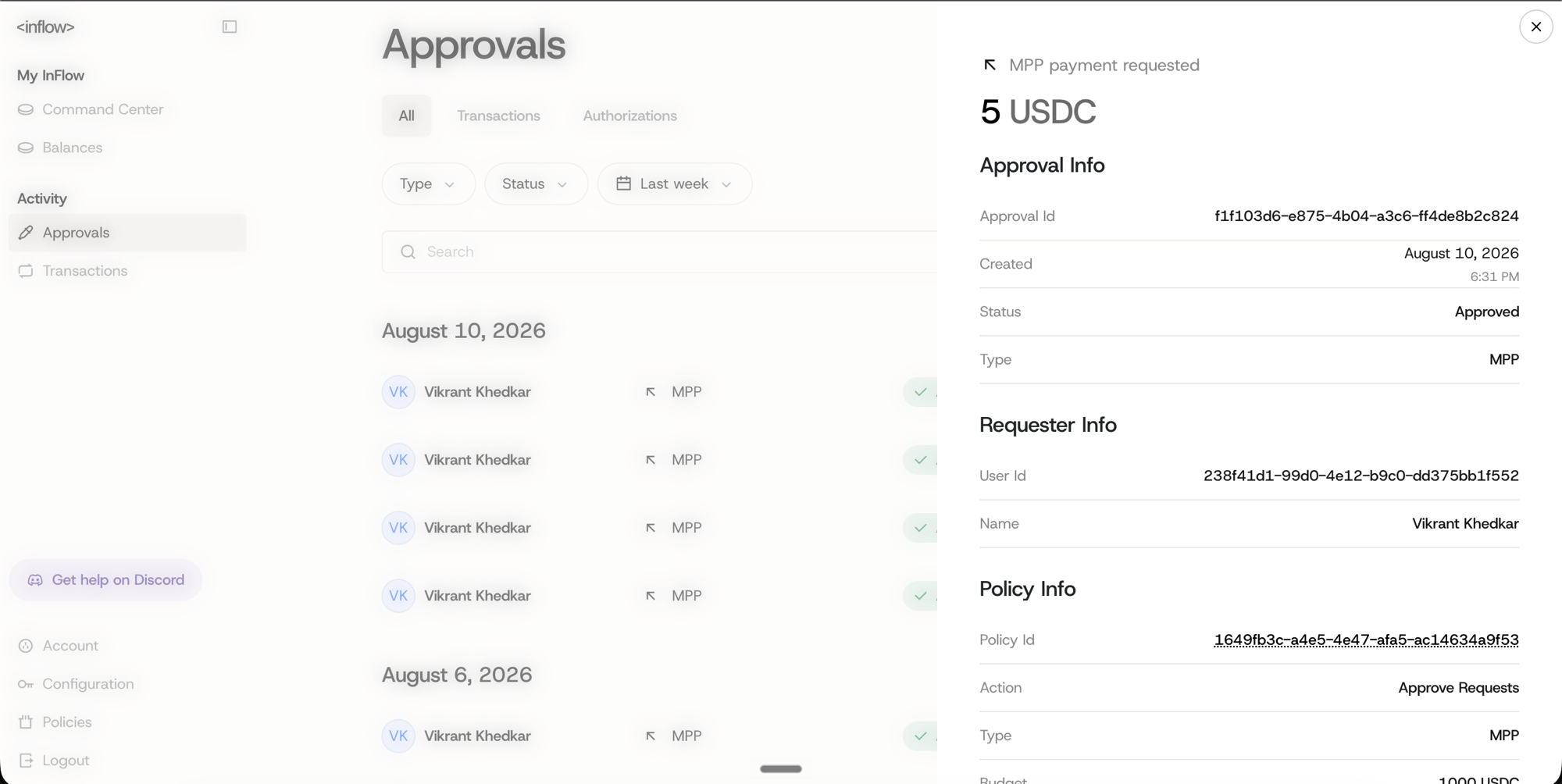
3. The agent's wallet pays the challenge, then retries the request with
`Authorization: Payment `. If the wallet requires approval, the owner
approves the payment in their wallet app.
4. The response contains an **API key and credits**. The agent sends the key as
`SGAI-APIKEY` on every request thereafter. The key is returned once, so store it.
## Payment method
Payments settle over [InFlow](https://inflowpay.ai), a wallet and payment service for AI
agents. The `402` challenge advertises it in the `WWW-Authenticate: Payment` header; pay it
with the InFlow CLI or SDK. Fund the InFlow wallet by sending USDC over the Base network.
* **Currency:** USDC
* **Network:** Base
* **Method:** `inflow` (balance rail, via InFlow)
## Set up an InFlow wallet
To pay, an agent needs an InFlow account, the CLI (or SDK), and a funded wallet.
Sign up at [inflowpay.ai](https://inflowpay.ai). This is the account your agent pays
from.
Install the CLI from [inflowcli.ai](https://inflowcli.ai), then log in to your account:
```bash theme={null}
inflow auth login
```
Send USDC over the Base network to your InFlow account, then confirm it's available:
```bash theme={null}
inflow balances list
```
Give your agent the InFlow CLI (or [MCP server](https://inflowpay.ai)) and its
[agentic-payments skill](https://mpp.dev). The agent handles the payment on its own:
it hits an `/api/agent/mpp/access/{pack}` endpoint, reads the `402` challenge, pays, and
retries with the credential. You only approve the spend if your wallet policy requires
it. The commands below show what that exchange looks like under the hood.
 InFlow is one MPP-compatible wallet. Any wallet or agent runtime that speaks MPP and holds
USDC can pay the `inflow` challenge. See [mpp.dev](https://mpp.dev) for the protocol.
## Credit packs
| Pack | Price (USDC) | Credits |
| -------- | ------------ | ------- |
| `small` | 5 | 1,000 |
| `medium` | 40 | 10,000 |
| `large` | 150 | 50,000 |
Credits meter product usage the same way a normal account's do. A minted account starts on
the free plan (10 requests/min, 1 concurrent crawl, 1 monitor).
## Endpoints
| Method | Endpoint | Auth | Purpose |
| ------ | ------------------------------ | ------------- | ---------------------------------------- |
| `GET` | `/api/agent/protocols` | none | Discover packs, method, and endpoints |
| `POST` | `/api/agent/mpp/access/{pack}` | none | Pay → mint account, API key, and credits |
| `POST` | `/api/credits/purchase/{pack}` | `SGAI-APIKEY` | Refill credits on your account |
| `GET` | `/api/credits` | `SGAI-APIKEY` | Check remaining balance |
## Getting Started
### 1. Discover
Free and unauthenticated. Start here to learn the packs, method, and endpoints.
```bash cURL theme={null}
curl https://v2-api.scrapegraphai.com/api/agent/protocols
```
### 2. Pay and mint
```bash InFlow theme={null}
inflow mpp pay \
https://v2-api.scrapegraphai.com/api/agent/mpp/access/small \
--method POST
# → { "apiKey": "sgai-…", "pack": "small", "credits": 1000,
# "remaining": 1000, "account": "created" }
```
### 3. Use the key
```bash cURL theme={null}
curl -X POST https://v2-api.scrapegraphai.com/api/scrape \
-H "SGAI-APIKEY: sgai-…" \
-H "content-type: application/json" \
-d '{"url": "https://example.com"}'
```
## Refilling
When credits run low, pay the keyed purchase route **with your API key** to top up the same
account. Keep your key because it is the only way to refill.
```bash cURL theme={null}
inflow mpp pay \
https://v2-api.scrapegraphai.com/api/credits/purchase/small \
--method POST \
--header "SGAI-APIKEY: sgai-…"
# → { "pack": "small", "credits": 1000, "remaining": 2000 }
```
If you lose the key, pay `POST /api/agent/mpp/access/{pack}` again. Every new payment mints a
fresh account.
## Terms
* **Minimum purchase:** the `small` pack (5 USDC).
* **Idempotency:** replaying the same payment credential re-delivers the same result. You are
never charged or credited twice for one payment.
* **Refunds:** payments are handled out-of-band. If a payment settles but access is not
granted (a transient error), retry with the same credential. The flow is idempotent and
self-heals. For anything unrecoverable, contact [support](mailto:support@scrapegraphai.com)
with your payment reference (returned in the `Payment-Receipt` header).
## Reference
* OpenAPI: `https://v2-api.scrapegraphai.com/api/openapi.json`
* Machine-readable guide for agents: `GET /api/agent/protocols`
InFlow is one MPP-compatible wallet. Any wallet or agent runtime that speaks MPP and holds
USDC can pay the `inflow` challenge. See [mpp.dev](https://mpp.dev) for the protocol.
## Credit packs
| Pack | Price (USDC) | Credits |
| -------- | ------------ | ------- |
| `small` | 5 | 1,000 |
| `medium` | 40 | 10,000 |
| `large` | 150 | 50,000 |
Credits meter product usage the same way a normal account's do. A minted account starts on
the free plan (10 requests/min, 1 concurrent crawl, 1 monitor).
## Endpoints
| Method | Endpoint | Auth | Purpose |
| ------ | ------------------------------ | ------------- | ---------------------------------------- |
| `GET` | `/api/agent/protocols` | none | Discover packs, method, and endpoints |
| `POST` | `/api/agent/mpp/access/{pack}` | none | Pay → mint account, API key, and credits |
| `POST` | `/api/credits/purchase/{pack}` | `SGAI-APIKEY` | Refill credits on your account |
| `GET` | `/api/credits` | `SGAI-APIKEY` | Check remaining balance |
## Getting Started
### 1. Discover
Free and unauthenticated. Start here to learn the packs, method, and endpoints.
```bash cURL theme={null}
curl https://v2-api.scrapegraphai.com/api/agent/protocols
```
### 2. Pay and mint
```bash InFlow theme={null}
inflow mpp pay \
https://v2-api.scrapegraphai.com/api/agent/mpp/access/small \
--method POST
# → { "apiKey": "sgai-…", "pack": "small", "credits": 1000,
# "remaining": 1000, "account": "created" }
```
### 3. Use the key
```bash cURL theme={null}
curl -X POST https://v2-api.scrapegraphai.com/api/scrape \
-H "SGAI-APIKEY: sgai-…" \
-H "content-type: application/json" \
-d '{"url": "https://example.com"}'
```
## Refilling
When credits run low, pay the keyed purchase route **with your API key** to top up the same
account. Keep your key because it is the only way to refill.
```bash cURL theme={null}
inflow mpp pay \
https://v2-api.scrapegraphai.com/api/credits/purchase/small \
--method POST \
--header "SGAI-APIKEY: sgai-…"
# → { "pack": "small", "credits": 1000, "remaining": 2000 }
```
If you lose the key, pay `POST /api/agent/mpp/access/{pack}` again. Every new payment mints a
fresh account.
## Terms
* **Minimum purchase:** the `small` pack (5 USDC).
* **Idempotency:** replaying the same payment credential re-delivers the same result. You are
never charged or credited twice for one payment.
* **Refunds:** payments are handled out-of-band. If a payment settles but access is not
granted (a transient error), retry with the same credential. The flow is idempotent and
self-heals. For anything unrecoverable, contact [support](mailto:support@scrapegraphai.com)
with your payment reference (returned in the `Payment-Receipt` header).
## Reference
* OpenAPI: `https://v2-api.scrapegraphai.com/api/openapi.json`
* Machine-readable guide for agents: `GET /api/agent/protocols`