> ## Documentation Index
> Fetch the complete documentation index at: https://docs.scrapegraphai.com/llms.txt
> Use this file to discover all available pages before exploring further.
# Markdownify
> Convert web content to clean, structured markdown
**Legacy v1 service.** Use [`Scrape`](/services/scrape) with `output_format="markdown"` instead — it is the canonical v2 API and the equivalent MCP tool. This page is kept for reference.
 ## Overview
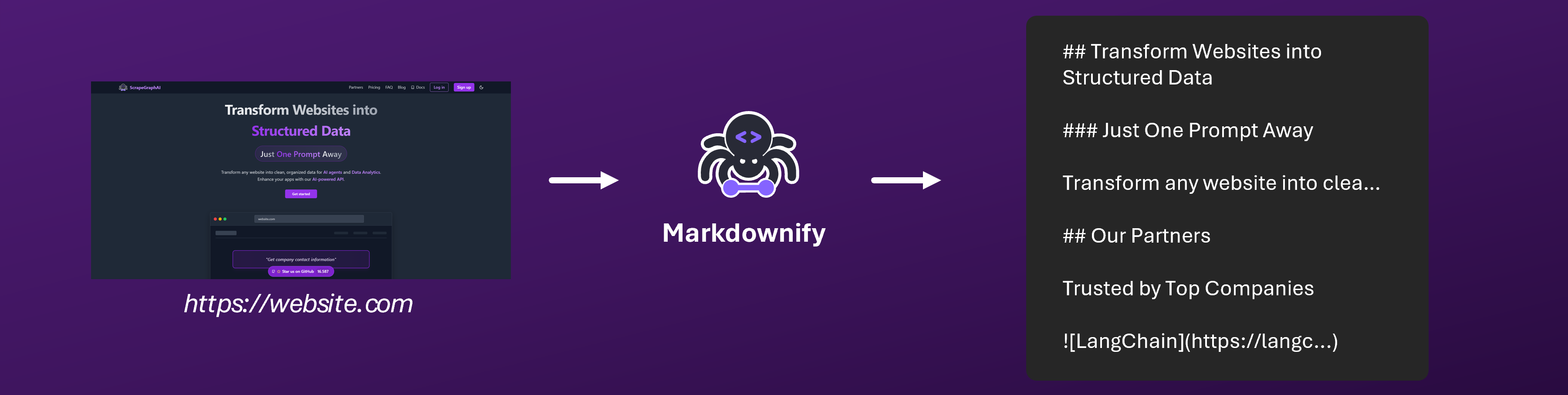
Markdownify is our specialized service that transforms web content into clean, well-formatted markdown. It intelligently preserves the content's structure while removing unnecessary elements, making it perfect for content migration, documentation creation, and knowledge base building.
Try Markdownify instantly in our [interactive playground](https://scrapegraphai.com/dashboard)
## Getting Started
### Quick Start
```python Python theme={null}
from scrapegraph_py import Client
client = Client(api_key="your-api-key")
response = client.markdownify(
website_url="https://example.com/article"
)
```
```javascript JavaScript theme={null}
import { markdownify } from 'scrapegraph-js';
const apiKey = 'your-api-key';
const response = await markdownify(apiKey, {
website_url: 'https://scrapegraphai.com/',
});
if (response.status === 'error') {
console.error(response.error);
} else {
console.log(response.data);
}
```
```bash cURL theme={null}
curl -X 'POST' \
'https://api.scrapegraphai.com/v1/markdownify' \
-H 'accept: application/json' \
-H 'SGAI-APIKEY: your-api-key' \
-H 'Content-Type: application/json' \
-d '{
"website_url": "https://example.com",
"mock": false
}'
```
```bash CLI theme={null}
just-scrape markdownify https://example.com/article
```
#### Parameters
| Parameter | Type | Required | Description |
| ------------- | ------- | -------- | -------------------------------------------------------- |
| apiKey | string | Yes | The ScrapeGraph API Key (first argument). |
| website\_url | string | Yes | The URL of the webpage to convert to markdown. |
| mock | boolean | No | Enable mock mode for testing. Default: false. |
| stealth | boolean | No | Enable anti-detection mode (+5 credits). Default: false. |
| wait\_ms | number | No | Page load wait time in ms (default: 3000). |
| country\_code | string | No | Proxy routing country code (e.g., "us"). |
Get your API key from the [dashboard](https://scrapegraphai.com/dashboard)
```json theme={null}
{
"request_id": "sg-req-md456",
"status": "completed",
"website_url": "https://example.com/article",
"result": "# Understanding AI-Powered Web Scraping\n\nWeb scraping has evolved significantly with the advent of AI technologies...\n\n## Key Benefits\n\n- Improved accuracy\n- Intelligent extraction\n- Structured output\n\n\n\n> AI-powered scraping represents the future of web data extraction.\n\n### Getting Started\n\n1. Choose your target website\n2. Define extraction goals\n3. Select appropriate tools\n",
"error": ""
}
```
The response includes:
* `request_id`: Unique identifier for tracking your request
* `status`: Current status of the conversion
* `result`: Object containing the markdown content and metadata
* `error`: Error message (if any occurred during conversion)
## Key Features
Intelligent content structure preservation
Removes ads, navigation, and irrelevant content
Maintains headings, lists, and text formatting
Preserves images and handles external links
## Use Cases
### Content Migration
* Convert blog posts to markdown
* Transform documentation
* Migrate knowledge bases
* Archive web content
### Documentation
* Create technical documentation
* Build wikis and guides
* Generate README files
* Maintain developer docs
### Content Management
* Prepare content for CMS import
* Create portable content
* Build learning resources
* Format articles
Want to learn more about our AI-powered scraping technology? Visit our [main website](https://scrapegraphai.com) to discover how we're revolutionizing web data extraction.
## Other Functionality
### Retrieve a previous request
If you know the response id of a previous request you made, you can retrieve all the information.
```javascript JavaScript theme={null}
import { history } from 'scrapegraph-js';
const apiKey = 'your_api_key';
const response = await history(apiKey, {
service: 'markdownify',
page: 1,
page_size: 10,
});
if (response.status === 'success') {
console.log(response.data.requests);
}
```
```bash cURL theme={null}
curl -X 'POST' \
'https://api.scrapegraphai.com/v1/markdownify' \
-H 'accept: application/json' \
-H 'SGAI-APIKEY: sgai-********************' \
-H 'Content-Type: application/json' \
-d '{
"website_url": "https://example.com",
"mock": false
}'
```
#### Parameters
| Parameter | Type | Required | Description |
| ---------- | ------ | -------- | ----------------------------------------- |
| apiKey | string | Yes | The ScrapeGraph API Key (first argument). |
| service | string | Yes | The service name (e.g., "markdownify"). |
| page | number | No | Page number (default: 1). |
| page\_size | number | No | Results per page (default: 10). |
### Async Support
For applications requiring asynchronous execution, Markdownify provides async support through the `AsyncClient`. Here's a basic example:
```python theme={null}
from scrapegraph_py import AsyncClient
import asyncio
async def main():
async with AsyncClient(api_key="your-api-key") as client:
response = await client.markdownify(
website_url="https://example.com/article"
)
print(response)
# Run the async function
asyncio.run(main())
```
For more advanced concurrent processing, you can use the following example:
```python theme={null}
import asyncio
from scrapegraph_py import AsyncClient
from scrapegraph_py.logger import sgai_logger
sgai_logger.set_logging(level="INFO")
async def main():
# Initialize async client
sgai_client = AsyncClient(api_key="your-api-key-here")
# Concurrent markdownify requests
urls = [
"https://scrapegraphai.com/",
"https://github.com/ScrapeGraphAI/Scrapegraph-ai",
]
tasks = [sgai_client.markdownify(website_url=url) for url in urls]
# Execute requests concurrently
responses = await asyncio.gather(*tasks, return_exceptions=True)
# Process results
for i, response in enumerate(responses):
if isinstance(response, Exception):
print(f"\nError for {urls[i]}: {response}")
else:
print(f"\nPage {i+1} Markdown:")
print(f"URL: {urls[i]}")
print(f"Result: {response['result']}")
await sgai_client.close()
if __name__ == "__main__":
asyncio.run(main())
```
This advanced example demonstrates:
* Concurrent processing of multiple URLs
* Error handling for failed requests
* Proper client cleanup
* Logging configuration
## Integration Options
### Official SDKs
* [Python SDK](/sdks/python) - Perfect for automation and content processing
* [JavaScript SDK](/sdks/javascript) - Ideal for web applications and content tools
### AI Framework Integrations
* [LangChain Integration](/integrations/langchain) - Use Markdownify in your content pipelines
* [LlamaIndex Integration](/integrations/llamaindex) - Create searchable knowledge bases
## Best Practices
### Content Optimization
1. Verify source content quality
2. Check image and link preservation
3. Review markdown formatting
4. Validate output structure
### Processing Tips
* Handle large content in chunks
* Preserve important metadata
* Maintain content hierarchy
* Check for formatting consistency
## Example Projects
Check out our [cookbook](/cookbook/introduction) for real-world examples:
* Blog migration tools
* Documentation generators
* Content archival systems
* Knowledge base builders
## API Reference
For detailed API documentation, see:
* [Start Conversion Job](/api-reference/endpoint/markdownify/start)
* [Get Job Status](/api-reference/endpoint/markdownify/get-status)
## Support & Resources
Comprehensive guides and tutorials
Detailed API documentation
Join our Discord community
Check out our open-source projects
Visit our official website
Sign up now and get your API key to begin converting web content to clean markdown!
## Overview
Markdownify is our specialized service that transforms web content into clean, well-formatted markdown. It intelligently preserves the content's structure while removing unnecessary elements, making it perfect for content migration, documentation creation, and knowledge base building.
Try Markdownify instantly in our [interactive playground](https://scrapegraphai.com/dashboard)
## Getting Started
### Quick Start
```python Python theme={null}
from scrapegraph_py import Client
client = Client(api_key="your-api-key")
response = client.markdownify(
website_url="https://example.com/article"
)
```
```javascript JavaScript theme={null}
import { markdownify } from 'scrapegraph-js';
const apiKey = 'your-api-key';
const response = await markdownify(apiKey, {
website_url: 'https://scrapegraphai.com/',
});
if (response.status === 'error') {
console.error(response.error);
} else {
console.log(response.data);
}
```
```bash cURL theme={null}
curl -X 'POST' \
'https://api.scrapegraphai.com/v1/markdownify' \
-H 'accept: application/json' \
-H 'SGAI-APIKEY: your-api-key' \
-H 'Content-Type: application/json' \
-d '{
"website_url": "https://example.com",
"mock": false
}'
```
```bash CLI theme={null}
just-scrape markdownify https://example.com/article
```
#### Parameters
| Parameter | Type | Required | Description |
| ------------- | ------- | -------- | -------------------------------------------------------- |
| apiKey | string | Yes | The ScrapeGraph API Key (first argument). |
| website\_url | string | Yes | The URL of the webpage to convert to markdown. |
| mock | boolean | No | Enable mock mode for testing. Default: false. |
| stealth | boolean | No | Enable anti-detection mode (+5 credits). Default: false. |
| wait\_ms | number | No | Page load wait time in ms (default: 3000). |
| country\_code | string | No | Proxy routing country code (e.g., "us"). |
Get your API key from the [dashboard](https://scrapegraphai.com/dashboard)
```json theme={null}
{
"request_id": "sg-req-md456",
"status": "completed",
"website_url": "https://example.com/article",
"result": "# Understanding AI-Powered Web Scraping\n\nWeb scraping has evolved significantly with the advent of AI technologies...\n\n## Key Benefits\n\n- Improved accuracy\n- Intelligent extraction\n- Structured output\n\n\n\n> AI-powered scraping represents the future of web data extraction.\n\n### Getting Started\n\n1. Choose your target website\n2. Define extraction goals\n3. Select appropriate tools\n",
"error": ""
}
```
The response includes:
* `request_id`: Unique identifier for tracking your request
* `status`: Current status of the conversion
* `result`: Object containing the markdown content and metadata
* `error`: Error message (if any occurred during conversion)
## Key Features
Intelligent content structure preservation
Removes ads, navigation, and irrelevant content
Maintains headings, lists, and text formatting
Preserves images and handles external links
## Use Cases
### Content Migration
* Convert blog posts to markdown
* Transform documentation
* Migrate knowledge bases
* Archive web content
### Documentation
* Create technical documentation
* Build wikis and guides
* Generate README files
* Maintain developer docs
### Content Management
* Prepare content for CMS import
* Create portable content
* Build learning resources
* Format articles
Want to learn more about our AI-powered scraping technology? Visit our [main website](https://scrapegraphai.com) to discover how we're revolutionizing web data extraction.
## Other Functionality
### Retrieve a previous request
If you know the response id of a previous request you made, you can retrieve all the information.
```javascript JavaScript theme={null}
import { history } from 'scrapegraph-js';
const apiKey = 'your_api_key';
const response = await history(apiKey, {
service: 'markdownify',
page: 1,
page_size: 10,
});
if (response.status === 'success') {
console.log(response.data.requests);
}
```
```bash cURL theme={null}
curl -X 'POST' \
'https://api.scrapegraphai.com/v1/markdownify' \
-H 'accept: application/json' \
-H 'SGAI-APIKEY: sgai-********************' \
-H 'Content-Type: application/json' \
-d '{
"website_url": "https://example.com",
"mock": false
}'
```
#### Parameters
| Parameter | Type | Required | Description |
| ---------- | ------ | -------- | ----------------------------------------- |
| apiKey | string | Yes | The ScrapeGraph API Key (first argument). |
| service | string | Yes | The service name (e.g., "markdownify"). |
| page | number | No | Page number (default: 1). |
| page\_size | number | No | Results per page (default: 10). |
### Async Support
For applications requiring asynchronous execution, Markdownify provides async support through the `AsyncClient`. Here's a basic example:
```python theme={null}
from scrapegraph_py import AsyncClient
import asyncio
async def main():
async with AsyncClient(api_key="your-api-key") as client:
response = await client.markdownify(
website_url="https://example.com/article"
)
print(response)
# Run the async function
asyncio.run(main())
```
For more advanced concurrent processing, you can use the following example:
```python theme={null}
import asyncio
from scrapegraph_py import AsyncClient
from scrapegraph_py.logger import sgai_logger
sgai_logger.set_logging(level="INFO")
async def main():
# Initialize async client
sgai_client = AsyncClient(api_key="your-api-key-here")
# Concurrent markdownify requests
urls = [
"https://scrapegraphai.com/",
"https://github.com/ScrapeGraphAI/Scrapegraph-ai",
]
tasks = [sgai_client.markdownify(website_url=url) for url in urls]
# Execute requests concurrently
responses = await asyncio.gather(*tasks, return_exceptions=True)
# Process results
for i, response in enumerate(responses):
if isinstance(response, Exception):
print(f"\nError for {urls[i]}: {response}")
else:
print(f"\nPage {i+1} Markdown:")
print(f"URL: {urls[i]}")
print(f"Result: {response['result']}")
await sgai_client.close()
if __name__ == "__main__":
asyncio.run(main())
```
This advanced example demonstrates:
* Concurrent processing of multiple URLs
* Error handling for failed requests
* Proper client cleanup
* Logging configuration
## Integration Options
### Official SDKs
* [Python SDK](/sdks/python) - Perfect for automation and content processing
* [JavaScript SDK](/sdks/javascript) - Ideal for web applications and content tools
### AI Framework Integrations
* [LangChain Integration](/integrations/langchain) - Use Markdownify in your content pipelines
* [LlamaIndex Integration](/integrations/llamaindex) - Create searchable knowledge bases
## Best Practices
### Content Optimization
1. Verify source content quality
2. Check image and link preservation
3. Review markdown formatting
4. Validate output structure
### Processing Tips
* Handle large content in chunks
* Preserve important metadata
* Maintain content hierarchy
* Check for formatting consistency
## Example Projects
Check out our [cookbook](/cookbook/introduction) for real-world examples:
* Blog migration tools
* Documentation generators
* Content archival systems
* Knowledge base builders
## API Reference
For detailed API documentation, see:
* [Start Conversion Job](/api-reference/endpoint/markdownify/start)
* [Get Job Status](/api-reference/endpoint/markdownify/get-status)
## Support & Resources
Comprehensive guides and tutorials
Detailed API documentation
Join our Discord community
Check out our open-source projects
Visit our official website
Sign up now and get your API key to begin converting web content to clean markdown!