> ## Documentation Index
> Fetch the complete documentation index at: https://docs.scrapegraphai.com/llms.txt
> Use this file to discover all available pages before exploring further.

# SmartScraper

> AI-powered web scraping for any website

<Warning>
  **Legacy v1 service.** Use [`Extract`](/services/extract) instead — it is the canonical v2 API and the equivalent MCP tool. This page is kept for reference.
</Warning>

<Frame>
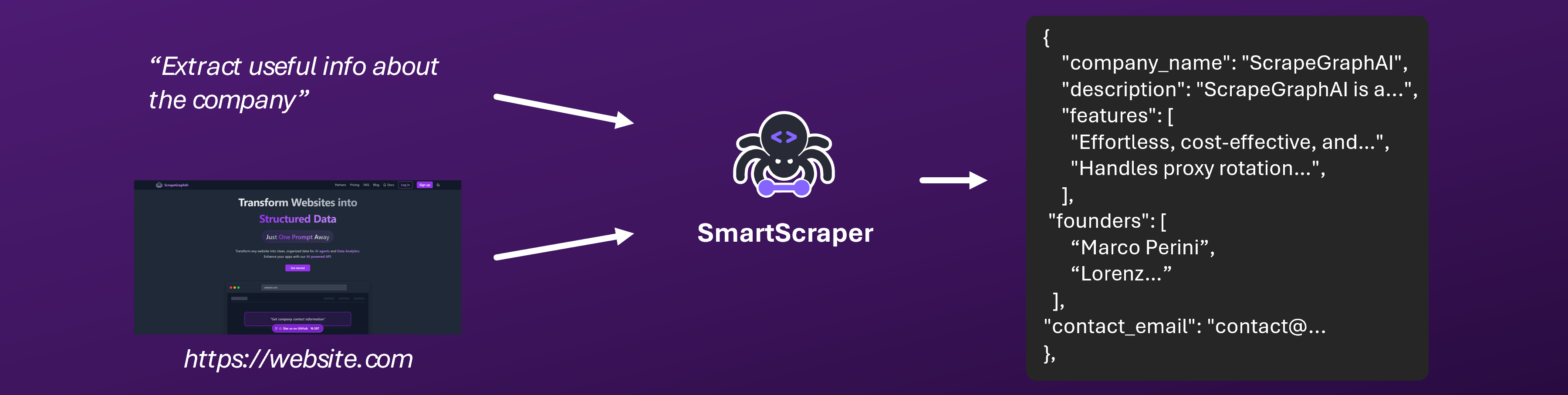
  <img src="https://mintcdn.com/scrapegraphaiinc-9e950277/YyZCOJZ2S-0C1Ind/services/images/smartscraper-banner.png?fit=max&auto=format&n=YyZCOJZ2S-0C1Ind&q=85&s=e743f01e5c384907a6bd135596cfb77a" alt="SmartScraper Service" width="3600" height="907" data-path="services/images/smartscraper-banner.png" />
</Frame>

## Overview

SmartScraper is our flagship LLM-powered web scraping service that intelligently extracts structured data from any website. Using advanced LLM models, it understands context and content like a human would, making web data extraction more reliable and efficient than ever.

<Note>
  Try SmartScraper instantly in our [interactive playground](https://scrapegraphai.com/dashboard)
</Note>

## Getting Started

### Quick Start

<CodeGroup>
  ```python Python theme={null}
  from scrapegraph_py import Client

  client = Client(api_key="your-api-key")

  response = client.smartscraper(
      website_url="https://scrapegraphai.com/",
      user_prompt="Extract info about the company"
  )
  ```

  ```javascript JavaScript theme={null}
  import { smartScraper } from 'scrapegraph-js';

  const apiKey = 'your-api-key';

  const response = await smartScraper(apiKey, {
    website_url: 'https://scrapegraphai.com',
    user_prompt: 'What does the company do?',
  });

  if (response.status === 'error') {
    console.error(response.error);
  } else {
    console.log(response.data);
  }
  ```

  ```bash cURL theme={null}
  curl -X 'POST' \
    'https://api.scrapegraphai.com/v1/smartscraper' \
    -H 'accept: application/json' \
    -H 'SGAI-APIKEY: your-api-key' \
    -H 'Content-Type: application/json' \
    -d '{
    "website_url": "https://example-shop.com/products/456",
    "user_prompt": "Extract product details including name, price, availability, specifications, and customer ratings."
  }'
  ```

  ```bash CLI theme={null}
  just-scrape smart-scraper https://scrapegraphai.com/ -p "Extract info about the company"
  ```
</CodeGroup>

#### Parameters

| Parameter      | Type    | Required | Description                                                                                               |
| -------------- | ------- | -------- | --------------------------------------------------------------------------------------------------------- |
| apiKey         | string  | Yes      | The ScrapeGraph API Key (first argument).                                                                 |
| user\_prompt   | string  | Yes      | A textual description of what you want to extract.                                                        |
| website\_url   | string  | No\*     | The URL of the webpage to scrape. \*One of `website_url`, `website_html`, or `website_markdown` required. |
| output\_schema | object  | No       | Pydantic or Zod schema for structured response format.                                                    |
| mock           | boolean | No       | Enable mock mode for testing.                                                                             |
| plain\_text    | boolean | No       | Return result as plain text instead of JSON.                                                              |
| stealth        | boolean | No       | Enable anti-detection mode (+5 credits).                                                                  |
| wait\_ms       | number  | No       | Page load wait time in ms (default: 3000).                                                                |
| country\_code  | string  | No       | Proxy routing country code (e.g., "us").                                                                  |

<Note>
  Get your API key from the [dashboard](https://scrapegraphai.com/dashboard)
</Note>

<Accordion title="Example Response" icon="terminal">
  ```json theme={null}
  {
    "request_id": "sg-req-abc123",
    "status": "completed",
    "website_url": "https://scrapegraphai.com/",
    "user_prompt": "Extract info about the company",
    "result": {
      "company_name": "ScrapeGraphAI",
      "description": "ScrapeGraphAI is a powerful AI scraping API designed for efficient web data extraction to power LLM applications and AI agents...",
      "features": [
        "Effortless, cost-effective, and AI-powered data extraction",
        "Handles proxy rotation and rate limits",
        "Supports a wide variety of websites"
      ],
      "contact_email": "contact@scrapegraphai.com",
      "social_links": {
        "github": "https://github.com/ScrapeGraphAI/Scrapegraph-ai",
        "linkedin": "https://www.linkedin.com/company/101881123",
        "twitter": "https://x.com/scrapegraphai"
      }
    },
    "error": ""
  }
  ```

  The response includes:

  * `request_id`: Unique identifier for tracking your request
  * `status`: Current status of the extraction ("completed", "running", "failed")
  * `result`: The extracted data in structured JSON format
  * `error`: Error message (if any occurred during extraction)
</Accordion>

<Accordion title="Using Your Own HTML" icon="code">
  Instead of providing a URL, you can optionally pass your own HTML content:

  ```python theme={null}
  html_content = """
  <html>
      <body>
          <h1>ScrapeGraphAI</h1>
          <div class="description">
              <p>AI-powered web scraping for modern applications.</p>
          </div>
          <div class="features">
              <ul>
                  <li>Smart Extraction</li>
                  <li>Local Processing</li>
                  <li>Schema Support</li>
              </ul>
          </div>
      </body>
  </html>
  """

  response = client.smartscraper(
      website_html=html_content,  # Use HTML content instead of URL
      user_prompt="Extract info about the company"
  )
  ```

  This is useful when:

  * You already have the HTML content cached
  * You want to process modified HTML
  * You're working with dynamically generated content
  * You need to process content offline
  * You want to pre-process the HTML before extraction

  <Note>
    You must provide exactly one of: `website_url`, `website_html`, or `website_markdown`. Providing multiple will result in an error.
  </Note>
</Accordion>

<Accordion title="Using Your Own Markdown" icon="code">
  You can also pass your own Markdown content directly for extraction:

  ```python theme={null}
  markdown_content = """
  # ScrapeGraphAI

  AI-powered web scraping for modern applications.

  ## Features

  - Smart Extraction
  - Local Processing
  - Schema Support
  """

  response = client.smartscraper(
      website_markdown=markdown_content,  # Use Markdown content instead of URL
      user_prompt="Extract info about the company"
  )
  ```

  ```javascript theme={null}
  const markdownContent = `
  # ScrapeGraphAI

  AI-powered web scraping for modern applications.

  ## Features

  - Smart Extraction
  - Local Processing
  - Schema Support
  `;

  const response = await smartScraper(apiKey, {
    website_markdown: markdownContent,
    user_prompt: 'Extract info about the company',
  });
  ```

  This is useful when:

  * You already have Markdown content from another source
  * You're processing documentation or README files
  * You want to extract structured data from Markdown
  * You're working with content that's already in Markdown format
  * You need to process content offline

  <Note>
    - Maximum content size: 2MB
    - You must provide exactly one of: `website_url`, `website_html`, or `website_markdown`
    - Parameters like `number_of_scrolls`, `total_pages`, and `stealth` are not applicable when using Markdown content
  </Note>
</Accordion>

## Key Features

<CardGroup cols={2}>
  <Card title="Universal Compatibility" icon="globe">
    Works with any website structure, including JavaScript-rendered content
  </Card>

  <Card title="AI Understanding" icon="brain">
    Contextual understanding of content for accurate extraction
  </Card>

  <Card title="Structured Output" icon="table">
    Returns clean, structured data in your preferred format
  </Card>

  <Card title="Schema Support" icon="code">
    Define custom output schemas using Pydantic or Zod
  </Card>
</CardGroup>

## Use Cases

### Content Aggregation

* News article extraction
* Blog post summarization
* Product information gathering
* Research data collection

### Data Analysis

* Market research
* Competitor analysis
* Price monitoring
* Trend tracking

### AI Training

* Dataset creation
* Training data collection
* Content classification
* Knowledge base building

<Note>
  Want to learn more about our AI-powered scraping technology? Visit our [main website](https://scrapegraphai.com) to discover how we're revolutionizing web data extraction.
</Note>

## Other Functionality

### Retrieve a previous request

If you know the response id of a previous request you made, you can retrieve all the information.

<CodeGroup>
  ```javascript JavaScript theme={null}
  import { history } from 'scrapegraph-js';

  const apiKey = 'your_api_key';

  const response = await history(apiKey, {
    service: 'smartscraper',
    page: 1,
    page_size: 10,
  });

  if (response.status === 'success') {
    console.log(response.data.requests);
  }
  ```
</CodeGroup>

#### Parameters

| Parameter  | Type   | Required | Description                               |
| ---------- | ------ | -------- | ----------------------------------------- |
| apiKey     | string | Yes      | The ScrapeGraph API Key (first argument). |
| service    | string | Yes      | The service name (e.g., "smartscraper").  |
| page       | number | No       | Page number (default: 1).                 |
| page\_size | number | No       | Results per page (default: 10).           |

### Custom Schema Example

Define exactly what data you want to extract:

<CodeGroup>
  ```python Python theme={null}
  from pydantic import BaseModel, Field

  class ArticleData(BaseModel):
      title: str = Field(description="Article title")
      author: str = Field(description="Author name")
      content: str = Field(description="Main article content")
      publish_date: str = Field(description="Publication date")

  response = client.smartscraper(
      website_url="https://example.com/article",
      user_prompt="Extract the article information",
      output_schema=ArticleData
  )
  ```

  ```javascript JavaScript theme={null}
  import { smartScraper } from 'scrapegraph-js';
  import { z } from 'zod';

  const apiKey = 'your_api_key';

  const schema = z.object({
    title: z.string().describe('The title of the webpage'),
    description: z.string().describe('The description of the webpage'),
    summary: z.string().describe('A brief summary of the webpage'),
  });

  const response = await smartScraper(apiKey, {
    website_url: 'https://scrapegraphai.com/',
    user_prompt: 'What does the company do?',
    output_schema: schema,
  });

  if (response.status === 'success') {
    console.log(response.data.result);
  }
  ```
</CodeGroup>

### Async Support

For applications requiring asynchronous execution, SmartScraper provides comprehensive async support through the `AsyncClient`:

<CodeGroup>
  ```python Python theme={null}
  import asyncio
  from scrapegraph_py import AsyncClient
  from pydantic import BaseModel, Field

  # Define your schema
  class WebpageSchema(BaseModel):
      title: str = Field(description="The title of the webpage")
      description: str = Field(description="The description of the webpage")
      summary: str = Field(description="A brief summary of the webpage")

  async def main():
      # Initialize the async client
      async with AsyncClient(api_key="your-api-key") as client:
          # List of URLs to analyze
          urls = [
              "https://scrapegraphai.com/",
              "https://github.com/ScrapeGraphAI/Scrapegraph-ai",
          ]

          # Create scraping tasks for each URL
          tasks = [
              client.smartscraper(
                  website_url=url,
                  user_prompt="Summarize the main content",
                  output_schema=WebpageSchema
              )
              for url in urls
          ]

          # Execute requests concurrently
          responses = await asyncio.gather(*tasks, return_exceptions=True)

          # Process results
          for i, response in enumerate(responses):
              if isinstance(response, Exception):
                  print(f"Error for {urls[i]}: {response}")
              else:
                  print(f"Result for {urls[i]}: {response['result']}")

  # Run the async function
  if __name__ == "__main__":
      asyncio.run(main())
  ```

  ```javascript JavaScript theme={null}
  import { smartScraper } from 'scrapegraph-js';
  import { z } from 'zod';

  const WebpageSchema = z.object({
    title: z.string().describe('The title of the webpage'),
    description: z.string().describe('The description of the webpage'),
    summary: z.string().describe('A brief summary of the webpage')
  });

  const apiKey = 'your-api-key';
  const urls = [
    'https://scrapegraphai.com/',
    'https://github.com/ScrapeGraphAI/Scrapegraph-ai'
  ];

  const results = await Promise.all(
    urls.map(url =>
      smartScraper(apiKey, {
        website_url: url,
        user_prompt: 'Summarize the main content',
        output_schema: WebpageSchema,
      })
    )
  );

  results.forEach((result, index) => {
    if (result.status === 'success') {
      console.log(`Results for ${urls[index]}:`, result.data.result);
    } else {
      console.error(`Error for ${urls[index]}:`, result.error);
    }
  });
  ```
</CodeGroup>

### Infinite Scroll Support

SmartScraper can handle infinite scroll pages by automatically scrolling to load more content before extraction. This is perfect for social media feeds, e-commerce product listings, and other dynamic content.

<CodeGroup>
  ```python Python theme={null}
  from scrapegraph_py import Client
  from scrapegraph_py.logger import sgai_logger
  from pydantic import BaseModel
  from typing import List

  sgai_logger.set_logging(level="INFO")

  # Define the output schema
  class Company(BaseModel):
      name: str
      category: str
      location: str

  class CompaniesResponse(BaseModel):
      companies: List[Company]

  # Initialize the client with explicit API key
  sgai_client = Client(api_key="sgai-api-key")

  try:
      # SmartScraper request with infinite scroll
      response = sgai_client.smartscraper(
          website_url="https://www.ycombinator.com/companies?batch=Spring%202025",
          user_prompt="Extract all company names and their categories from the page",
          output_schema=CompaniesResponse,
          number_of_scrolls=10  # Scroll 10 times to load more companies
      )

      # Print the response
      print(f"Request ID: {response['request_id']}")
      
      # Parse and print the results in a structured way
      result = CompaniesResponse.model_validate(response['result'])
      print("\nExtracted Companies:")
      print("-" * 80)
      for company in result.companies:
          print(f"Name: {company.name}")
          print(f"Category: {company.category}")
          print(f"Location: {company.location}")
          print("-" * 80)

  except Exception as e:
      print(f"An error occurred: {e}")

  finally:
      sgai_client.close()
  ```

  ```javascript JavaScript theme={null}
  import { smartScraper } from 'scrapegraph-js';
  import 'dotenv/config';

  const apiKey = process.env.SGAI_APIKEY;

  const response = await smartScraper(apiKey, {
    website_url: 'https://example.com/infinite-scroll-page',
    user_prompt: 'Extract all the posts from the feed',
    number_of_scrolls: 10,
  });

  if (response.status === 'success') {
    console.log('Extracted data from scrolled page:', response.data);
  } else {
    console.error('Error:', response.error);
  }
  ```
</CodeGroup>

#### Parameters for Infinite Scroll

| Parameter           | Type   | Required | Description                                                      |
| ------------------- | ------ | -------- | ---------------------------------------------------------------- |
| number\_of\_scrolls | number | No       | Number of times to scroll down to load more content (default: 0) |

<Note>
  Infinite scroll is particularly useful for:

  * Social media feeds (Twitter, Instagram, LinkedIn)
  * E-commerce product listings
  * News websites with continuous scrolling
  * Any page that loads content dynamically as you scroll
</Note>

### SmartScraper Endpoint

The SmartScraper endpoint is our core service for extracting structured data from any webpage using advanced language models. It automatically adapts to different website layouts and content types, enabling quick and reliable data extraction.

#### Key Capabilities

* **Universal Compatibility**: Works with any website structure, including JavaScript-rendered content
* **Schema Validation**: Supports both Pydantic (Python) and Zod (JavaScript) schemas
* **Concurrent Processing**: Efficient handling of multiple URLs through async support
* **Custom Extraction**: Flexible user prompts for targeted data extraction

#### Endpoint Details

```bash theme={null}
POST https://api.scrapegraphai.com/v1/smartscraper
```

##### Required Headers

| Header       | Description                 |
| ------------ | --------------------------- |
| SGAI-APIKEY  | Your API authentication key |
| Content-Type | application/json            |

##### Request Body

| Field             | Type    | Required | Description                                                                                       |
| ----------------- | ------- | -------- | ------------------------------------------------------------------------------------------------- |
| website\_url      | string  | Yes\*    | URL to scrape (\*must provide exactly one: website\_url, website\_html, or website\_markdown)     |
| website\_html     | string  | No       | Raw HTML content to process (max 2MB, mutually exclusive with website\_url and website\_markdown) |
| website\_markdown | string  | No       | Raw Markdown content to process (max 2MB, mutually exclusive with website\_url and website\_html) |
| user\_prompt      | string  | Yes      | Instructions for data extraction                                                                  |
| output\_schema    | object  | No       | Pydantic or Zod schema for response validation                                                    |
| mock              | boolean | no       | If you want mock data for testing                                                                 |

##### Response Format

```json theme={null}
{
  "request_id": "sg-req-abc123",
  "status": "completed",
  "website_url": "https://example.com",
  "result": {
    // Structured data based on schema or extraction prompt
  },
  "error": null
}
```

#### Best Practices

1. **Schema Definition**:
   * Define schemas to ensure consistent data structure
   * Use descriptive field names and types
   * Include field descriptions for better extraction accuracy

2. **Async Processing**:
   * Use async clients for concurrent requests
   * Implement proper error handling
   * Monitor rate limits and implement backoff strategies

3. **Error Handling**:
   * Always wrap requests in try-catch blocks
   * Check response status before processing
   * Implement retry logic for failed requests

## Integration Options

### Official SDKs

* [Python SDK](/sdks/python) - Perfect for data science and backend applications
* [JavaScript SDK](/sdks/javascript) - Ideal for web applications and Node.js

### AI Framework Integrations

* [LangChain Integration](/integrations/langchain) - Use SmartScraper in your LLM workflows
* [LlamaIndex Integration](/integrations/llamaindex) - Build powerful search and QA systems

## Best Practices

### Optimizing Extraction

1. Be specific in your prompts
2. Use schemas for structured data
3. Handle pagination for multi-page content
4. Implement error handling and retries

### Rate Limiting

* Implement reasonable delays between requests
* Use async clients for better performance
* Monitor your [API usage](/dashboard/overview)

## Example Projects

Check out our [cookbook](/cookbook/introduction) for real-world examples:

* E-commerce product scraping
* News aggregation
* Research data collection
* Content monitoring

## API Reference

For detailed API documentation, see:

* [Start Scraping Job](/api-reference/endpoint/smartscraper/start)
* [Get Job Status](/api-reference/endpoint/smartscraper/get-status)

## Support & Resources

<CardGroup cols={2}>
  <Card title="Documentation" icon="book" href="/introduction">
    Comprehensive guides and tutorials
  </Card>

  <Card title="API Reference" icon="code" href="/api-reference/introduction">
    Detailed API documentation
  </Card>

  <Card title="Community" icon="discord" href="https://discord.gg/uJN7TYcpNa">
    Join our Discord community
  </Card>

  <Card title="GitHub" icon="github" href="https://github.com/ScrapeGraphAI">
    Check out our open-source projects
  </Card>
</CardGroup>

<Card title="Ready to Start?" icon="rocket" href="https://scrapegraphai.com/dashboard">
  Sign up now and get your API key to begin extracting data with SmartScraper!
</Card>
